310 / 374
SOCT User Manual Version 10.0 rev. A
Calibration process
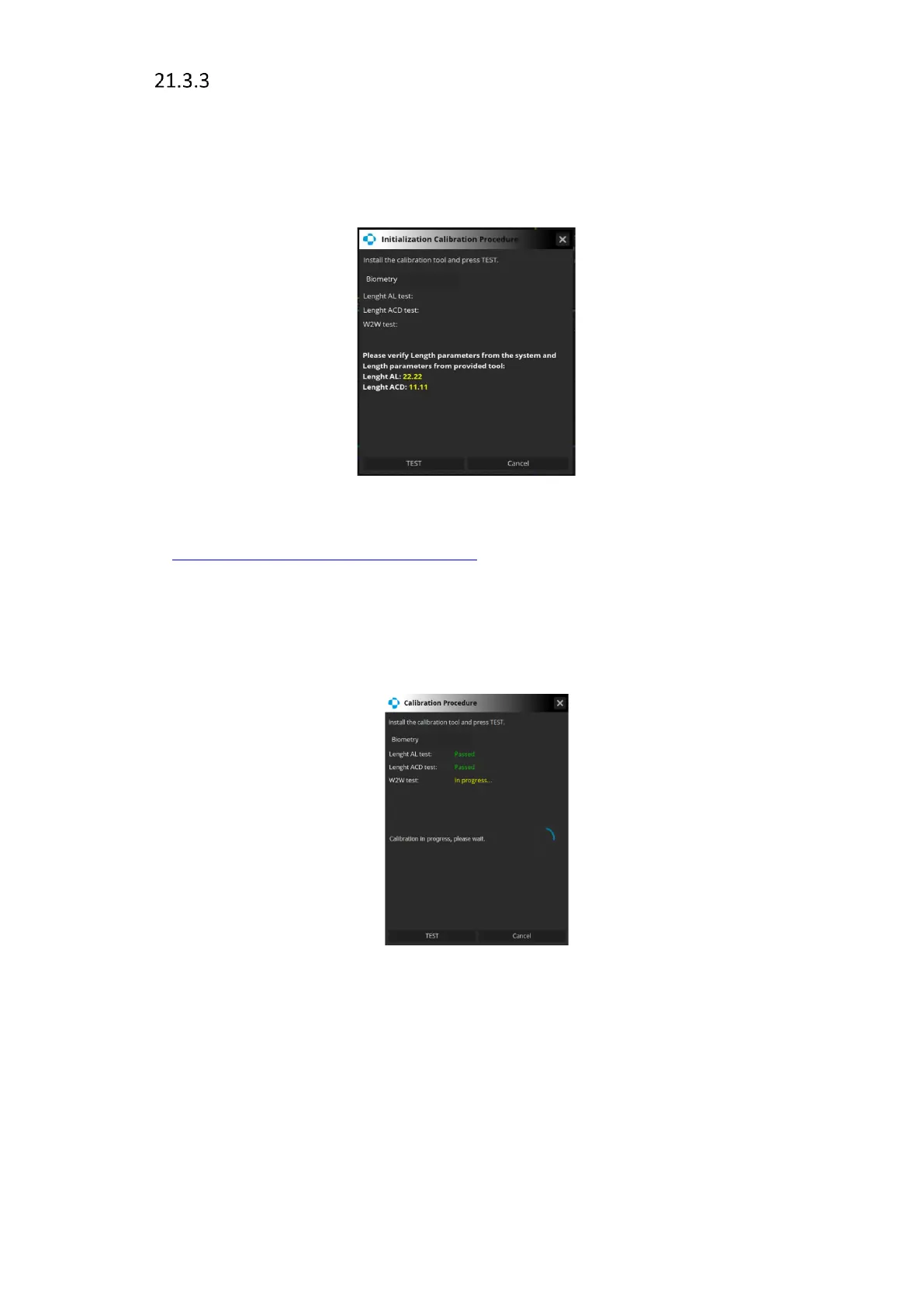
The calibration process can be started from within the Biometry or Topography Acquire
window by choosing [Settings] and clicking [Start calibration]. The calibration procedure starts
with the window presenting calibration details and the calibration tool test parameters, as
shown below.
The user is asked to install the calibration tool (the installation procedure is described in
section 21.1 Calibration procedure preparation) and to verify the correctness of the tool
parameters with the values provided displayed in the window. If the values are correct, the
user can start calibration by clicking the [TEST] button. To cancel calibration and close the
window click [Cancel].
Once the calibration begins, information in the window shows the progress of the process.
Figure 296. Calibration procedure in progress
A successful calibration is indicated by Calibration successful message inside the window. From
now on every examination performed on the day of the calibration can be used for IOL
calculations.
If calibration fails, performing biometry examinations is not possible if the IOL Calculator tab
is activated in the system.



 To Next Page