64 / 374
SOCT User Manual Version 10.0 rev. A
[Glaucoma] This program set captures tomograms of macula and optic disc, cornea and
the Angle. Scan programs: [Retina 3D], [Disc 3D], and [Anterior Radial],
[Anterior B-scan]
[Screening] This examination set captures tomograms of the macula, disc and central
region of the retina. Scan programs: [Retina 3D] [Disc 3D] [Central 3D]
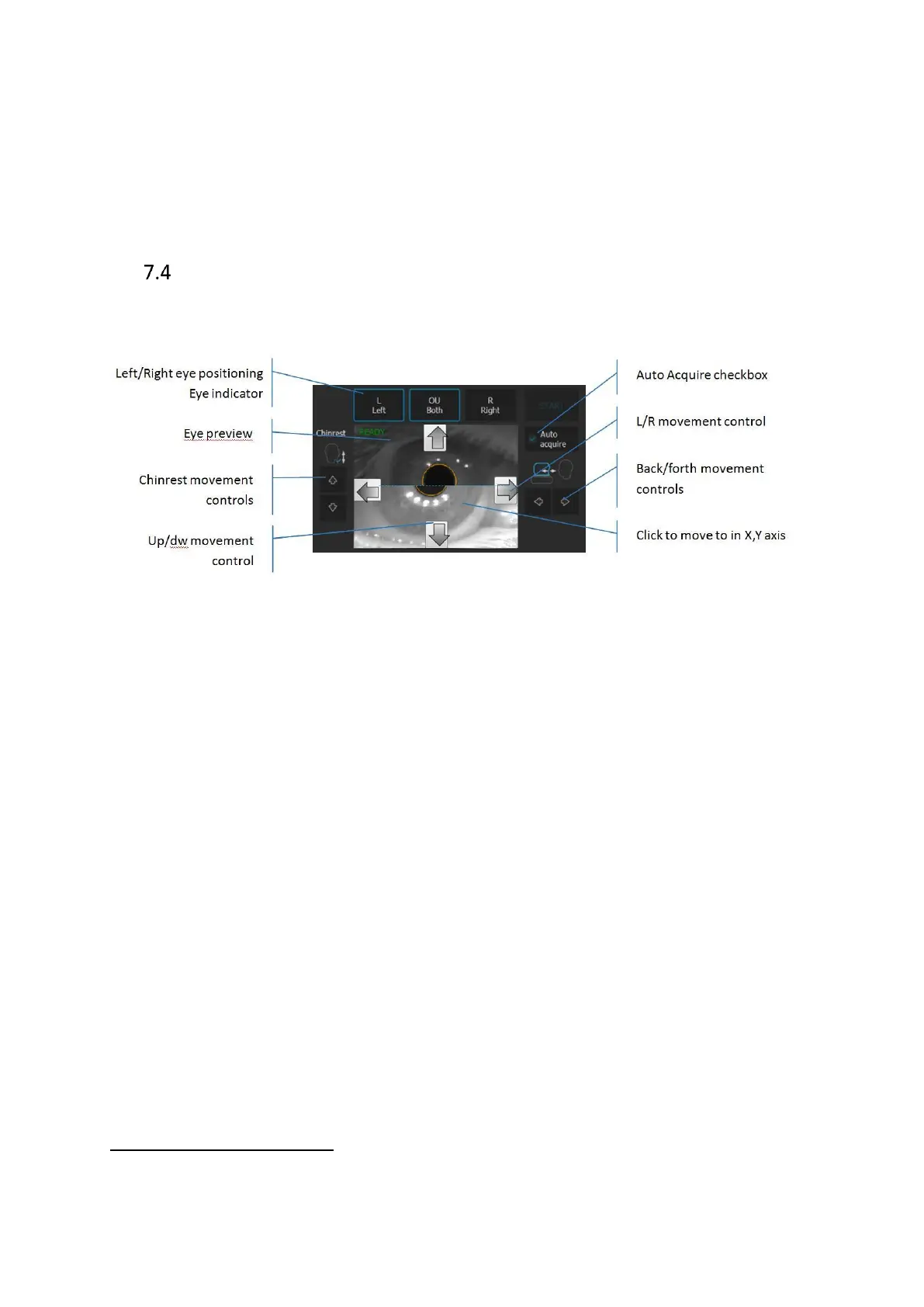
Device head movement controls
System is operated by mouse or touch screen
. Press Left or Right eye button to move the
device to the desired patient’s eye.
Figure 17. Device movement controls.
[Left] [Right] buttons Shows examined eye. When clicked it moves the SOCT
head across the chosen eye. When the user clicks on
already selected eye the head will set for initial Z position
across the patient’s eye.
OU Both When [OU Both] button is ON after pressing the [START]
button the device will acquire examination of both eyes
automatically.
Chinrest control Press to align patient’s head position. The canthus has to
be set at level of reference mark.
Eye preview Anterior segment image. Displayed view is created from
two cameras. On the Z working distance, images create
one view. Click on the pupil to correct the objective lens
position.



 To Next Page