334 / 374
SOCT User Manual Version 10.0 rev. A
i. Exporting tomograms with or without AI DeNoise
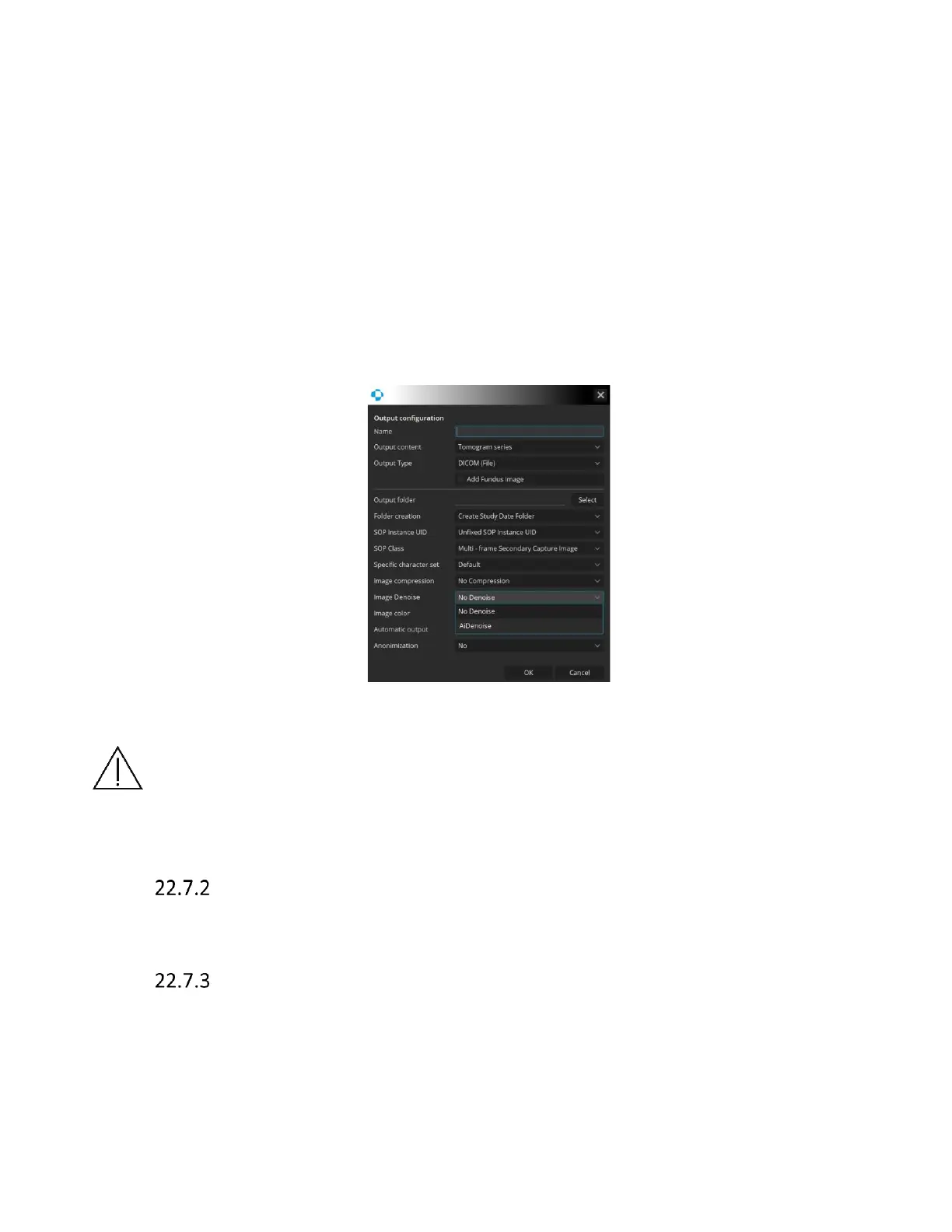
The user can decide if the tomograms are exported with the AI DeNoise function on or off.
To determine the export manner go to Setup → Preferences → Output Settings. In the output
configuration window find the Image Denoise section. Click on the drop-down menu in that
section to unfold it. Choose AI DeNoise if you wish to export tomograms denoised or click No AI
DeNoise to export tomograms with the denoise function off.
The choice between the two export manners is always there regardless of the selected output
type (DICOM, JPG, BMP).
Figure 325. AI DeNoise export settings
CAUTION Keep in mind that tomograms with very low signal level or low QI might
degrade the performance of the AI DeNoise algorithm, potentially leading to an altered
image. If you use such tomograms always make sure the exported denoised images are
identical with the original unprocessed images
Creating an Output set
Output configuration window has two views. One view for DICOM storage configuration and the
other for different file types.
Graphic file standard
Outputted data can be viewed in standard graphic file.



 To Next Page