66
Polyend Tracker+ Manual
NOTES
Pattern Format
4
▌ CHANGING THE PATTERN GRID VISUAL DIVIDERS
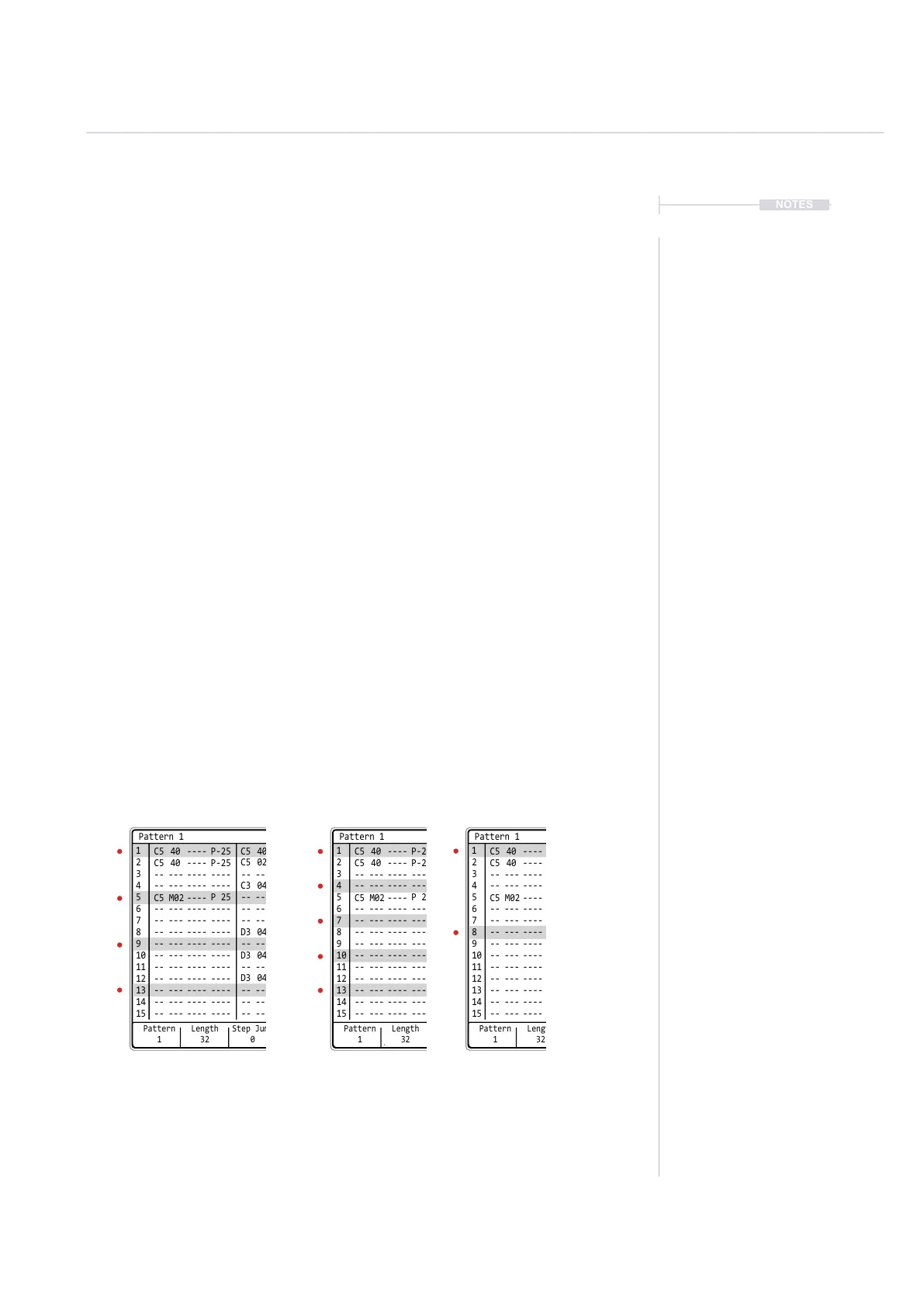
The pattern grid has a number of graphic guides as a visual aids when
sequencing steps into a pattern. This is by default set to divisions of 4
providing a visual on beat guide at rows 1, 5, 9 etc. These can be changed
in the ‘Cong’ menu settings.
1. Press [Cong] to open the project conguration menu.
2. Navigate to ‘Project Settings’ option. Navigate windows by pressing
[Left] or [Right]. Menu windows will also be automatically be selected
when pressing the relevant screen keys below the menu window to
navigate [Up] or [Down].
3. In the project setting options, central window, highlight ‘Pattern Divider’.
4. Press [Change] - 6
th
from Left Screen Button.
5. Turn (Jog) or Press [Up] / [Down] or [Up] / [Down] Screen Buttons to
highlight the desired option between 1 - 16.
6. Press [Apply] - 6
th
from left screen button to conrm selection or
[Cancel] - 3
rd
from left screen button to exit without changing.
7. The display will reect the new visual indicator divider bars.
Visual Dividers to aid step positioning.
Default shown = 4.
Pattern Divider.
Example = 3.
Pattern Divider.
Example = 7.
Pattern Divider Setting in ‘Cong’ Menu under ‘Project Settings’
Pattern
1
1
2
C5 40 ---- P-25
C5 M02 ----
C5 40 ---- P-25
-- --- ---- ----
-- --- ---- ---- -- ---
P 25
-- ---
-- --- ---- ---- -- ---
-- --- ---- ---- -- ---
-- --- ---- ----
-- --- ---- ---- -- ---
-- --- ---- ----
-- --- ---- ---- -- ---
-- --- ---- ----
-- --- ---- ---- -- ---
-- --- ---- ---- -- ---
-- --- ---- ---- -- ---
C5 02
C3 04
D3 04
D3 04
D3 04
C5 40
3
4
5
6
7
9
11
13
15
8
10
12
14
Length
32
Step Jump
0
Pattern 1
Pattern
1
1
2
C5 40 ---- P-25
C5 M02 ----
C5 40 ---- P-25
-- --- ---- ----
-- --- ---- ---- -- ---
P 25
-- ---
-- --- ---- ---- -- ---
-- --- ---- ---- -- ---
-- --- ---- ----
-- --- ---- ---- -- ---
-- --- ---- ----
-- --- ---- ---- -- ---
-- --- ---- ----
-- --- ---- ---- -- ---
-- --- ---- ---- -- ---
-- --- ---- ---- -- ---
C5 02
C3 04
D3 04
D3 04
D3 04
C5 40
3
4
5
6
7
9
11
13
15
8
10
12
14
Length
32
Step Jump
0
Pattern 1
Pattern
1
1
2
C5 40 ---- P-25
C5 M02 ----
C5 40 ---- P-25
-- --- ---- ----
-- --- ---- ---- -- ---
P 25
-- ---
-- --- ---- ---- -- ---
-- --- ---- ---- -- ---
-- --- ---- ----
-- --- ---- ---- -- ---
-- --- ---- ----
-- --- ---- ---- -- ---
-- --- ---- ----
-- --- ---- ---- -- ---
-- --- ---- ---- -- ---
-- --- ---- ---- -- ---
C5 02
C3 04
D3 04
D3 04
D3 04
C5 40
3
4
5
6
7
9
11
13
15
8
10
12
14
Length
32
Step Jump
0
Pattern 1



 To Next Page