Because RFL™ and Hubbell® have a policy of continuous product improvement, we reserve the right to change designs and specifications without notice.
5.5.3.7.4 MAP SELECT CRITERIA WINDOW
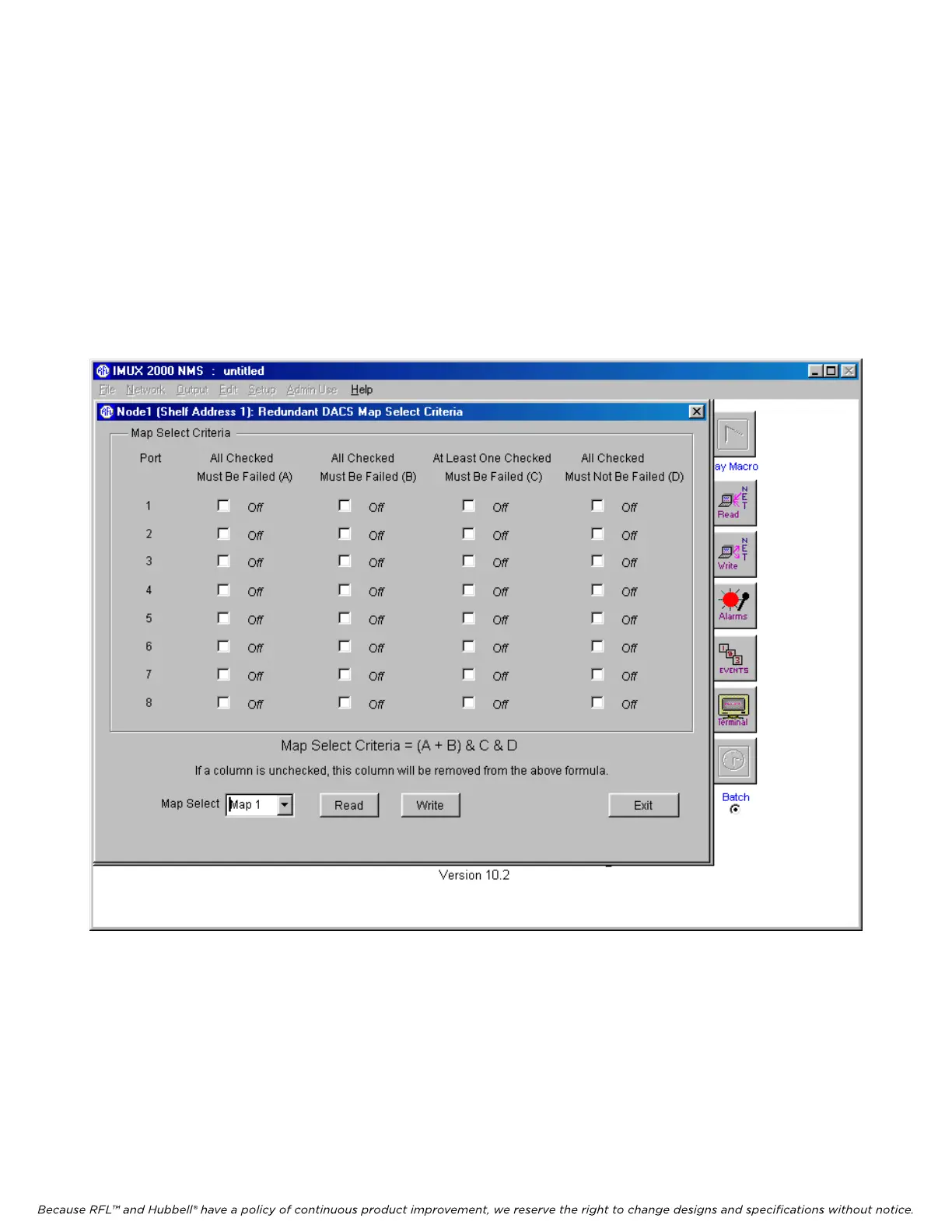
The Map Select Criteria window is shown in Figure 5-24. Map 0 does not have a Map Select Criteria
since it is the default state of the DACS module. Select Map 1 at the bottom of the window. Check the
appropriate boxes in columns A, B, C and D to set the Map Select Criteria for Map 1.
For example if you check Port 1 in column A only, the DACS module will switch from Map 0 to Map
1 only if Port 1 fails. If you check Port 1 in column A and Port 8 in column D, the DACS module will
switch from Map 0 to Map 1 only if Port 1 fails and Port 8 does not fail. Any combination of boxes in
columns one and two can be checked or unchecked.
Figure 5-24. Map Select Criteria window for Map 1 of a T1 or E1 system
M-DACS-T1 RFL Electronics Inc.
February 28, 2006 5-37 (973) 334-3100



 To Next Page