Because RFL™ and Hubbell® have a policy of continuous product improvement, we reserve the right to change designs and specifications without notice.
REMOTE CONTROL USING NMS
PROGRAMMING THE VF-5C MODULE
There are two ways to program the VF-5C module, locally using DIP switches, or remotely using NMS
(Network Management Software) version 10.3 or later. Refer to the IMUX 2000 or IMUX 2000E
Instruction Manual for information on using NMS. To program the VF-5C module using NMS go to the
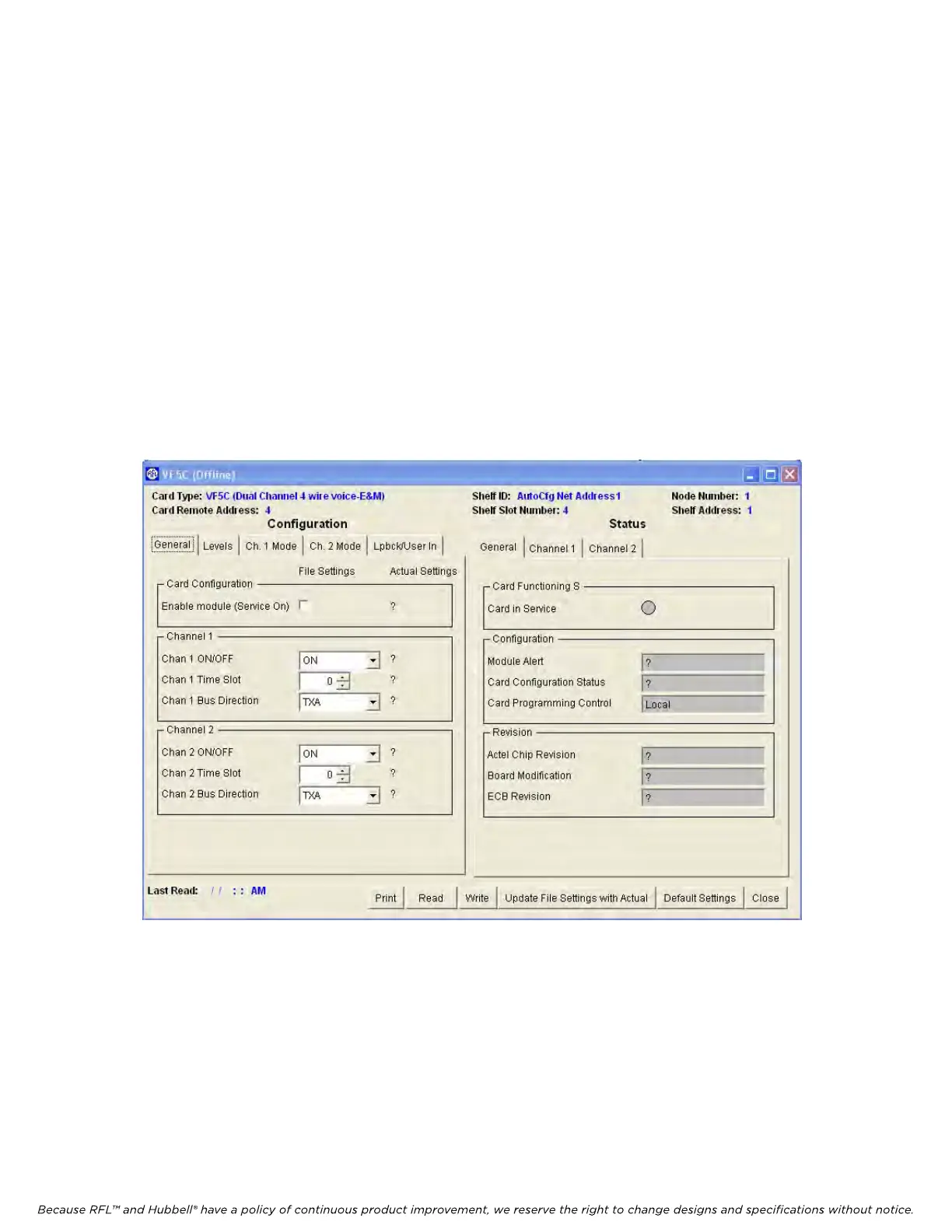
VF-5C General Configurations Window and Status Window for Node 1, as shown in Figure 16. The
General Configuration window is on the left and the General Status window is on the right. Note that
the configuration window has five top-level pages selected by tabs at the top of the window as follows:
General, Levels, Chan 1 Mode, Chan 2 Mode and Loopback/User info. The following discussion covers
the settings on the “General” page.
1. Enable module (Service On)
The Module Enable box can be checked or unchecked.
For the VF-5C module to be in service, check the Module Enable box (Service ON).
For the VF-5C module to be out of service, uncheck the Module Enable box (Service OFF).
Figure 16. Typical VF-5C General Configurations and Status Window for Node 1
2. Chan 1 On/Off
The Channel On/Off parameter can be set to ON or OFF.
When set to ON, Channel 1 is enabled (ON).
When set to OFF, Channel 1 is disabled (OFF)
RFL VF-5C RFL Electronics Inc.
October 8, 2012 31 (973) 334-3100



 To Next Page