SCANNER ACCESSIBILITY OPTION (B815)
SM B291/B295/B296/B297
1-85
Installation
On-Site Installation
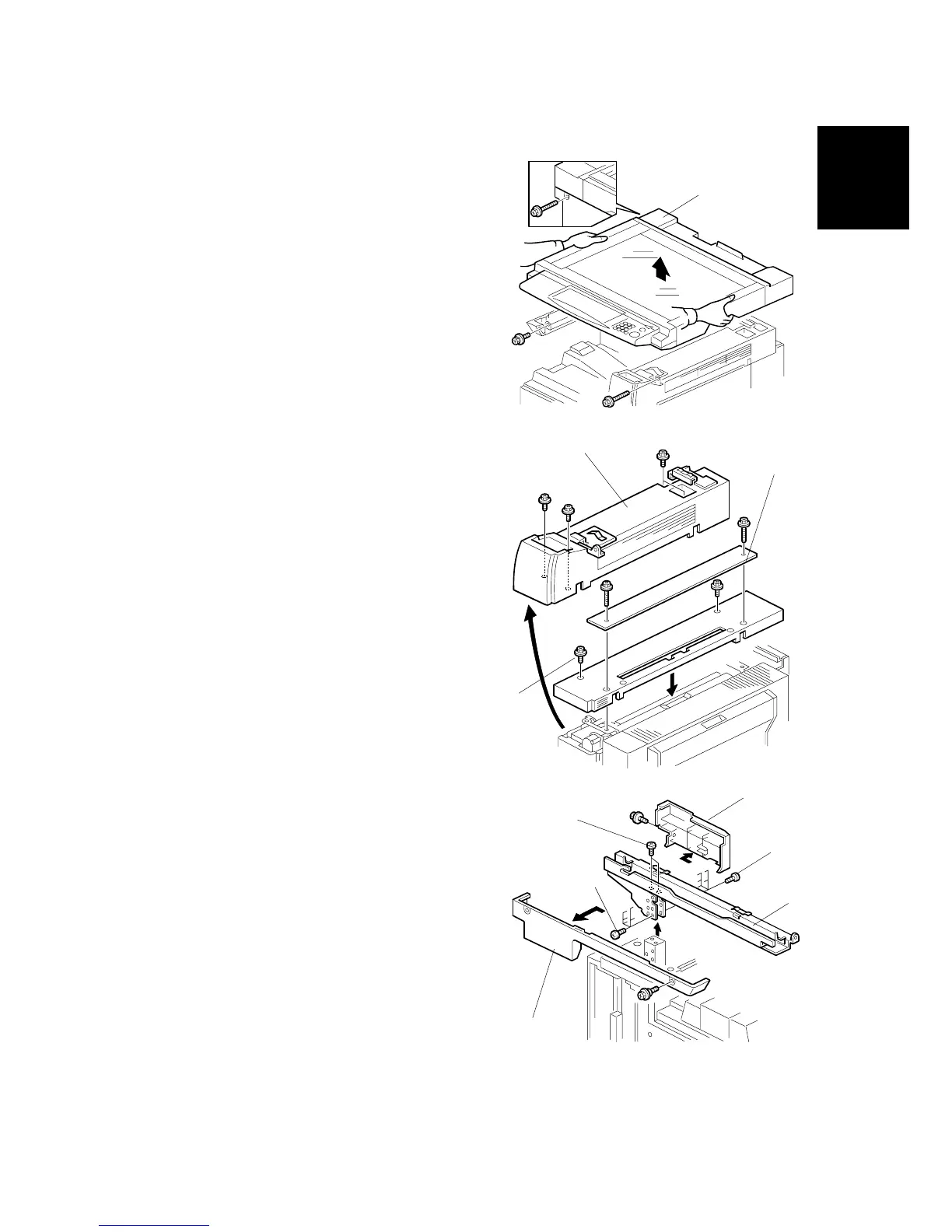
Move the Scanner Unit to Its Accessible
Location
1. Disconnect the scanner unit from the
machine (! x3)
2. Lift the scanner unit and set it at the
accessible location.
Replace the Cover
1. Remove the paper exit cover [A] (! x4)
2. Remove the upper right cover and
replace it with the cover [B] provided
with the Scanner Accessibility Option
(! x2 – M3 x14).
3. Attach the paper exit cover [C]
(provided with the option) (! x2).
Remove the Horizontal Arm
1. Remove:
• Right cover [A] (! x1)
• Left cover [B] (! x2)
2. To remove the horizontal arm [C] of the
scanner stand, remove these screws:
• Top [D] (! x2)
• Right side [E] (! x6)
NOTE: Keep these screws. They are
needed to fasten the cable cover in
Step 4 (next page).
• Left side [F] (! x6)
B815I112.WMF
B815I113.WMF
B815I114.WMF
[A]
[C]
[D]
[E]
[F]
[A]
[B]
[C]
[B]
[A]



 To Next Page