U.4.4
SEL-421 Relay User’s Guide Date Code 20090715
Basic Relay Operations
Establishing Communication
Observe the following precautions when connecting power to the SEL-421:
Contact with instrument terminals
can cause electrical shock that can
result in injury or death.
!
DANGER
Step 1. Always attach a safety ground as the first connection you make
to the SEL-421.
Step 2. Connect the grounding terminal (#Z31) labeled GND on the rear
panel to a rack frame ground or main station ground for proper
safety and performance.
Step 3. Use 16 AWG (1.5 mm
2
) wire (or heavier) to connect to the
POWER terminals, observing the following:
➤ When you use a dc power source, you must connect the source
with the proper polarity, as indicated by the + (Terminal #Z29)
and – (Terminal #Z30) symbols on the power terminals.
➤ You can use ac input for the 48/125 Vdc power supply and the
125/250 Vdc power supply.
➤ The relay operates from 30 to 120 Hz (nominal 50/60 Hz) when
alternating current supplies the POWER input.
Upon connecting power, you will see information on the front-
panel LCD (liquid crystal display) and the ENABLED LED (light-
emitting diode) will illuminate.
For complete information on the SEL-421 front panel, see
Front-Panel Operations on page U.5.1.
Establishing Communication
Once you have applied the correct power input successfully, you are ready to
operate the relay. Use the relay front panel and the communications ports to
communicate with the relay.
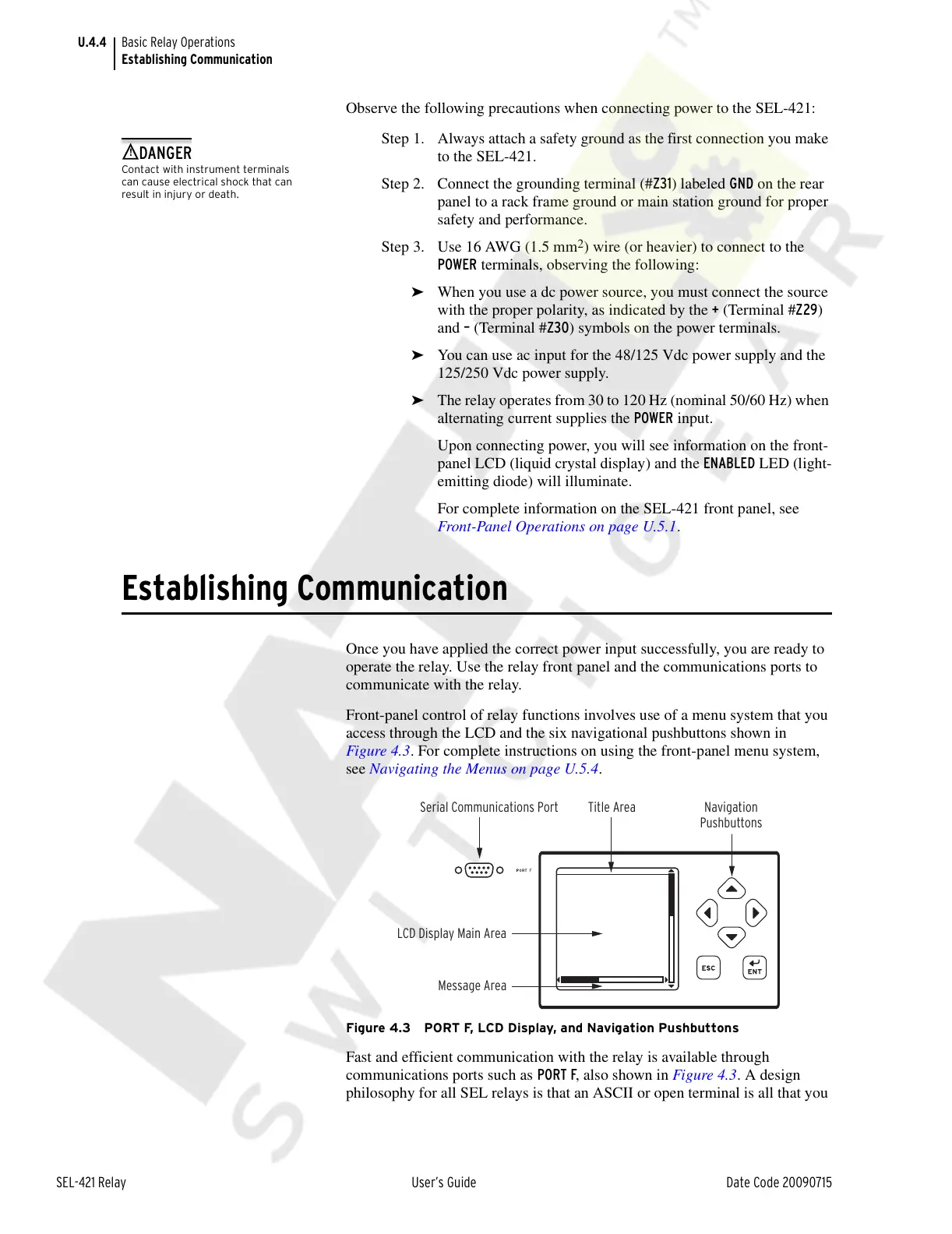
Front-panel control of relay functions involves use of a menu system that you
access through the LCD and the six navigational pushbuttons shown in
Figure 4.3. For complete instructions on using the front-panel menu system,
see Navigating the Menus on page U.5.4.
Figure 4.3 PORT F, LCD Display, and Navigation Pushbuttons
Fast and efficient communication with the relay is available through
communications ports such as PORT F, also shown in Figure 4.3. A design
philosophy for all SEL relays is that an ASCII or open terminal is all that you
Serial Communications Port Title Area Navigation
Pushbuttons
LCD Display Main Area
Message Area
Courtesy of NationalSwitchgear.com



 To Next Page