U.6.16
SEL-421 Relay User’s Guide Date Code 20090715
Testing and Troubleshooting
Test Methods
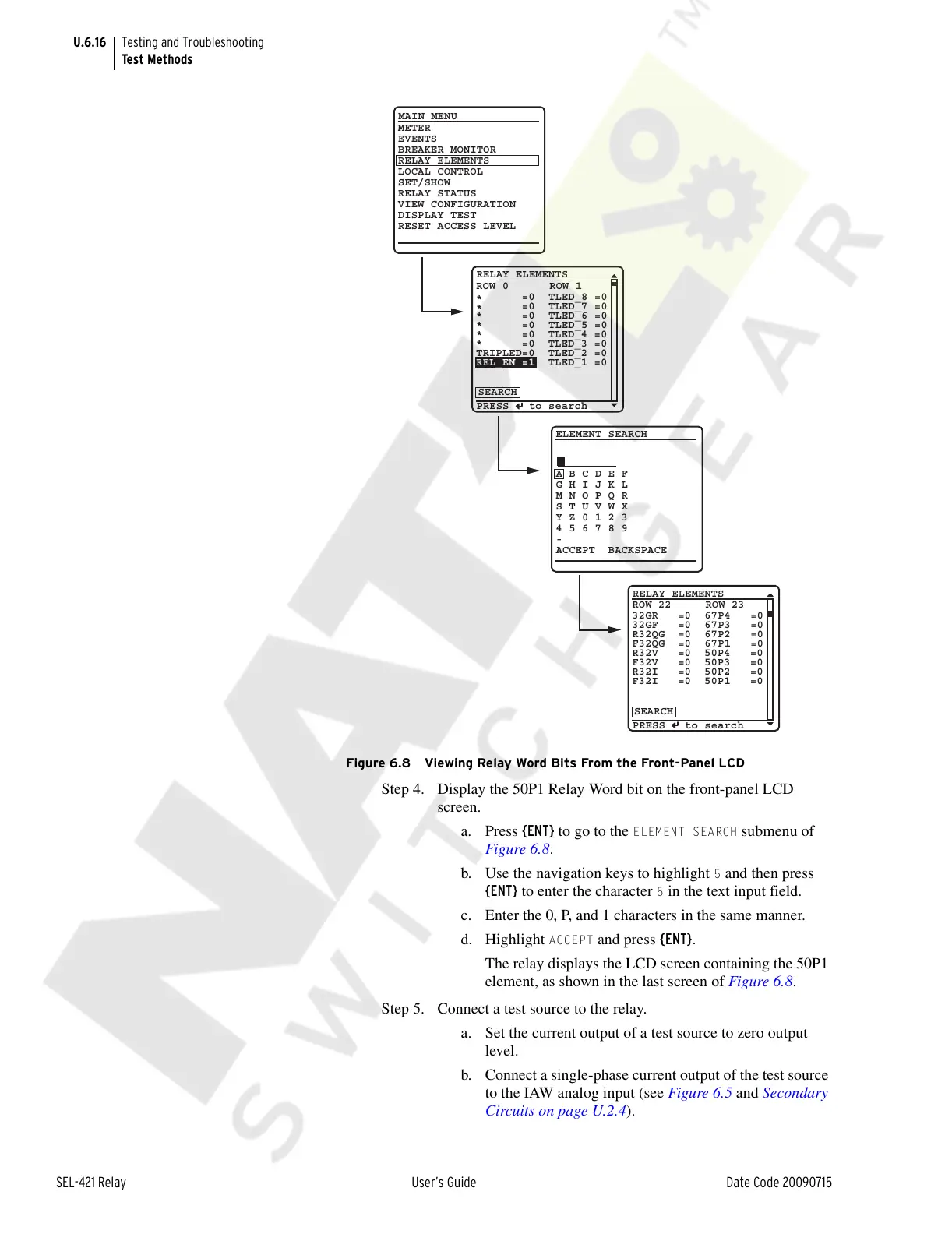
Figure 6.8 Viewing Relay Word Bits From the Front-Panel LCD
Step 4. Display the 50P1 Relay Word bit on the front-panel LCD
screen.
a. Press {ENT} to go to the
ELEMENT SEARCH submenu of
Figure 6.8.
b. Use the navigation keys to highlight
5 and then press
{ENT} to enter the character
5 in the text input field.
c. Enter the 0, P, and 1 characters in the same manner.
d. Highlight
ACCEPT and press {ENT}.
The relay displays the LCD screen containing the 50P1
element, as shown in the last screen of Figure 6.8.
Step 5. Connect a test source to the relay.
a. Set the current output of a test source to zero output
level.
b. Connect a single-phase current output of the test source
to the IAW analog input (see Figure 6.5 and Secondary
Circuits on page U.2.4).
ELEMENT SEARCH
A B C D E F
G H I J K L
M N O P Q R
S T U V W X
Y Z 0 1 2 3
4 5 6 7 8 9
-
ACCEPT BACKSPACE
METER
EVENTS
BREAKER MONITOR
RELAY ELEMENTS
LOCAL CONTROL
SET/SHOW
RELAY STATUS
VIEW CONFIGURATION
DISPLAY TEST
RESET ACCESS LEVEL
MAIN MENU
PRESS to search
RELAY ELEMENTS
SEARCH
PRESS to search
RELAY ELEMENTS
SEARCH
ROW 22 ROW 23
32GR =0 67P4 =0
32GF =0 67P3 =0
R32QG =0 67P2 =0
F32QG =0 67P1 =0
R32V =0 50P4 =0
F32V =0 50P3 =0
R32I =0 50P2 =0
F32I =0 50P1 =0
ROW 0 ROW 1
*
=0 TLED_8 =0
*
=0 TLED_7 =0
* =0 TLED_6 =0
* =0 TLED_5 =0
* =0 TLED_4 =0
* =0 TLED_3 =0
TRIPLED=0 TLED_2 =0
REL_EN =1 TLED_1 =0
Courtesy of NationalSwitchgear.com



 To Next Page