U.5.31
Date Code 20090715 User’s Guide SEL-421 Relay
Front-Panel Operations
Front-Panel Menus and Screens
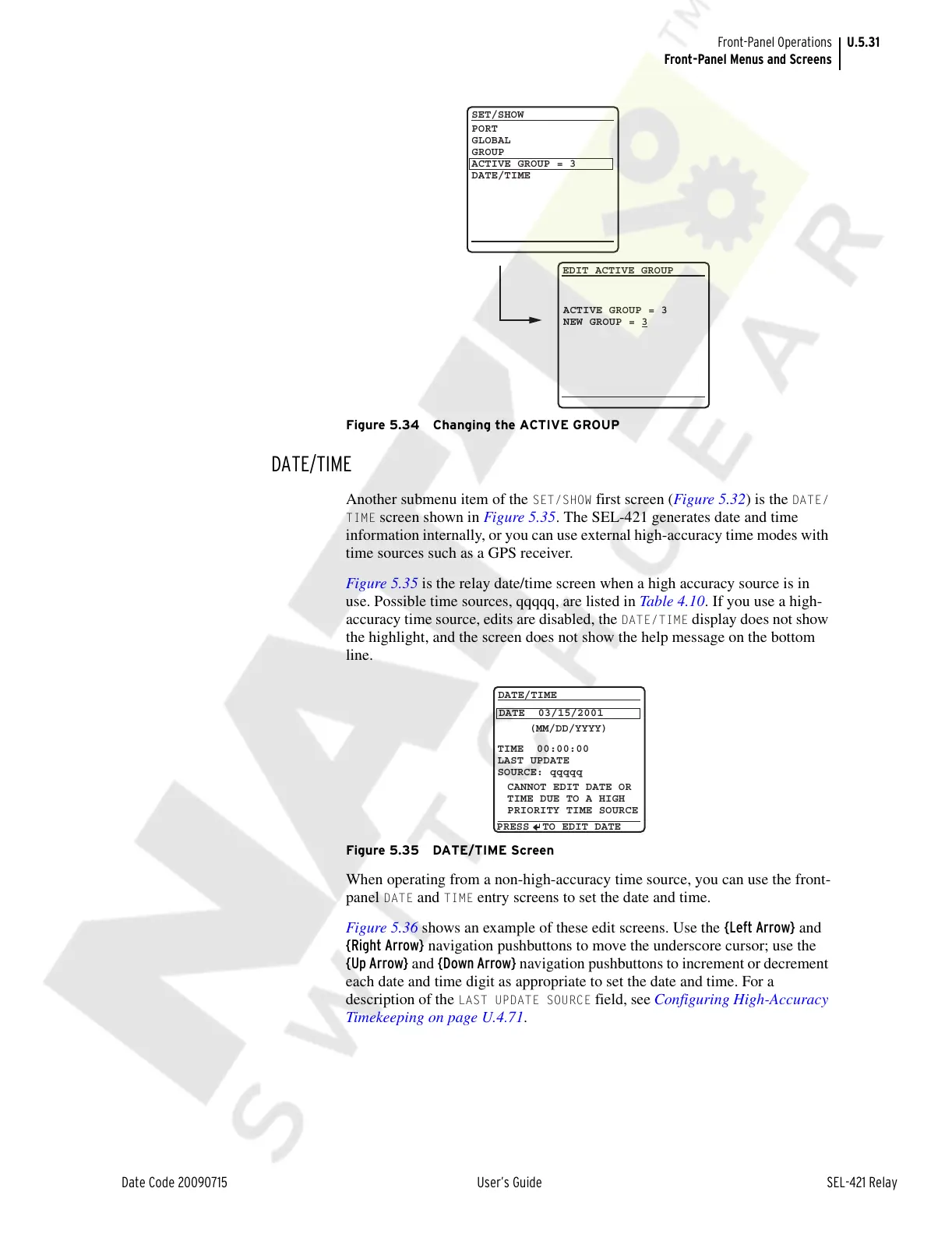
Figure 5.34 Changing the ACTIVE GROUP
DATE/TIME
Another submenu item of the SET/SHOW first screen (Figure 5.32) is the DATE/
TIME
screen shown in Figure 5.35. The SEL-421 generates date and time
information internally, or you can use external high-accuracy time modes with
time sources such as a GPS receiver.
Figure 5.35 is the relay date/time screen when a high accuracy source is in
use. Possible time sources, qqqqq, are listed in Table 4.10. If you use a high-
accuracy time source, edits are disabled, the
DATE/TIME display does not show
the highlight, and the screen does not show the help message on the bottom
line.
Figure 5.35 DATE/TIME Screen
When operating from a non-high-accuracy time source, you can use the front-
panel
DATE and TIME entry screens to set the date and time.
Figure 5.36 shows an example of these edit screens. Use the {Left Arrow} and
{Right Arrow} navigation pushbuttons to move the underscore cursor; use the
{Up Arrow} and {Down Arrow} navigation pushbuttons to increment or decrement
each date and time digit as appropriate to set the date and time. For a
description of the
LAST UPDATE SOURCE field, see Configuring High-Accuracy
Timekeeping on page U.4.71.
EDIT ACTIVE GROUP
ACTIVE GROUP = 3
NEW GROUP = 3
SET/SHOW
PORT
GLOBAL
GROUP
ACTIVE GROUP = 3
DATE/TIME
DATE/TIME
DATE 03/15/2001
PRESS TO EDIT DATE
(MM/DD/YYYY)
TIME 00:00:00
LAST UPDATE
SOURCE: qqqqq
CANNOT EDIT DATE OR
TIME DUE TO A HIGH
PRIORITY TIME SOURCE
Courtesy of NationalSwitchgear.com



 To Next Page