U.5.30
SEL-421 Relay User’s Guide Date Code 20090715
Front-Panel Operations
Front-Panel Menus and Screens
The SEL-421 displays different settings entry screens depending on the
settings type. For the
CTRW setting in Figure 5.32, the relay requires basic
alphanumeric input. Other settings can have other data input requirements.
The front-panel settings input data types are the following:
➤ Basic alphanumeric
➤ Character or string or SELOGIC control equations
➤ Setting options
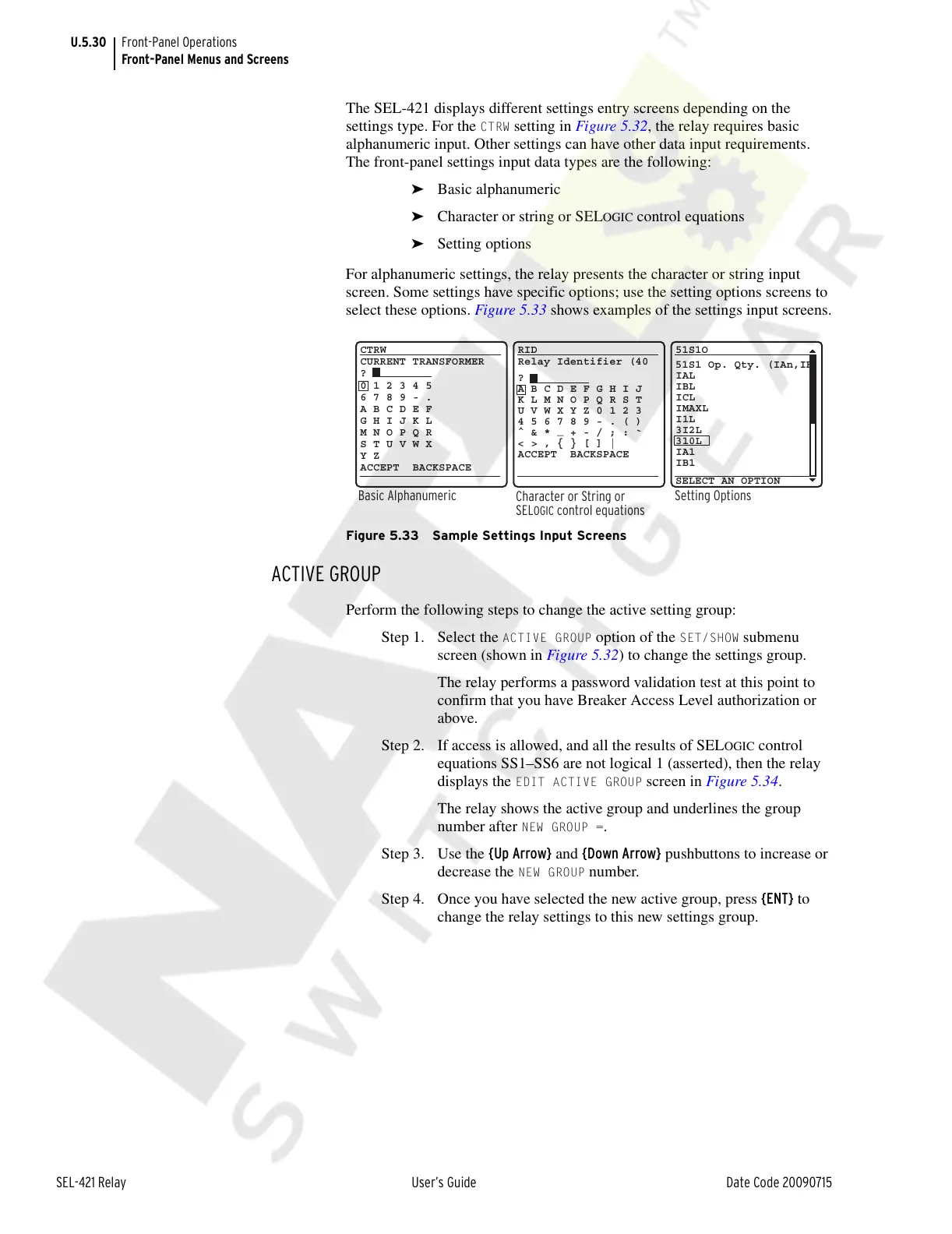
For alphanumeric settings, the relay presents the character or string input
screen. Some settings have specific options; use the setting options screens to
select these options. Figure 5.33 shows examples of the settings input screens.
Figure 5.33 Sample Settings Input Screens
ACTIVE GROUP
Perform the following steps to change the active setting group:
Step 1. Select the
ACTIVE GROUP option of the SET/SHOW submenu
screen (shown in Figure 5.32) to change the settings group.
The relay performs a password validation test at this point to
confirm that you have Breaker Access Level authorization or
above.
Step 2. If access is allowed, and all the results of SEL
OGIC control
equations SS1–SS6 are not logical 1 (asserted), then the relay
displays the
EDIT ACTIVE GROUP screen in Figure 5.34.
The relay shows the active group and underlines the group
number after
NEW GROUP =.
Step 3. Use the {Up Arrow} and {Down Arrow} pushbuttons to increase or
decrease the
NEW GROUP number.
Step 4. Once you have selected the new active group, press {ENT} to
change the relay settings to this new settings group.
Character or String or
SEL
OGIC
control equations
RID
?
A B C D E F G H I J
K L M N O P Q R S T
U V W X Y Z 0 1 2 3
4 5 6 7 8 9 - . ( )
^ & *
_
+ - / ; :
`
< > , { } [ ] |
ACCEPT BACKSPACE
Relay Identifier (40
Basic Alphanumeric
CTRW
?
CURRENT TRANSFORMER
0 1 2 3 4 5
6 7 8 9 - .
A B C D E F
G H I J K L
M N O P Q R
S T U V W X
Y Z
ACCEPT BACKSPACE
Setting Options
51S1O
SELECT AN OPTION
51S1 Op. Qty. (IAn,IB
IAL
IBL
ICL
IMAXL
I1L
3I2L
310L
IA1
IB1
Courtesy of NationalSwitchgear.com



 To Next Page