U.4.22
SEL-421 Relay User’s Guide Date Code 20090715
Basic Relay Operations
Making Simple Settings Changes
The procedure in the following steps assumes that you have successfully
established communication with the relay (see Making an EIA-232 Serial Port
Connection on page U.4.5). In addition, you must be familiar with relay
access levels and passwords (see Changing the Default Passwords: Terminal
on page U.4.9).
Step 1. Prepare to control the relay at Access Level 2.
a. Using a communications terminal, type ACC <Enter>.
b. Type the Access Level 1 password and press <Enter>.
You will see the Access Level 1 => prompt.
c. Type the 2AC <Enter> command.
d. Type the correct password to go to Access Level 2.
You will see the Access Level 2 =>> prompt.
Step 2. Access the Display Points and Aliases prompt.
a. Enter the SET F command.
b. Advance through the front-panel settings (repeatedly
type > and then <Enter>) until you reach the Display
Points and Aliases category.
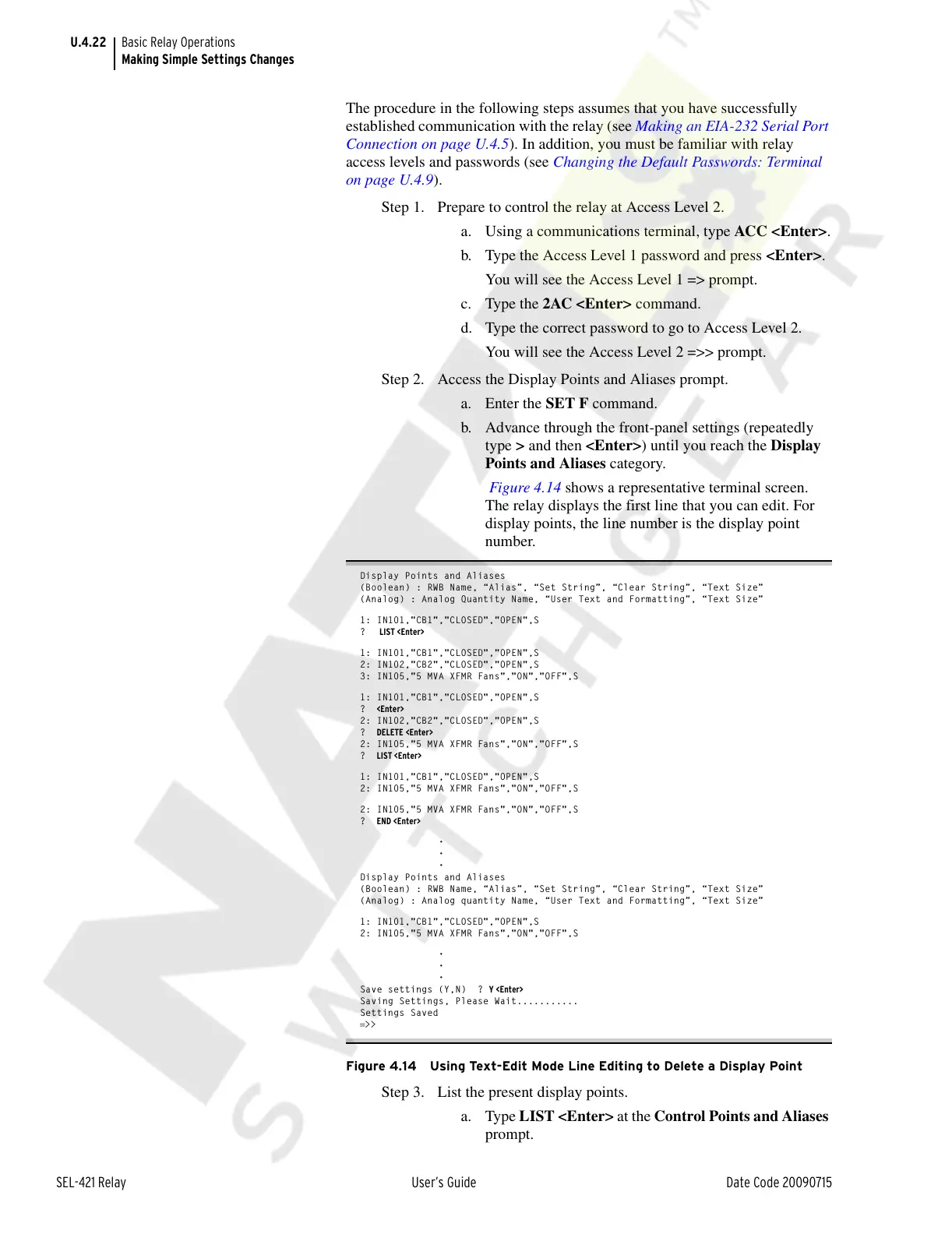
Figure 4.14 shows a representative terminal screen.
The relay displays the first line that you can edit. For
display points, the line number is the display point
number.
Display Points and Aliases
(Boolean) : RWB Name, “Alias”, “Set String”, “Clear String”, “Text Size”
(Analog) : Analog Quantity Name, “User Text and Formatting”, “Text Size”
1: IN101,"CB1","CLOSED","OPEN",S
? LIST <Enter>
1: IN101,"CB1","CLOSED","OPEN",S
2: IN102,"CB2","CLOSED","OPEN",S
3: IN105,"5 MVA XFMR Fans","ON","OFF",S
1: IN101,"CB1","CLOSED","OPEN",S
? <Enter>
2: IN102,"CB2","CLOSED","OPEN",S
? DELETE <Enter>
2: IN105,"5 MVA XFMR Fans","ON","OFF",S
? LIST <Enter>
1: IN101,"CB1","CLOSED","OPEN",S
2: IN105,"5 MVA XFMR Fans","ON","OFF",S
2: IN105,"5 MVA XFMR Fans","ON","OFF",S
? END <Enter>
•
•
•
Display Points and Aliases
(Boolean) : RWB Name, “Alias”, “Set String”, “Clear String”, “Text Size”
(Analog) : Analog quantity Name, “User Text and Formatting”, “Text Size”
1: IN101,"CB1","CLOSED","OPEN",S
2: IN105,"5 MVA XFMR Fans","ON","OFF",S
•
•
•
Save settings (Y,N) ? Y <Enter>
Saving Settings, Please Wait...........
Settings Saved
=>>
Figure 4.14 Using Text-Edit Mode Line Editing to Delete a Display Point
Step 3. List the present display points.
a. Type LIST <Enter> at the Control Points and Aliases
prompt.
Courtesy of NationalSwitchgear.com



 To Next Page