U.4.52
SEL-421 Relay User’s Guide Date Code 20090715
Basic Relay Operations
Reading Oscillograms, Event Reports, and SER
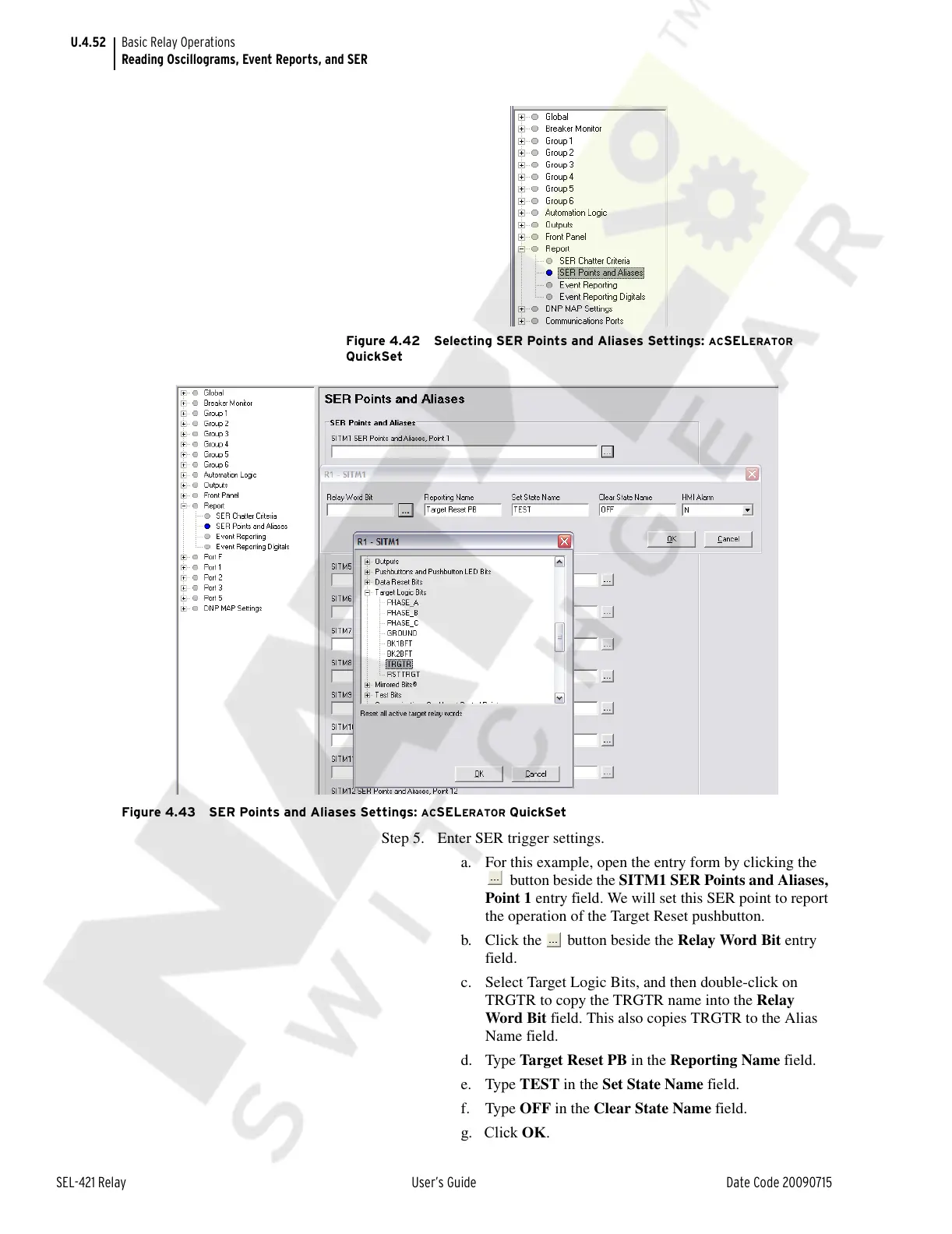
Figure 4.42 Selecting SER Points and Aliases Settings: ACSELERATOR
QuickSet
Figure 4.43 SER Points and Aliases Settings:
ACSELERATOR QuickSet
Step 5. Enter SER trigger settings.
a. For this example, open the entry form by clicking the
button beside the SITM1 SER Points and Aliases,
Point 1 entry field. We will set this SER point to report
the operation of the Target Reset pushbutton.
b. Click the button beside the Relay Word Bit entry
field.
c. Select Target Logic Bits, and then double-click on
TRGTR to copy the TRGTR name into the Relay
Word Bit field. This also copies TRGTR to the Alias
Name field.
d. Type Target Reset PB in the Reporting Name field.
e. Type TEST in the Set State Name field.
f. Type OFF in the Clear State Name field.
g. Click OK.
Courtesy of NationalSwitchgear.com



 To Next Page