U.5.5
Date Code 20090715 User’s Guide SEL-421 Relay
Front-Panel Operations
Front-Panel Layout
Screen Scrolling
The SEL-421 has two screen scrolling modes: autoscrolling mode and
manual-scrolling mode. After front-panel time out, the LCD presents each of
the display screens in this sequence:
➤ Any active (filled) alarm points screens
➤ Any active (filled) display points screens
➤ Enabled metering screens
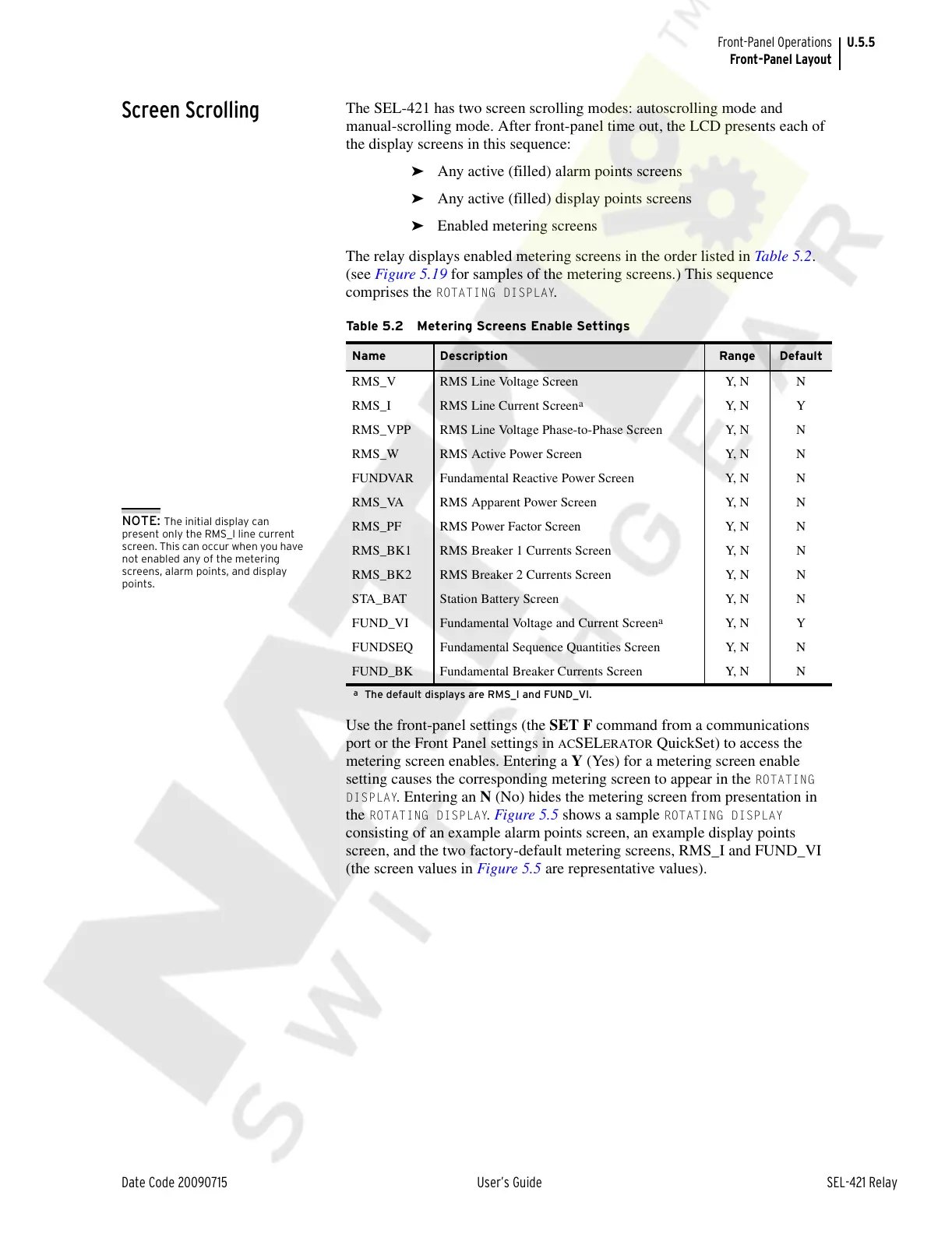
The relay displays enabled metering screens in the order listed in Table 5.2.
(see Figure 5.19 for samples of the metering screens.) This sequence
comprises the
ROTATING DISPLAY.
Use the front-panel settings (the SET F command from a communications
port or the Front Panel settings in
ACSELERATOR QuickSet) to access the
metering screen enables. Entering a Y (Yes) for a metering screen enable
setting causes the corresponding metering screen to appear in the
ROTATING
DISPLAY
. Entering an N (No) hides the metering screen from presentation in
the
ROTATING DISPLAY. Figure 5.5 shows a sample ROTATING DISPLAY
consisting of an example alarm points screen, an example display points
screen, and the two factory-default metering screens, RMS_I and FUND_VI
(the screen values in Figure 5.5 are representative values).
Table 5.2 Metering Screens Enable Settings
Name Description Range Default
R M S _ V RM S L i n e Vo l t a g e S c re e n Y, N N
RMS_I RMS Line Current Screen
a
a
The default displays are RMS_I and FUND_VI.
Y, N Y
RMS_VPP RMS Line Voltage Phase-to-Phase Screen Y, N N
RMS_W RMS Active Power Screen Y, N N
FUNDVAR Fundamental Reactive Power Screen Y, N N
RMS_VA RMS Apparent Power Screen Y, N N
RMS_PF RMS Power Factor Screen Y, N N
RMS_BK1 RMS Breaker 1 Currents Screen Y, N N
RMS_BK2 RMS Breaker 2 Currents Screen Y, N N
STA_BAT Station Battery Screen Y, N N
FUND_VI Fundamental Voltage and Current Screen
a
Y, N Y
FUNDSEQ Fundamental Sequence Quantities Screen Y, N N
FUND_BK Fundamental Breaker Currents Screen Y, N N
NOTE: The initial display can
present only the RMS_I line current
screen. This can occur when you have
not enabled any of the metering
screens, alarm points, and display
points.
Courtesy of NationalSwitchgear.com



 To Next Page