U.5.22
SEL-421 Relay User’s Guide Date Code 20090715
Front-Panel Operations
Front-Panel Menus and Screens
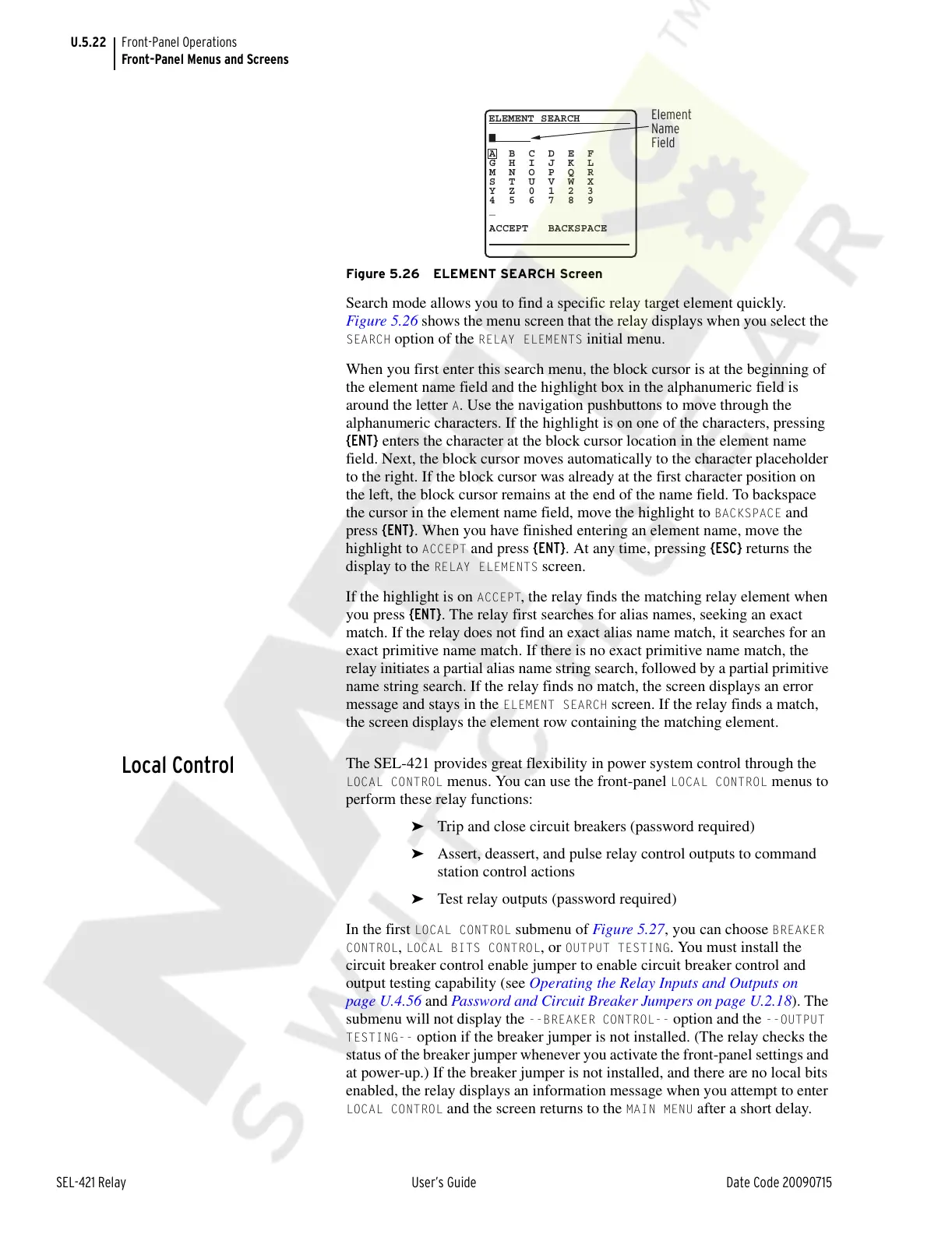
Figure 5.26 ELEMENT SEARCH Screen
Search mode allows you to find a specific relay target element quickly.
Figure 5.26 shows the menu screen that the relay displays when you select the
SEARCH option of the RELAY ELEMENTS initial menu.
When you first enter this search menu, the block cursor is at the beginning of
the element name field and the highlight box in the alphanumeric field is
around the letter
A. Use the navigation pushbuttons to move through the
alphanumeric characters. If the highlight is on one of the characters, pressing
{ENT} enters the character at the block cursor location in the element name
field. Next, the block cursor moves automatically to the character placeholder
to the right. If the block cursor was already at the first character position on
the left, the block cursor remains at the end of the name field. To backspace
the cursor in the element name field, move the highlight to
BACKSPACE and
press {ENT}. When you have finished entering an element name, move the
highlight to
ACCEPT and press {ENT}. At any time, pressing {ESC} returns the
display to the
RELAY ELEMENTS screen.
If the highlight is on
ACCEPT, the relay finds the matching relay element when
you press {ENT}. The relay first searches for alias names, seeking an exact
match. If the relay does not find an exact alias name match, it searches for an
exact primitive name match. If there is no exact primitive name match, the
relay initiates a partial alias name string search, followed by a partial primitive
name string search. If the relay finds no match, the screen displays an error
message and stays in the
ELEMENT SEARCH screen. If the relay finds a match,
the screen displays the element row containing the matching element.
Local Control
The SEL-421 provides great flexibility in power system control through the
LOCAL CONTROL menus. You can use the front-panel LOCAL CONTROL menus to
perform these relay functions:
➤ Trip and close circuit breakers (password required)
➤ Assert, deassert, and pulse relay control outputs to command
station control actions
➤ Test relay outputs (password required)
In the first
LOCAL CONTROL submenu of Figure 5.27, you can choose BREAKER
CONTROL
, LOCAL BITS CONTROL, or OUTPUT TESTING. You must install the
circuit breaker control enable jumper to enable circuit breaker control and
output testing capability (see Operating the Relay Inputs and Outputs on
page U.4.56 and Password and Circuit Breaker Jumpers on page U.2.18). The
submenu will not display the
--BREAKER CONTROL-- option and the --OUTPUT
TESTING--
option if the breaker jumper is not installed. (The relay checks the
status of the breaker jumper whenever you activate the front-panel settings and
at power-up.) If the breaker jumper is not installed, and there are no local bits
enabled, the relay displays an information message when you attempt to enter
LOCAL CONTROL and the screen returns to the MAIN MENU after a short delay.
A B C D E F
G H I J K L
M N O P Q R
S T U V W X
Y Z 0 1 2 3
4 5 6 7 8 9
_
ACCEPT BACKSPACE
ELEMENT SEARCH
Element
Name
Field
Courtesy of NationalSwitchgear.com



 To Next Page