U.4.7
Date Code 20090715 User’s Guide SEL-421 Relay
Basic Relay Operations
Changing the Default Passwords
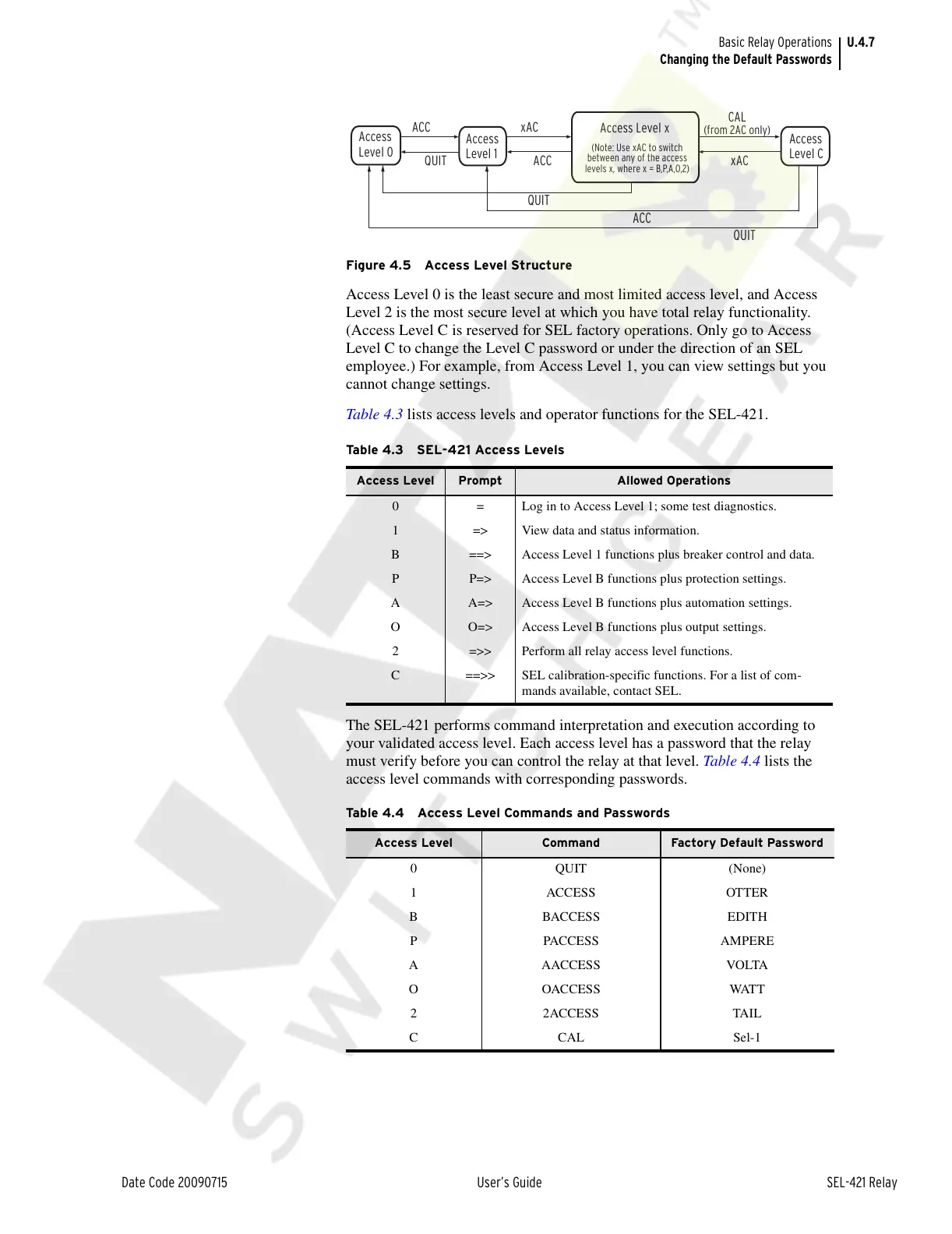
Figure 4.5 Access Level Structure
Access Level 0 is the least secure and most limited access level, and Access
Level 2 is the most secure level at which you have total relay functionality.
(Access Level C is reserved for SEL factory operations. Only go to Access
Level C to change the Level C password or under the direction of an SEL
employee.) For example, from Access Level 1, you can view settings but you
cannot change settings.
Table 4.3 lists access levels and operator functions for the SEL-421.
The SEL-421 performs command interpretation and execution according to
your validated access level. Each access level has a password that the relay
must verify before you can control the relay at that level. Tabl e 4 . 4 lists the
access level commands with corresponding passwords.
Table 4.3 SEL-421 Access Levels
Access Level Prompt Allowed Operations
0 = Log in to Access Level 1; some test diagnostics.
1 => View data and status information.
B ==> Access Level 1 functions plus breaker control and data.
P P=> Access Level B functions plus protection settings.
A A=> Access Level B functions plus automation settings.
O O=> Access Level B functions plus output settings.
2 =>> Perform all relay access level functions.
C ==>> SEL calibration-specific functions. For a list of com-
mands available, contact SEL.
Table 4.4 Access Level Commands and Passwords
Access Level Command Factory Default Password
0 QUIT (None)
1 ACCESS OTTER
B BACCESS EDITH
P PACCESS AMPERE
A AACCESS VOLTA
OOACCESS WATT
2 2ACCESS TAIL
CCAL Sel-1
Access
Level 0
Access Level x
(Note: Use xAC to switch
between any of the access
levels x, where x = B,P,A,O,2)
ACC
QUIT
QUIT
ACC
QUIT
ACC
xAC
Access
Level 1
xAC
CAL
(from 2AC only)
Access
Level C
Courtesy of NationalSwitchgear.com



 To Next Page