U.4.17
Date Code 20090715 User’s Guide SEL-421 Relay
Basic Relay Operations
Making Simple Settings Changes
Making Settings Changes: Initial Global Settings
You must configure the SEL-421 for specific conditions found in the power
system where you are connecting the relay. In particular, you must set the
nominal frequency and phase rotation.
The procedure in the following steps assumes that you have successfully
established communication with the relay; see Making an EIA-232 Serial Port
Connection on page U.4.5 for a step-by-step procedure. In addition, you must
be familiar with relay access levels and passwords. See Changing the Default
Passwords: Terminal on page U.4.9 to change the default access level
passwords.
This example jumps to a Global setting that is not at the beginning of the
Global settings list. Thus, you enter SET G, the setting name, and <Enter>.
To start at the beginning of the Global settings, simply type SET G <Enter>
without a settings name.
Step 1. Prepare to control the relay at Access Level 2.
a. Using a communications terminal, type ACC <Enter>.
b. Type the Access Level 1 password and press <Enter>.
You will see the Access Level 2 => prompt.
c. Type the 2AC <Enter> command.
d. Type the correct password to go to Access Level 2.
You will see the Access Level 2 =>> prompt.
Step 2. Type SET G NFREQ <Enter> (this sets the nominal system
frequency using the NFREQ setting, which has options of 50
Hz and 60 Hz).
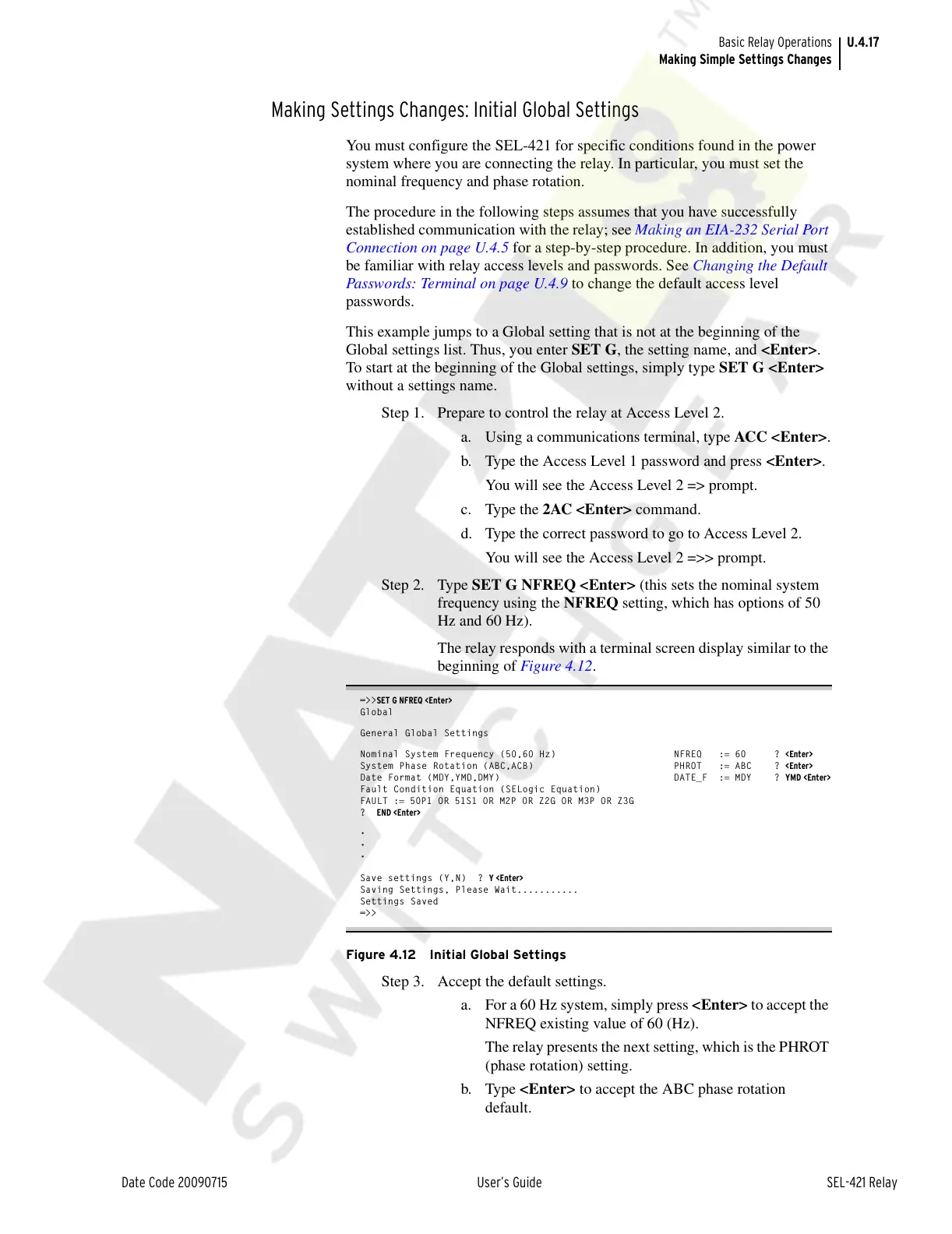
The relay responds with a terminal screen display similar to the
beginning of Figure 4.12.
=>>SET G NFREQ <Enter>
Global
General Global Settings
Nominal System Frequency (50,60 Hz) NFREQ := 60 ? <Enter>
System Phase Rotation (ABC,ACB) PHROT := ABC ? <Enter>
Date Format (MDY,YMD,DMY) DATE_F := MDY ? YMD <Enter>
Fault Condition Equation (SELogic Equation)
FAULT := 50P1 OR 51S1 OR M2P OR Z2G OR M3P OR Z3G
? END <Enter>
•
•
•
Save settings (Y,N) ? Y <Enter>
Saving Settings, Please Wait...........
Settings Saved
=>>
Figure 4.12 Initial Global Settings
Step 3. Accept the default settings.
a. For a 60 Hz system, simply press <Enter> to accept the
NFREQ existing value of 60 (Hz).
The relay presents the next setting, which is the PHROT
(phase rotation) setting.
b. Type <Enter> to accept the ABC phase rotation
default.
Courtesy of NationalSwitchgear.com



 To Next Page