U.5.29
Date Code 20090715 User’s Guide SEL-421 Relay
Front-Panel Operations
Front-Panel Menus and Screens
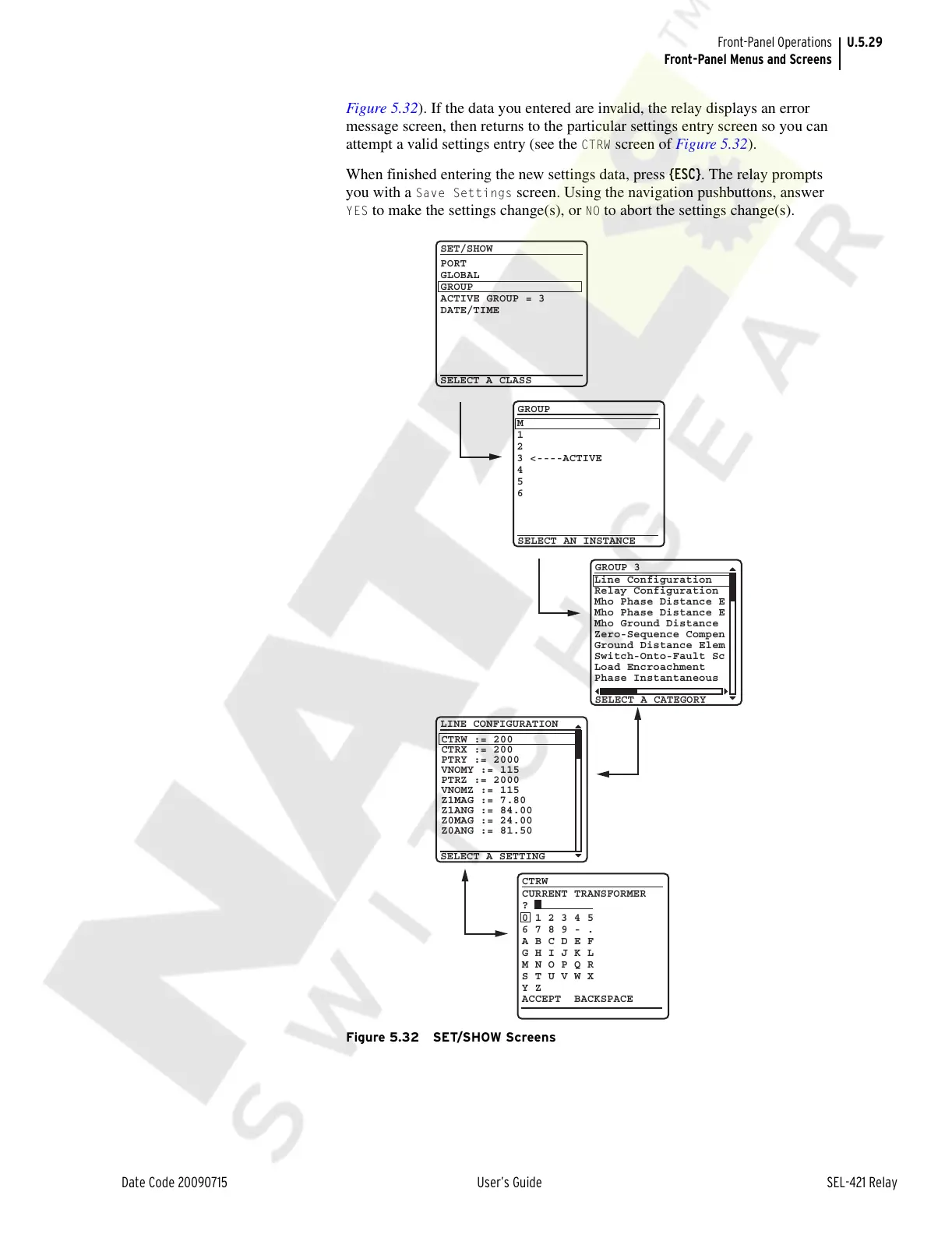
Figure 5.32). If the data you entered are invalid, the relay displays an error
message screen, then returns to the particular settings entry screen so you can
attempt a valid settings entry (see the
CTRW screen of Figure 5.32).
When finished entering the new settings data, press {ESC}. The relay prompts
you with a
Save Settings screen. Using the navigation pushbuttons, answer
YES to make the settings change(s), or NO to abort the settings change(s).
Figure 5.32 SET/SHOW Screens
SET/SHOW
PORT
GLOBAL
GROUP
ACTIVE GROUP = 3
DATE/TIME
GROUP
SELECT AN INSTANCE
SELECT A CLASS
M
1
2
3 <----ACTIVE
4
5
6
GROUP 3
SELECT A CATEGORY
Line Configuration
Relay Configuration
Mho Phase Distance E
Mho Phase Distance E
Mho Ground Distance
Zero-Sequence Compen
Ground Distance Elem
Switch-Onto-Fault Sc
Load Encroachment
Phase Instantaneous
SELECT A SETTING
LINE CONFIGURATION
CTRW := 200
CTRX := 200
PTRY := 2000
VNOMY := 115
PTRZ := 2000
VNOMZ := 115
Z1MAG := 7.80
Z1ANG := 84.00
Z0MAG := 24.00
Z0ANG := 81.50
CTRW
?
CURRENT TRANSFORMER
0 1 2 3 4 5
6 7 8 9 - .
A B C D E F
G H I J K L
M N O P Q R
S T U V W X
Y Z
ACCEPT BACKSPACE
Courtesy of NationalSwitchgear.com



 To Next Page