Note: It is not possible to calibrate the instrument during the execution of the measurements. It is
possible to open different lists and sub-lists but the positions in these lists are not displayed inversely
and so - not accessible. The “play” icon indicates that the instrument is in the measurement process.
In order to change the sensitivity the current measurement in progress must be finished!
3.3.2 Calibration by setting transducer's sensitivity – By Sensitivity
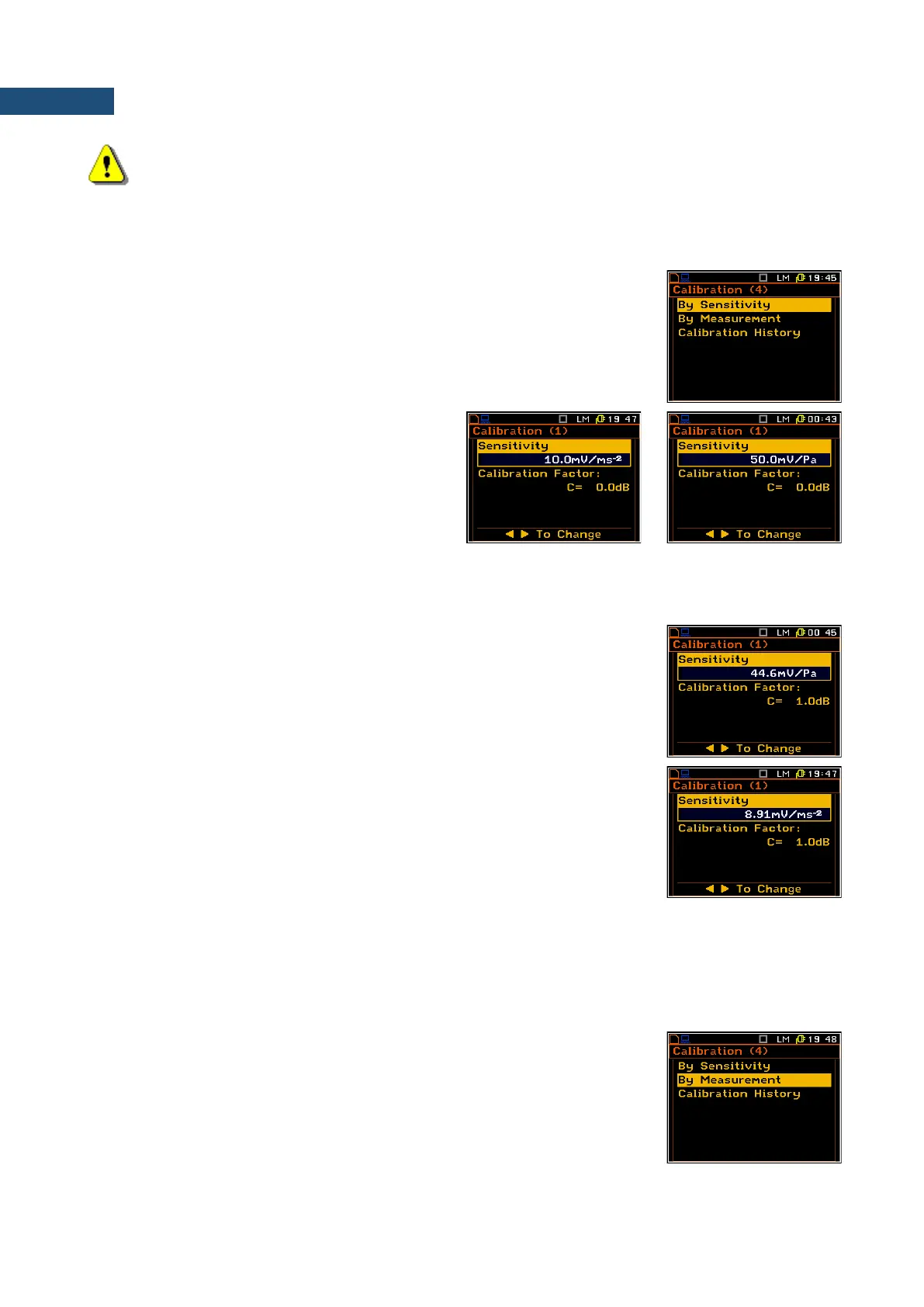
Calibration by setting the transducer’s (microphone or accelerometer)
sensitivity can be performed in the following way:
1. Select this type of the calibration (highlight the By Sensitivity text) from the
Calibration x sub-list and press the <ENTER> key.
The sensitivity is indicated in units in accordance with the settings of the Mode
for that channel made in the Channels Setup menu - Vibration or Sound.
2. Set the sensitivity of the transducer using
information taken from its calibration certificate
using the ◄ / ► key (or combination of the
<Shift> and ◄ / ► key).
In case of accelerometer the calibration factor is
calculated automatically, in the relation to
10.0mV/ms
-2
.
In case of microphone the calibration factor is
calculated automatically in the relation to
50.0mV/Pa.
For the sensitivity of the microphone smaller than 50.0mV/Pa, the calibration
factor is positive. For the sensitivity of the microphone greater than 50.0mV/Pa,
the calibration factor is negative.
The lowest applicable value of the sensitivity to be introduced is equal to
50.0V/Pa (it conforms to the calibration factor equal to 60.0dB) and the
greatest one – 50.0V/Pa (calibration factor equal to -60.0dB).
For the sensitivity of the accelerometer lower than 10.0mV/ms
-2
the calibration
factor will always be positive. For the sensitivity of the accelerometer greater
than 10.0mV/ms
-2
, the calibration factor is negative.
The lowest applicable value of the sensitivity to be introduced is equal to
10.0
V/ms
-2
(it conforms to the calibration factor equal to 60.0dB) and the
highest one is equal to 10.0V/ms
-2
(calibration factor equal to -60.0dB).
3. Press <ENTER> to save the selected calibration factor. Press <ESC> to return to the Calibration sub-list
without saving any changes made in this list.
3.3.3 Calibration by measurement – By Measurement
Calibration by actual measurements can be done in the following way:
1. Select the calibration by measurement (highlight the By Measurement text)
from the Calibration/Channel x sub-list and press <ENTER>.



 To Next Page