8 CALCULATION OF DOSE PARAMETERS – Auxiliary Functions
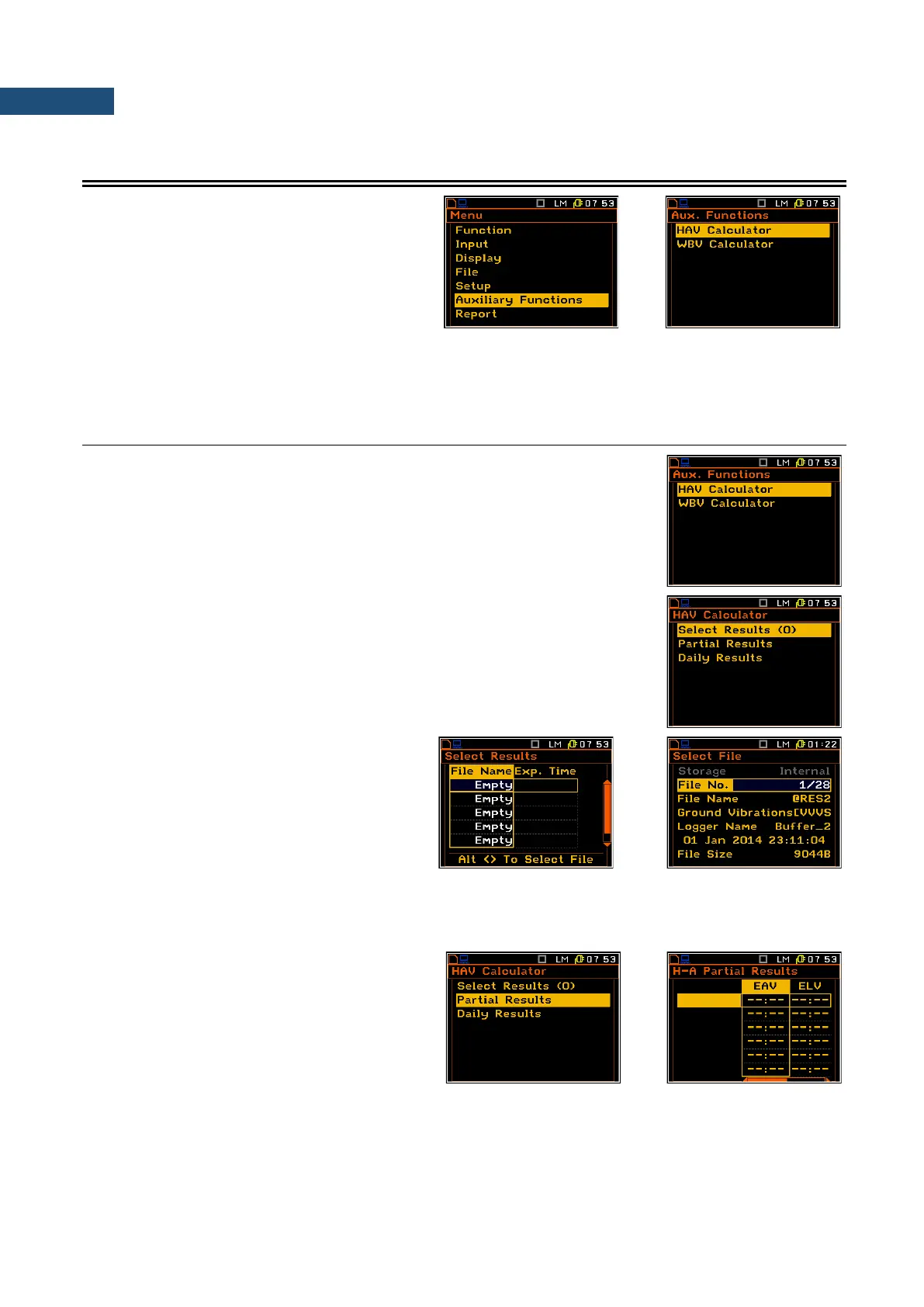
The Auxiliary Functions list is used to
calculate the various parameters, which are
mainly dedicated for the control of the
vibration measurements. This sub-list
contains two positions: HAV Calculator and
WBV Calculator, which are used to
calculate the characteristic parameters for
Hand-arm and Whole-body measurements.
It enables to calculate the HAV and WBV value, Partial Results (partial exposure) and Daily Results (daily
exposure).
8.1 CALCULATION OF HAND-ARM OR WHOLE-BODY VIBRATION DOSE
The HAV Calculator / WBV Calculator list is used to calculate the various
Hand–Arm / Whole-Body parameters which are mainly dedicated for the
control of the vibration dose. There are calculated: the Partial EAV/ELV,
Partial Exposure and Daily Exposure of vibration. All results are calculated
according to the standard selected in the Standard position (path: <Menu>
/ Input / Auxiliary Setup / HAV/WBV Dose Setup).
The HAV Calculator / WBV Calculator list consists of the following
positions:
Select Results that enables the user to select files of measurement
results with hand-arm / whole-body data;
Partial Results that displays the result of exposure;
Daily Results that displays the result of daily exposure.
Selection of the file with result of
measurement
The Select Results list is used to load data
file from the FLASH DISC (memory of the
instrument). By pressing at the same time
<Alt> and ► keys the user can select the
files to be used for calculation of the dose
value.
It is possible to select 6 files with hand-arm / whole-body results. The Exp. Time defines the period during
which the measurement results are extrapolated.
The figure in the brackets on the right side of the Select Results indicates the number of selected files.
Selection of the partial results
The Partial Results position is used to
display partial results, for each file. The
results are displayed in two columns – the
first column for EAV results and the second
for ELV results.



 To Next Page