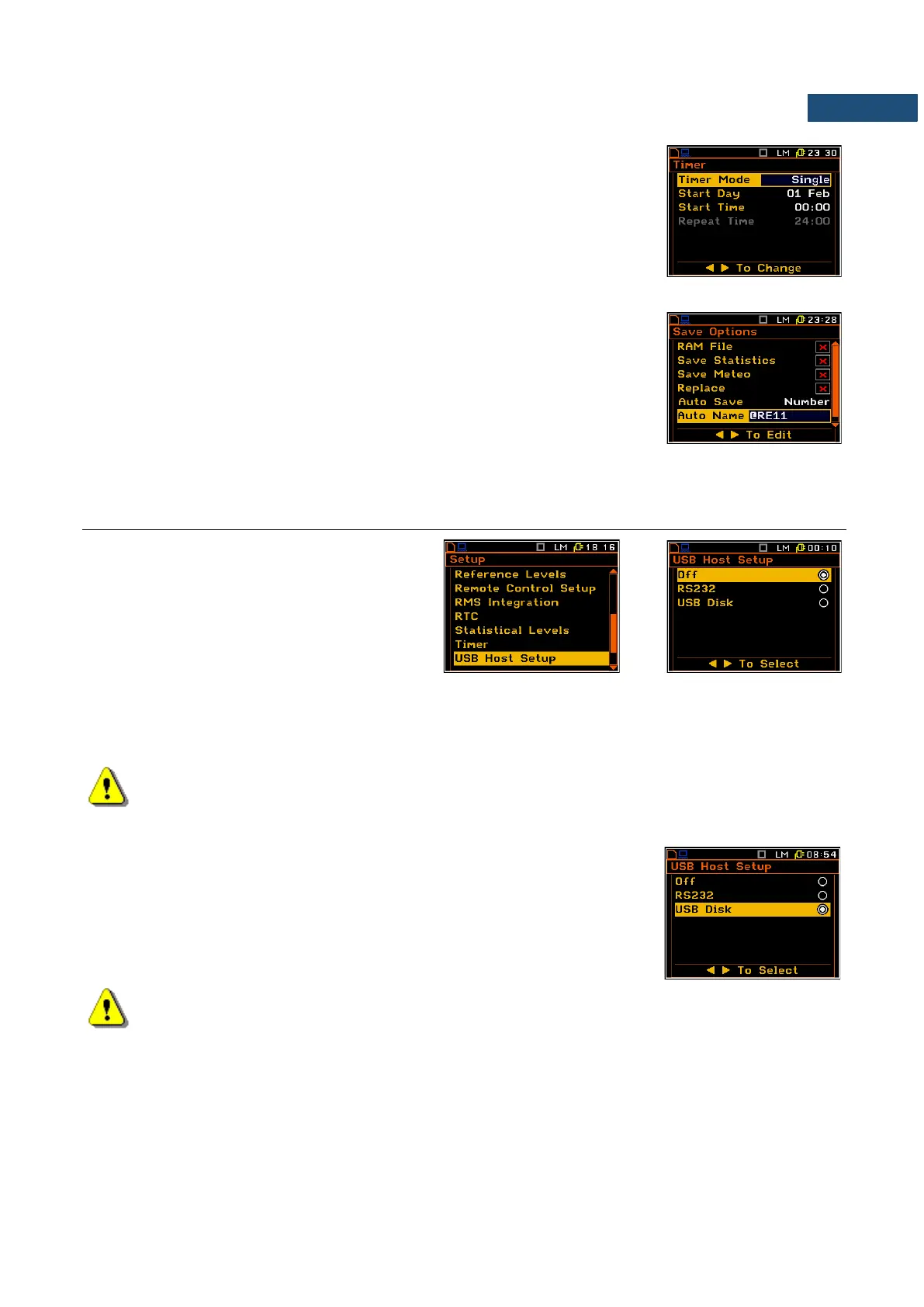
Example of Timer execution
Let’s assume that you wish to switch on the instrument on the 1
st
of February,
at 00:00, make measurement during 10 seconds without using logger and
save the results in a file named @RE11.
In order to do this the user has to set the parameters of the Timer function
(path: <Menu> / Setup / Timer), the measurement parameters (path: <Menu>
/ Input / Measurement Setup), activate the Auto Save function (path: <Menu>
/ File / Save Options), name the file (the File Name list is opened after
switching on the Auto Save function) and finally – switch off the instrument.
The instrument will be switched on the 1
st
of February at 00:00 and will be
warmed up for the period of 60 seconds decrementing the counter visible on
the display by one after each second.
After warming up the instrument and the pre-set Start Delay time, the
measurements will be performed for a period of ten seconds. Then, the
results will be saved in the previously named file and finally – the instrument
will switch off.
7.16 PROGRAMMING THE INSTRUMENT’S SOCKET NAMED USB HOST – USB HOST SETUP
The USB Host Setup enables the user to
programme the functionality of the
instrument’s socket named USB Host.
This position is hidden when the
Wave Recorder function was activated.
The socket USB Host can be used to serve as the input of the different interfaces: RS 232 or USB Disk. The
RS 232 interface in the SVAN 95x instrument is available as a hardware option (a special interface, named as
the SV 55, with a dedicated microprocessor has to be attached to the socket USB Host). An error occurs in
the case of the connection to the socket the peripheral device of the different type than the selected one.
Note: The converter SV 55 serves as the RS 232 interface. The SV 55 connection
to the USB Host socket is detected and after successful detection the headphone icon is switched
on. The transmission using the SV 55 is possible only in the case when the instrument is not
connected to a PC with the USB Device port.
The USB host interface can be used to control the external USB memory disk
(USB Disk) with the FAT16 or FAT32 file systems.
To activate the USB memory stich the user should switch on the USB Disk
option in the USB Host Setup list (path: <Menu> / Setup / USB Host Setup).
Note: The USB disk when connected to the USB Host socket switches off the instrument’s internal
flash memory. All file functions and remote commands are redirected to the USB disk. The internal
flash memory is activated after disconnecting the USB disk from the instrument.



 To Next Page