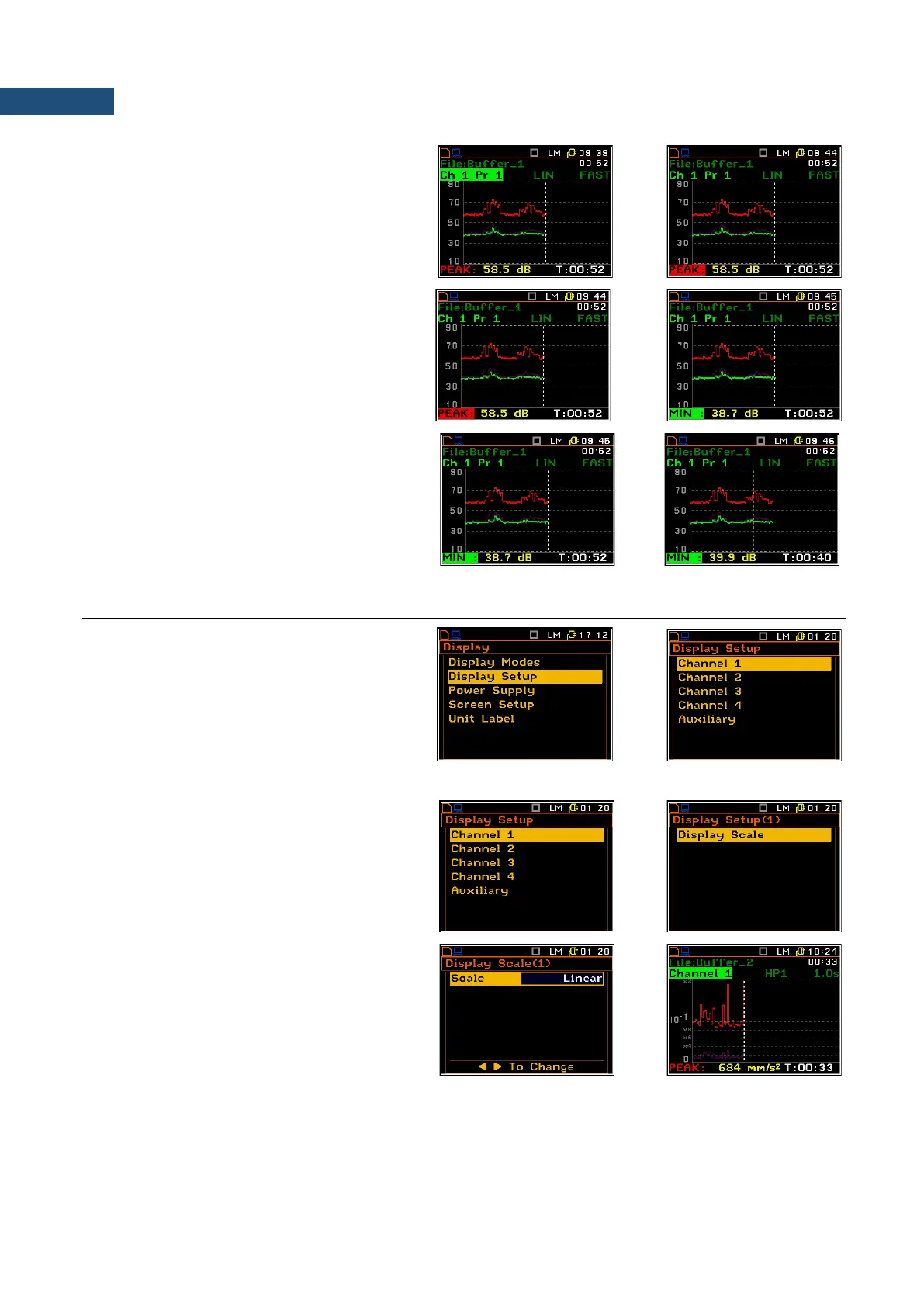
Changing the active fields
Jumping between positions is made by
means of the ▲ or ▼ keys.
Changing the field content
When Profile or Function position is chosen,
then the profile number or function name is
changed by means of the ◄ / ► key pressed
with <Alt>.
Changing the cursor position
The user may change the cursor position by
means of the ◄ / ► key. The appropriate
value is presented in the line below the plot.
6.2 SETTING THE PARAMETERS OF GRAPHICAL PRESENTATIONS – DISPLAY SETUP
The Display Setup position enables the user
to change scale of the graphical results
presentations for each channel separately.
In the Display Scale window, the user may
adjust the scale in the available modes of
graphical presentation of the measurement
results (time-history in the Logger and spectra
in the Spectrum mode).
Setting the scale of the logger presentation
For Vibration input two options are available
for the Scale position: Linear, and Logarithm.
For Sound input only Logarithm scale is
possible.
In case of Linear scale, the graphical
presentation and the units are linear. In case
of Logarithm scale the graphical presentation
is given in the logarithmic scale and the
measurement results are expressed in
decibels (the results are related to the values
set up in the Reference Levels sub-list (path:
<Menu> / Setup / Reference Levels).



 To Next Page