The reverberation time analysis (RT60) is an optional function of the SVAN 958A instrument, which provides
reverberation time calculation for 1/3 octave bands (from 31.5 Hz to 10 kHz) and three total RMS levels (A, C
and Z weighted). Whole measurement process and calculations implemented in the SVAN 958A instrument
fulfil the ISO 3382 standard.
The reverberation time of the room can be obtained with the use of the SVAN 958A instrument by two
measurement methods: Impulse (Impulse Response Method) and Decay (Interrupted Noise Method). The
selection of the method depends on the type of the sound source utilized by the user. The Impulse method is
designed for measurement utilizing the impulse sound source (like pistol shot, petard explosion), whereas the
Decay method is intended for measurements when room is excited by broad or narrow band sound noise
source (usually pink noise). For more details about the measurement and calculation process see Appendix E.
The reverberation time analysis applied in the instrument consists of two parts:
1. The measurement part during which the acoustic response of the room is registered.
2. The calculation part during which the reverberation time (EDT, RT 20, RT 30 and RT User) is calculated
for the measured room response.
Note: It is recommended to familiarize with the Appendix E before proceeding.
This chapter describes only the navigation of the instruments, whereas Appendix E depicts
the definitions and description of the reverberation time measurement.
15.1 SELECTING RT60 FUNCTION
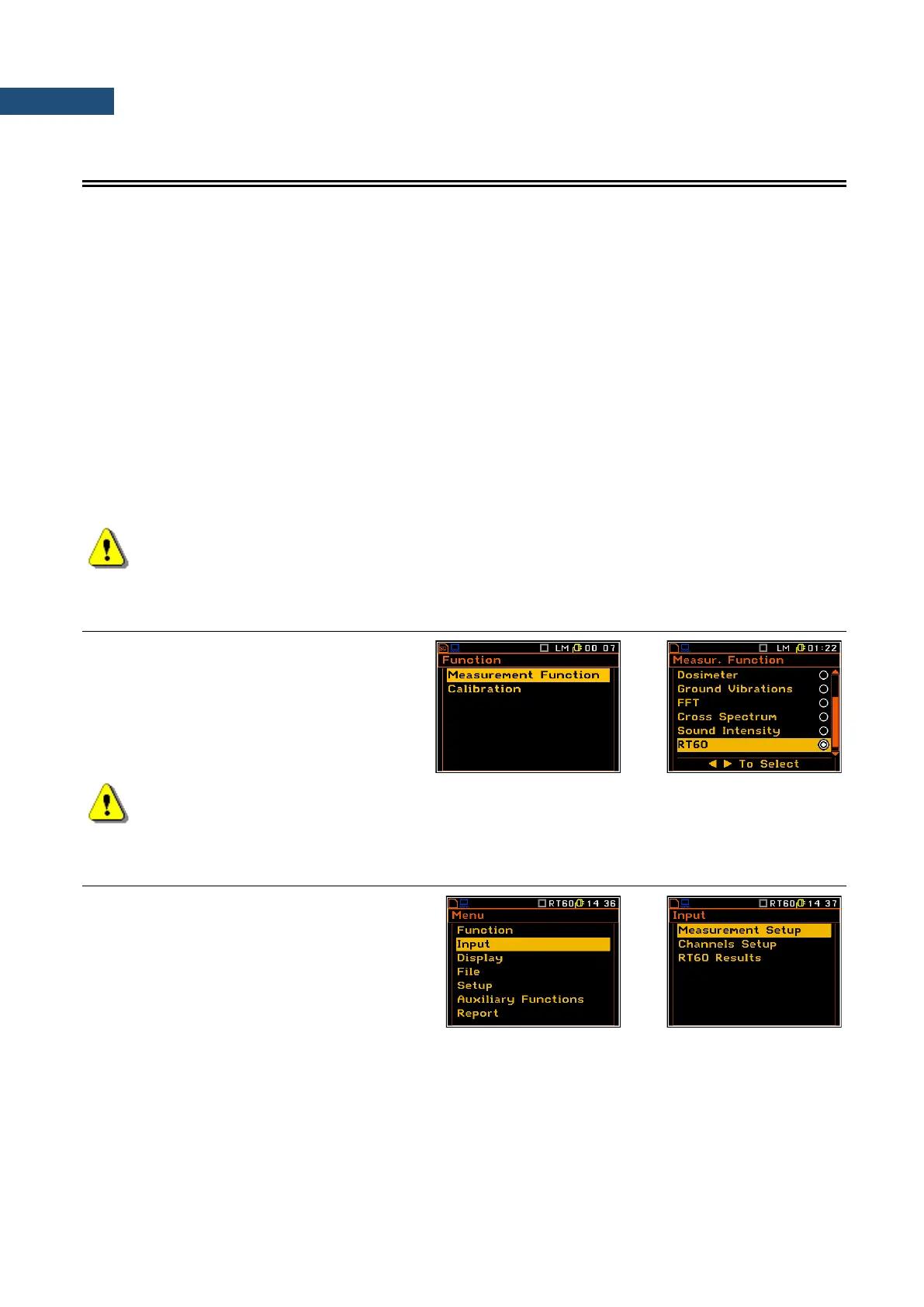
In order to select the RT 60 function the user
has to enter the Function list by pressing the
<Menu> key, then select the Measurement
Function position and open it by pressing
<ENTER>. In the Measurement Function
list the user has to highlight the RT 60 option,
mark it by ► key and then press <ENTER>.
Note: It is not possible to change the current function while a measurement is taking place.
In this case the instrument displays for about 2 seconds the text ”Measurement in Progress”. In
order to change the current measurement function the instrument must be stopped!
15.2 SETTING RT 60 PARAMETERS
The execution of the RT 60 analysis depends
on settings made in the Input list, which
consists of three positions:
Measurement Setup, Channels Setup and
RT60 Results.
The reverberation time analysis applied in the instrument consists of two parts:
1. The measurement part during which the acoustic response of the room is registered.
2. The calculation part during which the reverberation time (EDT, RT 20, RT 30 and RT User) is
calculated for the measured room response.



 To Next Page