The Linear option means that the values of LEQ or RMS based results don’t depend on the detector time
constant (Detector). The Exponential option means that all LEQ or RMS based results will be measured with
the selected detector time constant (Detector) – see Chapter
4.2.
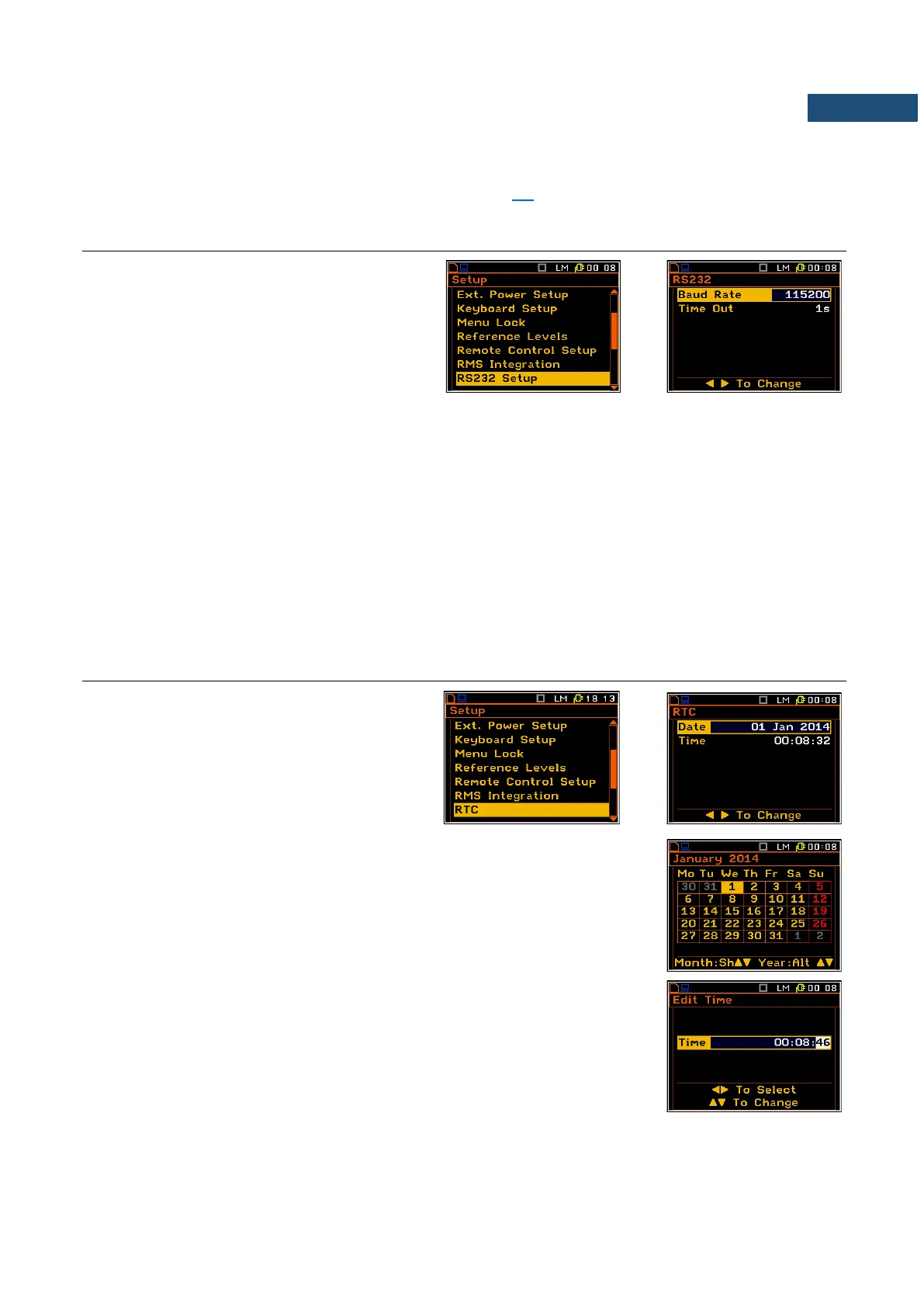
7.12 SETTING THE PARAMETERS OF THE SERIAL INTERFACE – RS232 SETUP
The RS232 position enables the user to
programme the RS 232 interface transmission
speed (Baud Rate) and to set the time limit
during which the communication operation
should be performed (Time Out).
This position appears when the RS232 option
was selected in the USB Host Setup list.
Setting the transmission speed of the serial interface
The RS 232 interface transmission (Baud Rate) speed can be selected from the following available values:
1200 (bits / second), 2400 (bits / s), 4800 (bits / s), 9600 (bits / s), 19200 (bits / s), 38000 (bits / s),
57600 (bits / s) or 115200 (bits / s). The selection is made by means of the ◄ / ► key. The setting here should
be the same as in the connected instrument or computer to ensure successful data transfer.
The other RS 232 transmission parameters are fixed to 8 bits for data, No parity & 1 Stop bit.
Setting time limit for the performance of serial interface operation
The default value of the parameter Time Out is equal to one second but this may be too short for some slower
printers, which may not be fast enough. In such cases, the Time Out parameter may have to be increased to
a higher value.
7.13 PROGRAMMING THE INSTRUMENT’S INTERNAL REAL TIME CLOCK – RTC
The RTC enables the user to programme the
internal Real Time Clock. This clock is
displayed in the different places depending on
the selected presentation mode.
The window is closed and the instrument
returns to the Instrument list after pressing the
<ENTER> or <ESC> key.
The required date can be selected in a special window, which is opened after
pressing the ◄ / ► key when the Start Day text is displayed inversely in the
Timer sub-list.
In order to set data the user has to select its position by means of the ◄ , ►
and ▲, ▼ push button and then press <ENTER> to set the chosen value.
Editing the time is performed in the special window, which is opened after
pressing the ► key. The selection of the correct parameter (hour, minute,
second, and also day, month and year) is performed using the ◄ / ► key and
the change of its value – using the ▲ / ▼ key pressed together with <Alt>.



 To Next Page