4.4.2 Setting the parameters of attenuation measurements – “SEAT” Setup
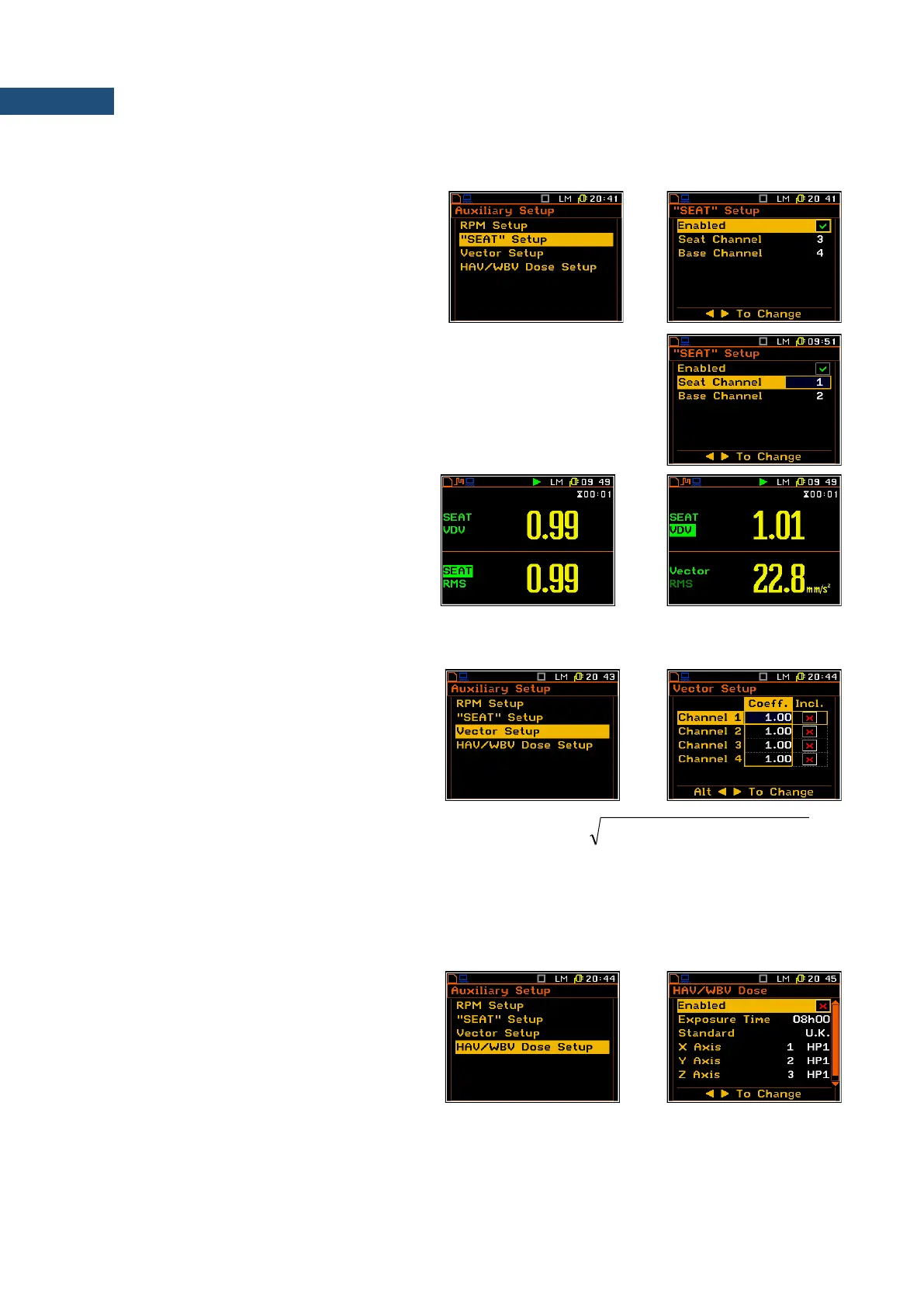
The “SEAT” Setup option may be used for
measurements of attenuation of vibration.
One of the channels (Base Channel)
measures the signal before attenuation and
other (Seat Channel) measures the signal
after attenuation (e.g. as in the case of the seat
suspension in vehicles).
In the Seat Channel position the user can select the “seat” channel for
attenuation measurements.
In the Base Channel position the user can select the base channel for
attenuation measurements.
The SEAT results are presented in the double
results presentation mode. The results are
calculated by dividing RMS or VDV result from
Seat Channel by RMS or VDV result from
Base Channel.
Additionally, the Vector RMS result can be
viewed in parallel to the SEAT result.
4.4.3 Settings for vector calculations – Vector Setup
In the Vector Setup list the user may select the
coefficients to calculate the vector. When the
user needs to calculate it with other than
standard coefficients, it is possible to select the
coefficient within the values from 0.00 to 2.00.
The values presented above are taken into account
during the calculations of the measurement results.
Vector is calculated according to the formulae:
2
44
2
33
2
22
2
11
xkxkxkxkVECTOR
+++=
Where k
1
, k
2
, k
3
and k
4
are the coefficients and x
1
, x
2
, x
3
and x
4
are RMS results for different channels. It is
important that the user should choose only coefficients corresponding with the proper channels.
4.4.4 Setting the parameters for dose measurements – HAV/WBV Dose Setup
The HAV/WBV Dose Setup position enables
the user to set the parameters of hand-arm
and whole-body vibration dose
measurements.
For the HAV/WBV Dose measurements the
user should switch on HAV/WBV Dose option
in the Enabled position, select channels for tri-
axial accelerometer and select suitable filters
in the Channels Setup list.



 To Next Page