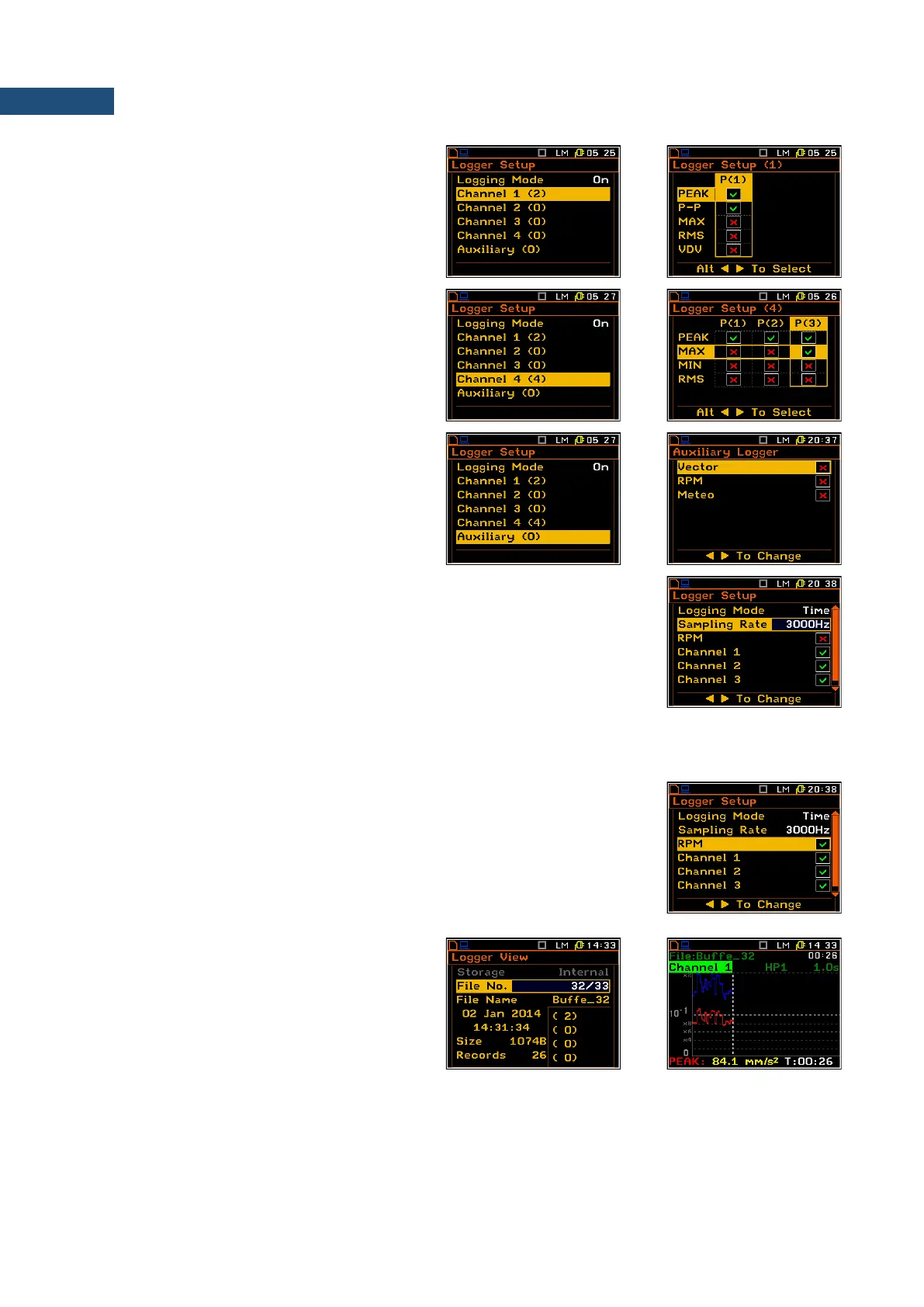
Selecting time-history results to be logged
The Channel x (y) positions define results,
which are to be saved in a logger file. The (y)
value shows the number of selected results for
each channel x.
Up to five measurement results: PEAK, P–P,
MAX, RMS, VDV in case of vibration
measurements and up to four results from each
profile: PEAK, MAX, MIN and RMS in case of
sound measurements can be saved in the
logger’s file of the instrument.
It is also possible to save Vector calculation,
RPM measurement and Meteo results in a
logger file. These parameters can be selected
in the Auxiliary list
Selecting parameters of time-domain signal recording
The Sampling Rate position defines the sampling rate with which the time-
domain signal can be stored in the logger memory of the instrument. Available
values are as follows: 3000 Hz, 2400 Hz, 1500 Hz, 1200 Hz, 750 Hz, 600 Hz,
375 Hz, 300 Hz, 187 Hz, 150 Hz.
The time-domain signal is always frequency weighted. If the sampling rate is selected as 3000 Hz the signal in
each channel is weighting with the filter, selected in the first profile of respective channel. If the sampling rate
is another than 3000 Hz the signal is weighting with the HP1 filter.
It is also possible to save RPM results switching on the RPM position.
To save RPM measurement results the user has to enable the RPM function in
the Auxiliary Setup list (path: Menu / Input / Auxiliary Setup / RPM Setup /
Enabled: [x]) and change Ext.I/O settings into Digital In (path: <Menu> / Setup /
Ext. I/O Setup / Mode: Digital In).
Positions Channel x enable the user to select the channels for which to record
the time-domain signal.
The results from selected channels are
recorded in the logger files, which can be
viewed in the Logger View list (path: <Menu>
/ File / Logger View).



 To Next Page