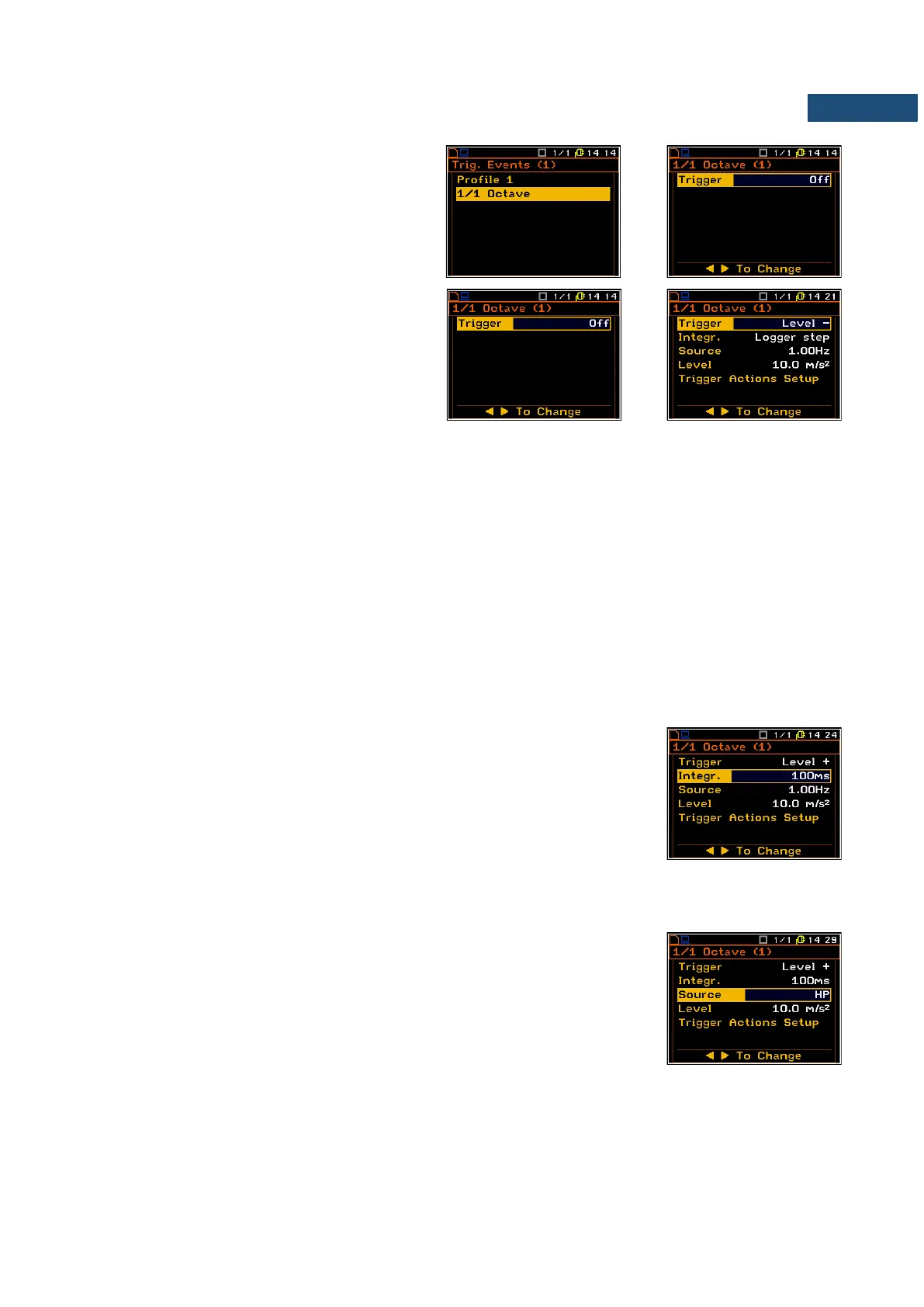
For the 1/1 Octave or 1/3 Octave functions
additional 1/1 Octave or 1/3 Octave position
appears in the Trigger Events list. These
positions enable the user to define additional
trigger events with the use of result of 1/1 or 1/3
analysys.
The Trigger position enables the user to switch
the trigger on and select the trigger type:
Level -, Level +, Slope -, Slope +, Grad - and
Grad +.
In each interval of the measurement, defined by
Integr, the triggering condition is checked and:
• if Level + is selected, the triggering condition is fulfilled only when Source has the greater value than
determined by Level, otherwise the triggering condition is not fulfilled.
• if Level – is selected, the triggering condition is fulfilled only when Source has the lower value than this
determined by Level, otherwise the triggering condition is not fulfilled.
• if Slope + is selected, the triggering condition is fulfilled only when the rising value of Source is passing
the level determined by Level.
• if Slope – is selected, the triggering condition is fulfilled only when the falling value of Source is passing
the level determined by Level.
• if Grad + is selected, the triggering condition is fulfilled only when the signal has the greater level than
determined by Level and the gradient of the signal is greater than determined by Gradient. Otherwise
the triggering condition is not fulfilled.
• if Grad - is selected, the triggering condition is fulfilled only when the signal has the lower level than this
determined by Level and the gradient of the signal is lower than determined by Gradient. Otherwise the
triggering condition is not fulfilled.
Step for checking the triggering condition
The Integr. position enables the user to select time (integration period) for
condition evaluation: equal to Logger step (path: <Menu> / Input /
Data Logging / Logger Setup), 100ms, 1.0s, and equal to current
measurement time calculated from measurement start - Meas. Time (path:
<Menu> / Input / Measurement Setup) and Int. Period (path: <Menu> / Input /
Measurement Setup). If Meas. Time is selected the triggering conditio is
checked every second and RMS is averaged from the begining of the
measurement (Meas. Time is displayed in the right upper corner of the display
right under the real Time Clock).
The trigger condition can be defined for the selected RMS result in the Source
position calculated for 1/1 Octave filters (1.00 Hz, 2.00 Hz, 4.00 Hz, 8.00 Hz,
16.0 Hz, 31.5 Hz, 63.0 Hz, 125 Hz, 250 Hz, 500 Hz, 1.00 kHz, 2.00 kHz,
4.00 kHz, 8.00 kHz and 16.00 kHz), or 1/3 Octave filters (0.80 Hz, 1.00 Hz,
1.25 Hz, 1.60 Hz, 2.00 Hz, 2.50 Hz, 3.15 Hz, 4.00 Hz, 5.00 Hz, 6.30 Hz,
8.00 Hz, 10.0 Hz, 12.5 Hz, 16.0 Hz, 20.0 Hz, 25.0 Hz, 31.5 Hz, 40.0 Hz,
50.0 Hz, 63.0 Hz, 80.0 Hz, 100 Hz, 125 Hz, 160 Hz, 200 Hz, 250 Hz, 315 Hz,
400 Hz, 500 Hz, 630 Hz, 800 Hz, 1.00 kHz, 1.25 kHz, 1.60 kHz, 2.00 kHz,
2.50 kHz, 3.15 kHz, 4.00 kHz, 5.00 kHz, 6.30 kHz, 8.00 kHz, 10.0 kHz,
12.5 kHz, 16.0 kHz and 20.0 kHz), and also Total Level results with
appropriate filters: A/C/Lin for Sound channel and HP/filter of Profil(1)/filter of
Profil(1) for Vibration channel.



 To Next Page