RS-232 INTERFACE 7 - 3
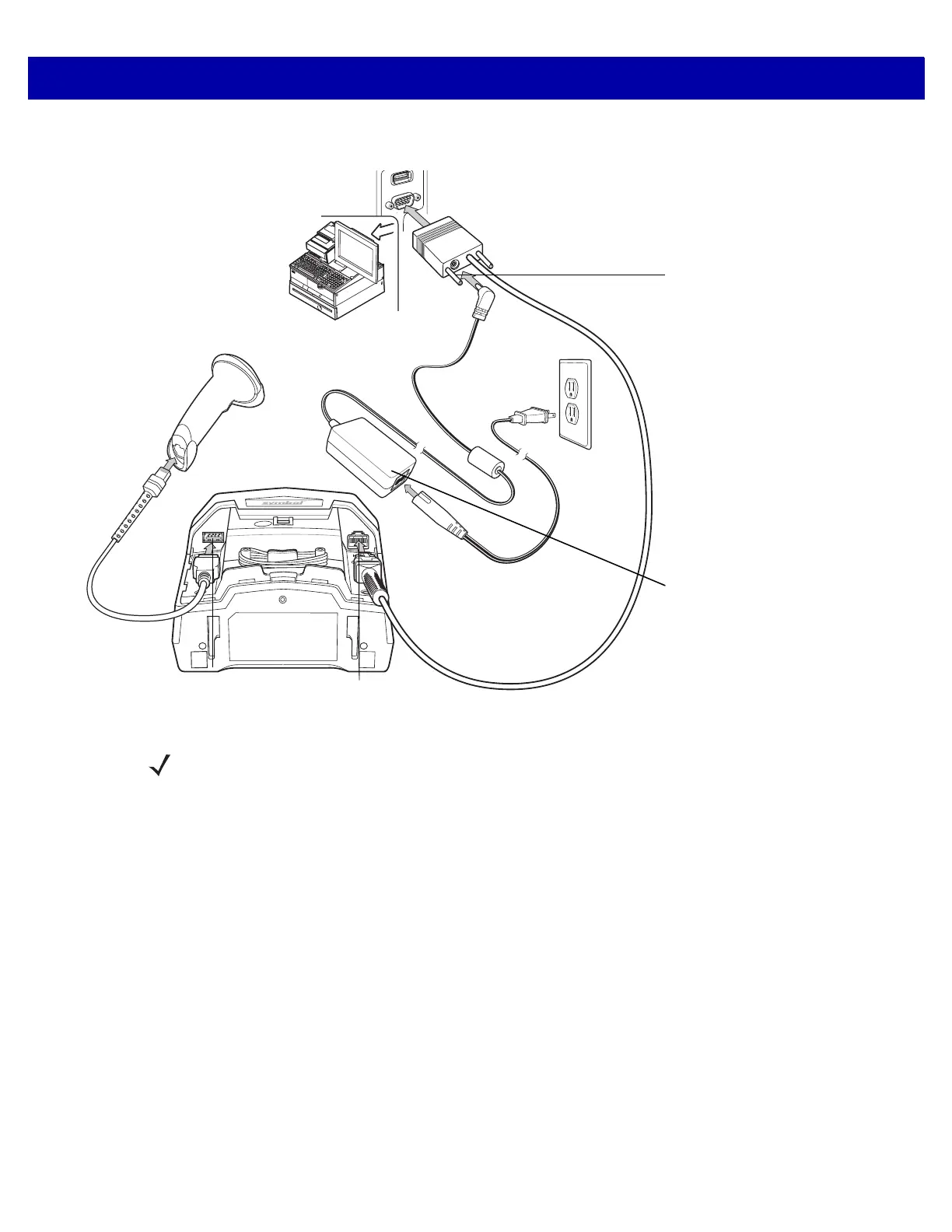
Figure 7-2
RS-232 Connection with Auxiliary Scanner - 12 Volt Power Supplied Externally
To set up the DS7708 with an RS-232 interface:
1. Remove the back cover from the DS7708. See Removing the Back Cover on page 1-5.
2. Plug the host interface cable modular connector into the scanner’s host port host port.
3. Connect the other end of the interface cable to the serial port on the host.
4. Scan the appropriate bar codes in this chapter, or use 123Scan²
to match the host settings.
5. If using an auxiliary scanner:
a. Connect the auxiliary scanner cable to the auxiliary scanner port on the DS7708.
b. Connect a 12 volt external power supply to a 12 volt Power Plus host connector as shown in Figure
7-2.
6. Replace the DS7708 back cover (see Removing and Replacing the Back Cover on page 1-5).
Power Port
IMPORTANT: A 12 volt
power connection is
required when using an
auxiliary scanner. (See
available cables under
Accessories on page vi.)
12 Volt Power Supply
Auxiliary Scanner Port Host Port
NOTE Interface cables vary depending on configuration. The connectors may be different from the examples
illustrated, but the steps to connect the scanner are the same. See RS-232 Cables on page vii for cable
information and part numbers.



 To Next Page