Surveying with the HiPer+
1-866-4TOPCON www.topconpositioning.com
3-19
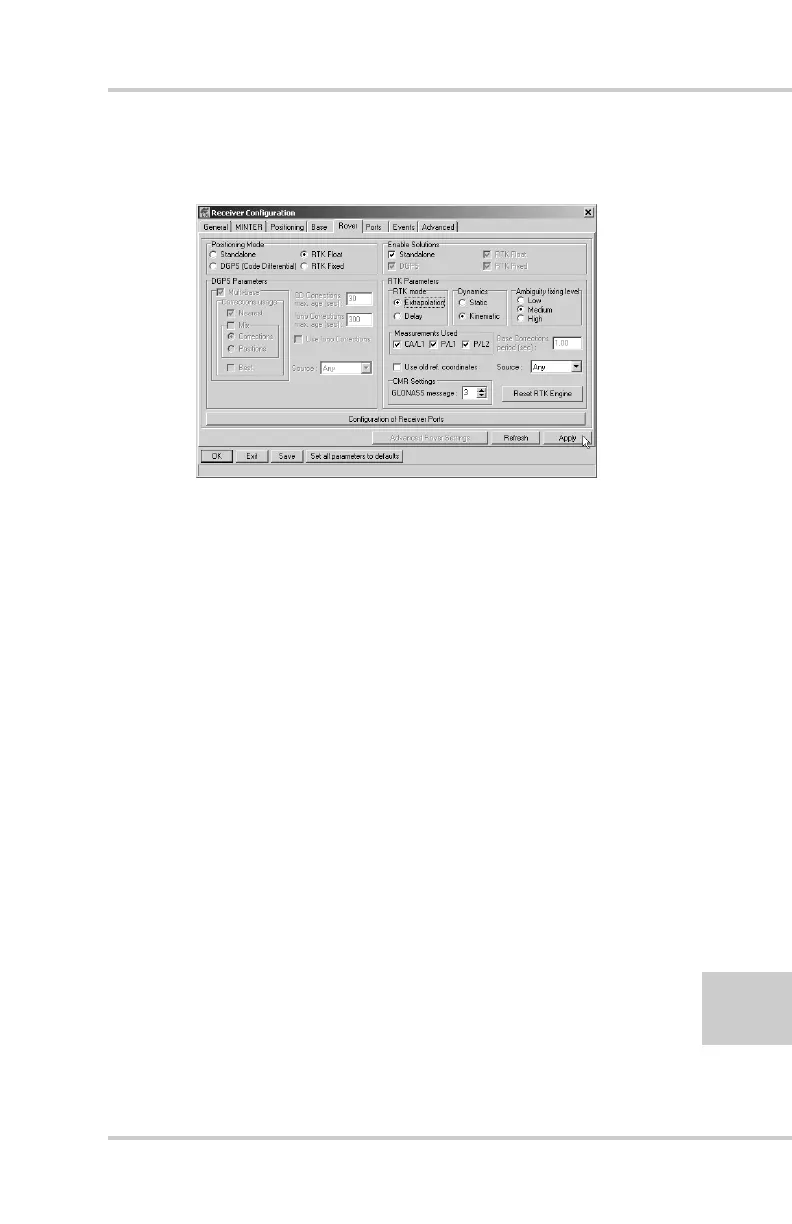
5. Select the Rover tab and set the desired Positioning
Mode (Figure 3-12).
Figure 3-12. Rover Tab Configuration
If you selected RTK Float or RTK Fixed, adjust the
following RTK Parameters settings:
• Select Extrapolation or Delay.
–Extrapolation is for low-latency, high frequency
output (>= 5 Hz) RTK applications. The rover will
extrapolate the base station’s carrier phase
measurement corrections when computing the rover's
current RTK position.
–Delay is for 1 Hz high precision RTK applications.
The Rover RTK engine will compute either a delayed
RTK position (for the epoch to which the newly
received RTCM/CMR message corresponds) or the
current stand-alone position (while waiting for new
RTCM/CMR messages coming from the base).
• Select the antenna status during RTK, either Static or
Kinematic.
• Specify the Ambiguity fixing level (not applicable to
RTK Float). The Ambiguity Fixing Level radio
buttons govern the process of the RTK engine, fixing



 To Next Page