Configuration
Topcon HiPer+ Operator’s Manual
2-22
Checking Internal Battery Status
You have three options to check the status of the internal
batteries:
1. View the BATT LED for battery status. See “Battery
LED” on page 4-6 for more information on this LED.
• A green light indicates greater than 85% charge.
• An orange light indicates an intermediate charge.
• A red light indicates less then 15% charge.
2. Click on Configuration->Receiver and view the
battery voltages on the Receiver Configuration
screen.
OR
Click on Help->About and view the battery voltages
on the About PC-CDU screen.
MINTER Configuration
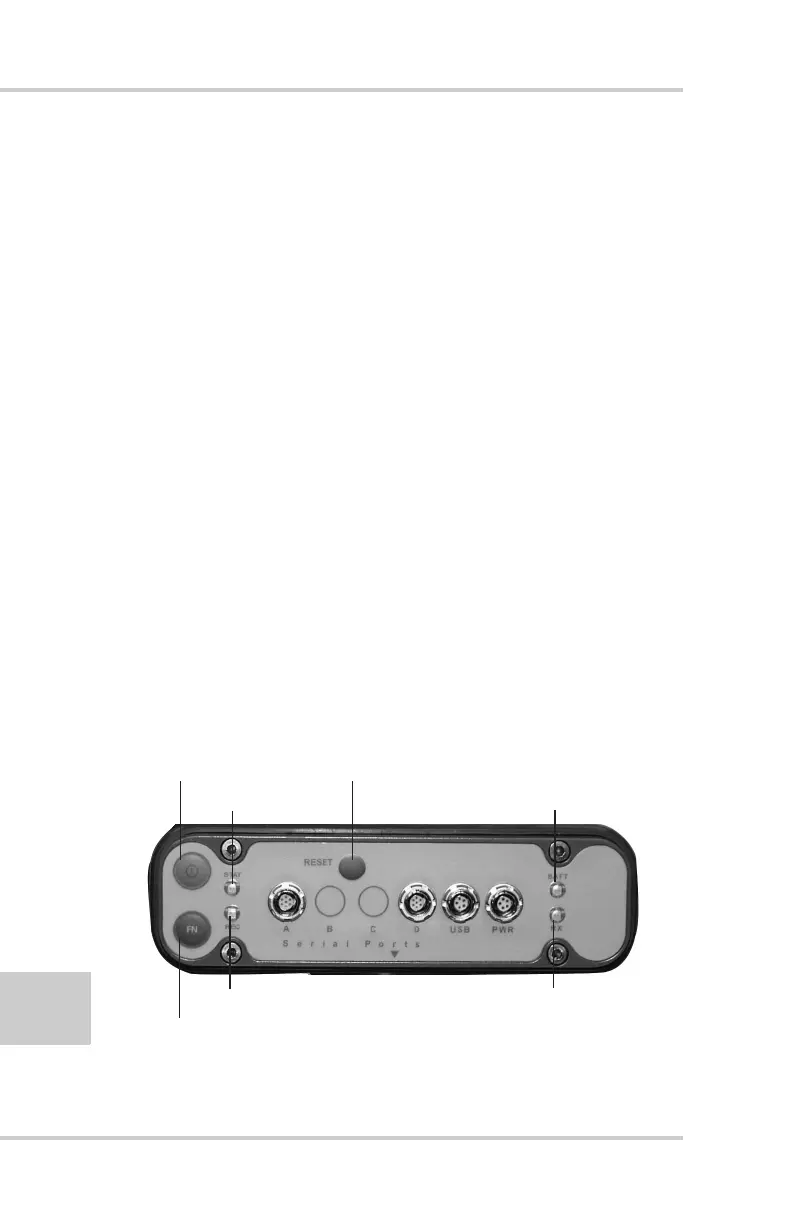
The HiPer+ Minimum INTERface (MINTER) consists of two
keys (Power and FN) and four LEDs (STAT, REC, BATT, and
RX) that control and display the receiver’s operation
(Figure 2-20).
Figure 2-20. HiPer+ MINTER
Power key
FN key (function/recording)
REC (recording LED)
STAT (status LED)
BATT (battery LED)
RX (modem LED)
Reset Key



 To Next Page