Operation
Topcon HiPer+ Operator’s Manual
4-4
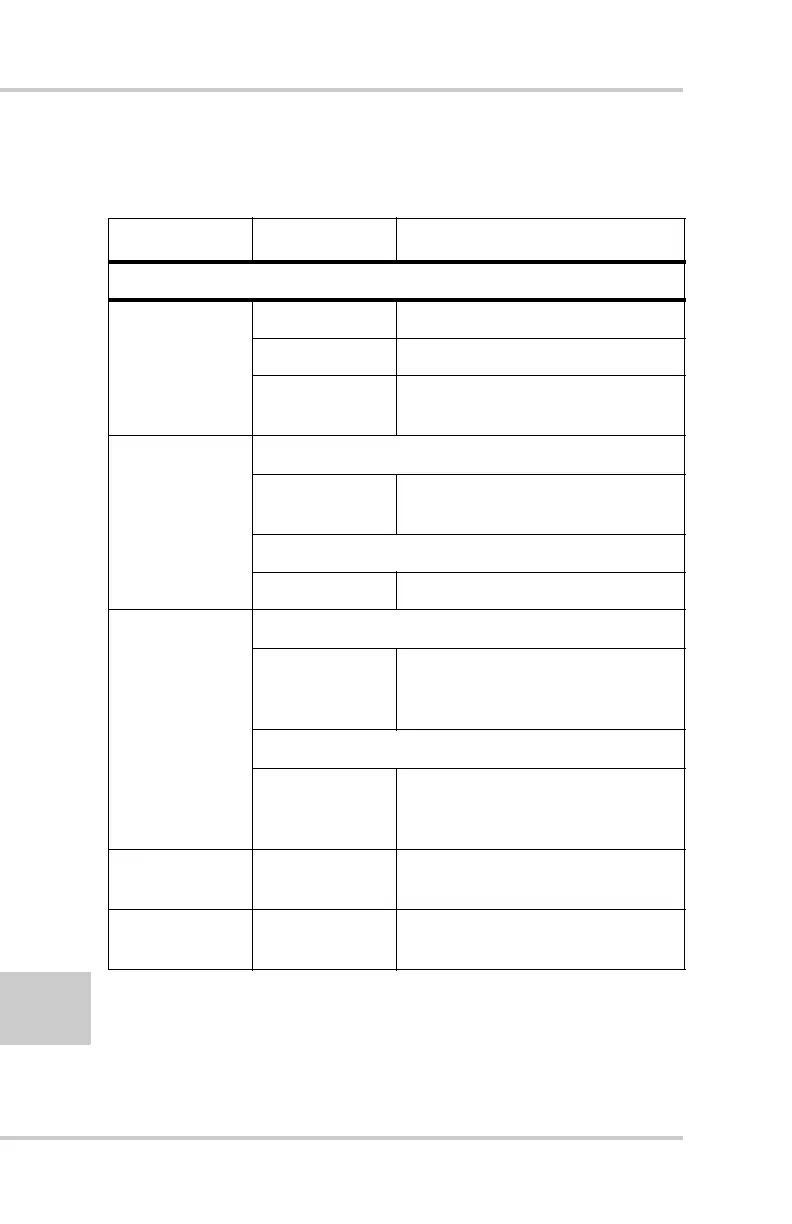
Table 4-1. FN Key Functions and REC LED Status
FN Key REC LED Status
When data recording is off, and the FN key is...
Not pressed
No light No data recording.
Orange blink Internal file system test in progress.
Red No free memory; hardware problem
with data recording.
Pressed for < 1
second
If FN key mode is “LED blink mode switch”
Orange Release to change information
mode.
If FN key mode is “Occupation mode switch”
Orange No function.
Pressed for 1–5
seconds
If FN key mode is “LED blink mode switch”
Green Release to start data recording (post-
processing occupation mode
undefined).
If FN key mode is “Occupation mode switch”
Green Release to start recording
(Kinematic or Static post-processing
occupation mode)
Pressed for 5–8
seconds
Red Release to turn serial port A baud
rate to 9600 bps.
Pressed for > 8
seconds
No light No function.



 To Next Page