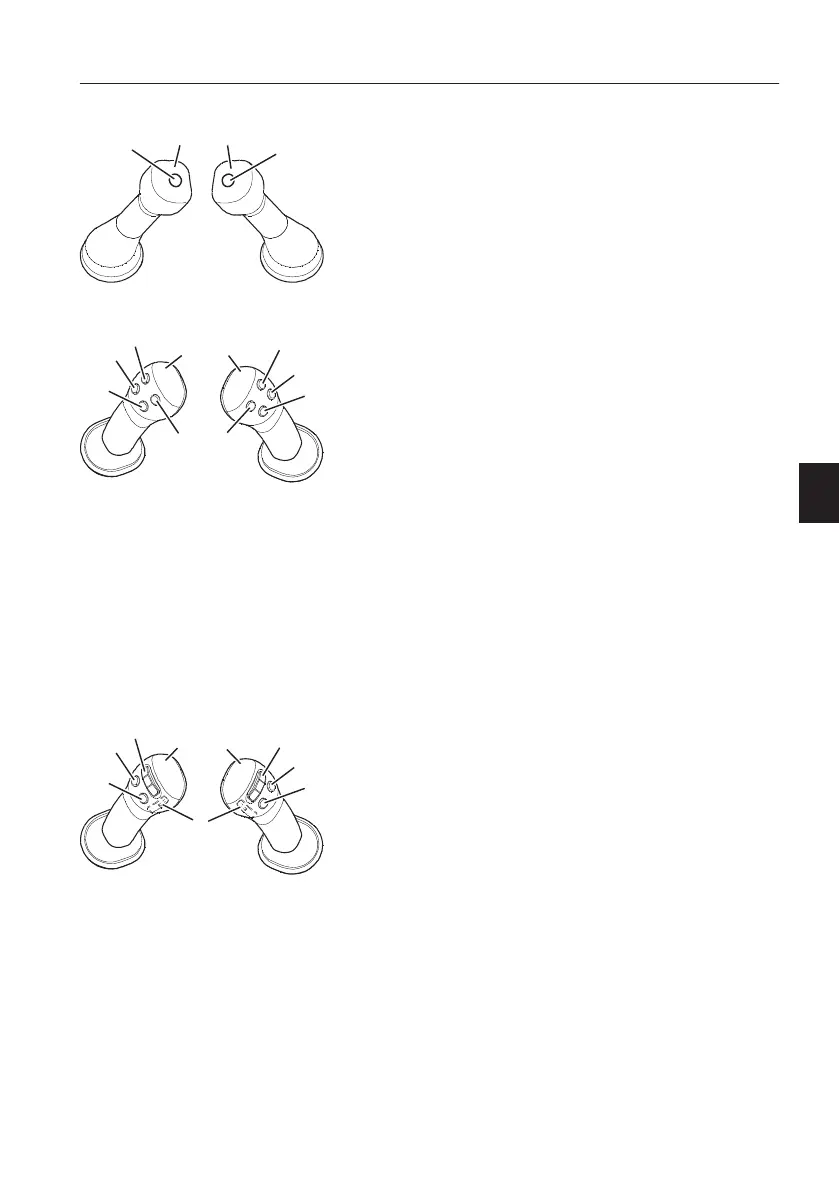
Control lever with one button
A Left operating lever
B Right operating lever
1 Horn button
2 Boost/hammer button
NOTE!
When the hammer select switch is activated, the
boost function does not work.
Control lever with four buttons
A Left operating lever
B Right operating lever
1 Rotator button (X3)
Clockwise rotation
2 Rotator button (X3)
Counterclockwise rotation
3 Horn button
4 Joystick shortkey button
5 X1 - hammer button or
X1 - shear close
6 X1 - unassigned or
X1 - shear open
7 Float button
8 Boost button
Control lever with three buttons and proportional
switch
A Left operating lever
B Right operating lever
1 Proportional switch for X3 (rotator)
Left - clockwise rotation
Right - counterclockwise rotation
2 Proportional switch for X1 (hammer/shear)
Left - shear close
Right - shear open
3 Horn button
4 Joystick shortkey button
5 Boost button
6 Float button
7 Unassigned
NOTE!
Before operating the control levers for X1 or X3
operation, make sure to read and understand the
different control types for the different buttons and
switches, refer to page
78
for details.
Other controls
Controls
97



 To Next Page