Service Manual – Corrective maintenance
SERVICE MANUAL • X-MIND prime 3D • (19) • 11/2019 • NXMPEN080A
11.2.9.2
Primary collimator beam alignment adjustment
Warning
In case of tubehead replacement or digital sensor replacement the x-ray
beam should be aligned using mechanical regulations: do not perform the
following instructions.
Perform the following operations only in case of collimator replacement,
collimator light barrier or motors replacement or if the above verification
checks failed
1.
If the collimator position has to be adjusted, enter the SET-UP mode, open “Unit
setting configuration” window and select “Collimator offsets” tab (refer to
paragraph 8.4)
2.
Select “W0-Pan windows” if you want to adjust the panoramic collimation
windows
Note
Perform first the Panoramic collimator adjustment (as explained below)
and then proceed with the exact sequence of the operations reported in
the following paragraphs
3.
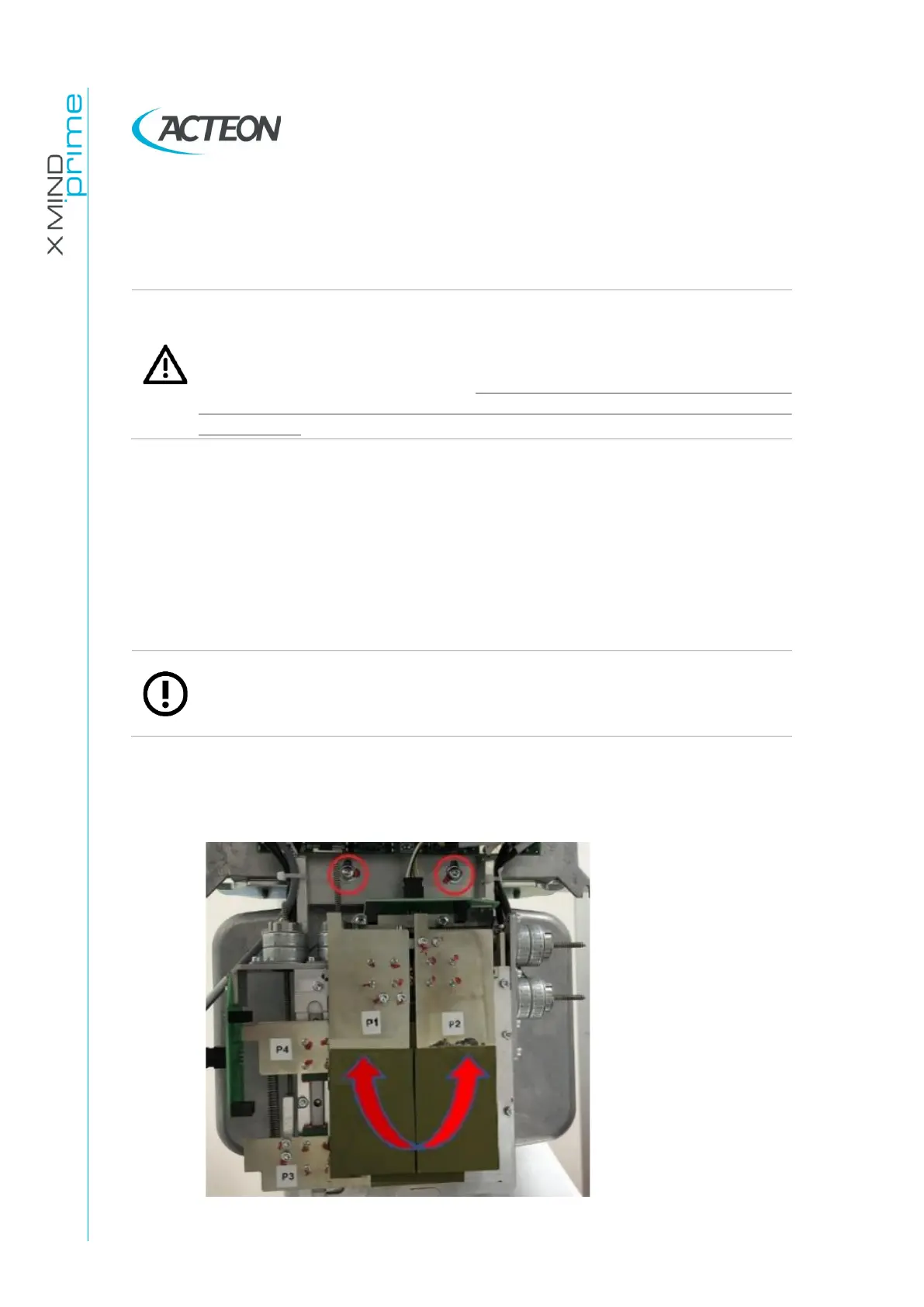
If the irradiated area in the panoramic acquisition is tilted with respect to the
sensor area, adjust the collimator rotation through its fixing screws indicated
by the red circles in the image below.
Collimator fixing-regulations for tilting adjustment















 To Next Page