141
Internet (WAP) function
Editing favourites
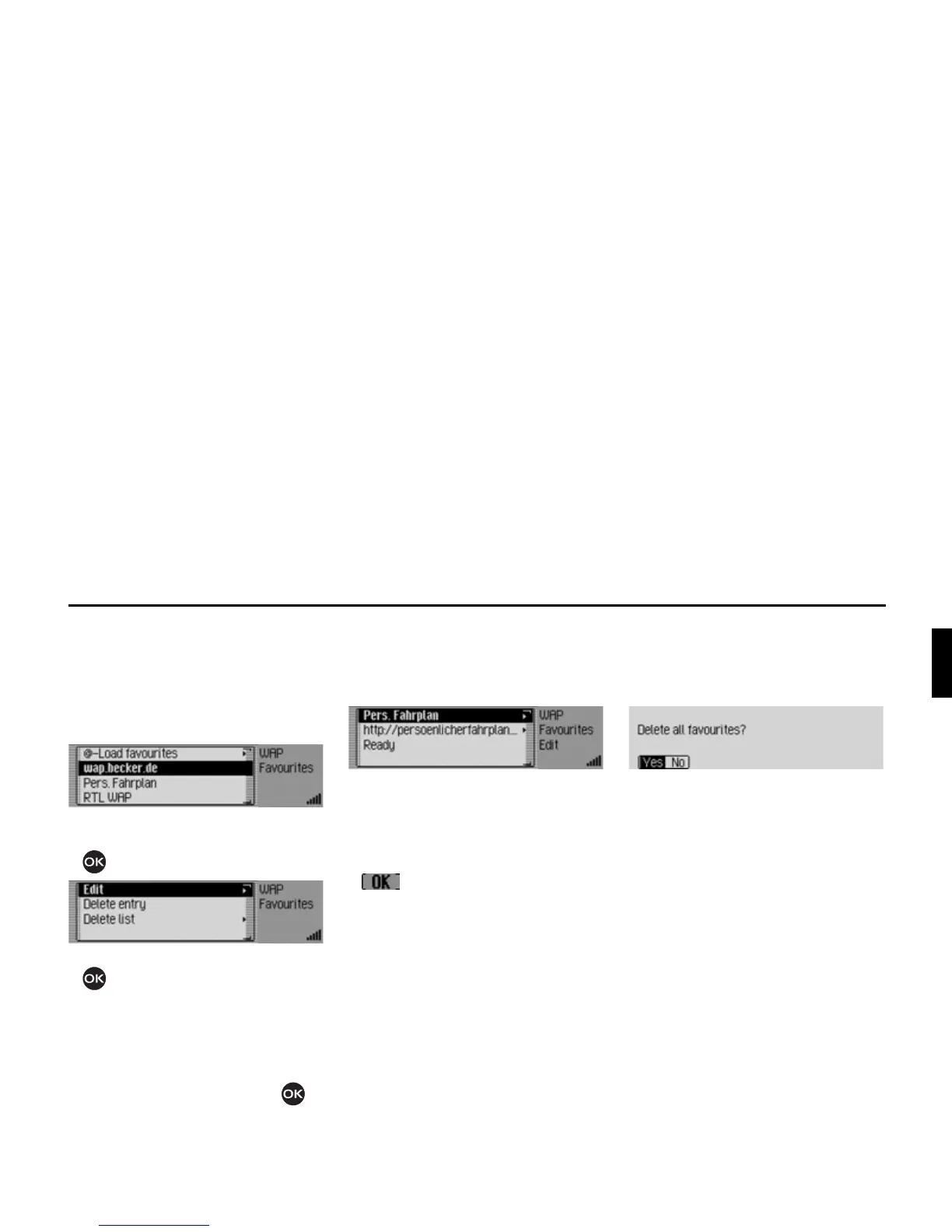
In the list of favourites you can edit the
favourites (change name or URL), delete
an entry or delete all the favourites.
X Open the list of favourites.
X Select the entry to be edited.
X Press the rotary control/ push button
until a menu appears.
X Turn the rotary control/push button
to select one of the following op-
tions:
(GLW,
'HOHWHHQWU\ or
'HOHWHOLVW.
X Confirm your selection by pressing
the rotary control/ push button .
Editing
After selecting
(GLW the name of the fa-
vourite and the URL for the favourite are
displayed.
X Select the name or the URL to edit it.
In this case, an input menu will be dis-
played.
X Make the changes you wish.
X After making a change, select the
symbol from the input menu.
X Then select the 5HDG\ entry.
The changes are then saved.
Deleting an entry
After selecting
'HOHWHHQWU\ the favourite
is deleted from the list of favourites
without any further information being
given.
Deleting list
You can delete all the favourites in the
list of favourites.
X Select the 'HOHWHOLVW entry.
X When the prompt appears, select <HV
to delete all the favourites or 1R to can-
cel the procedure.
If you select
<HV the list of favourites
will be deleted and the empty list is dis-
played.














 To Next Page