160
Address book
Importing SIM card entries
You can import a SIM card entry and
save it as an address book entry.
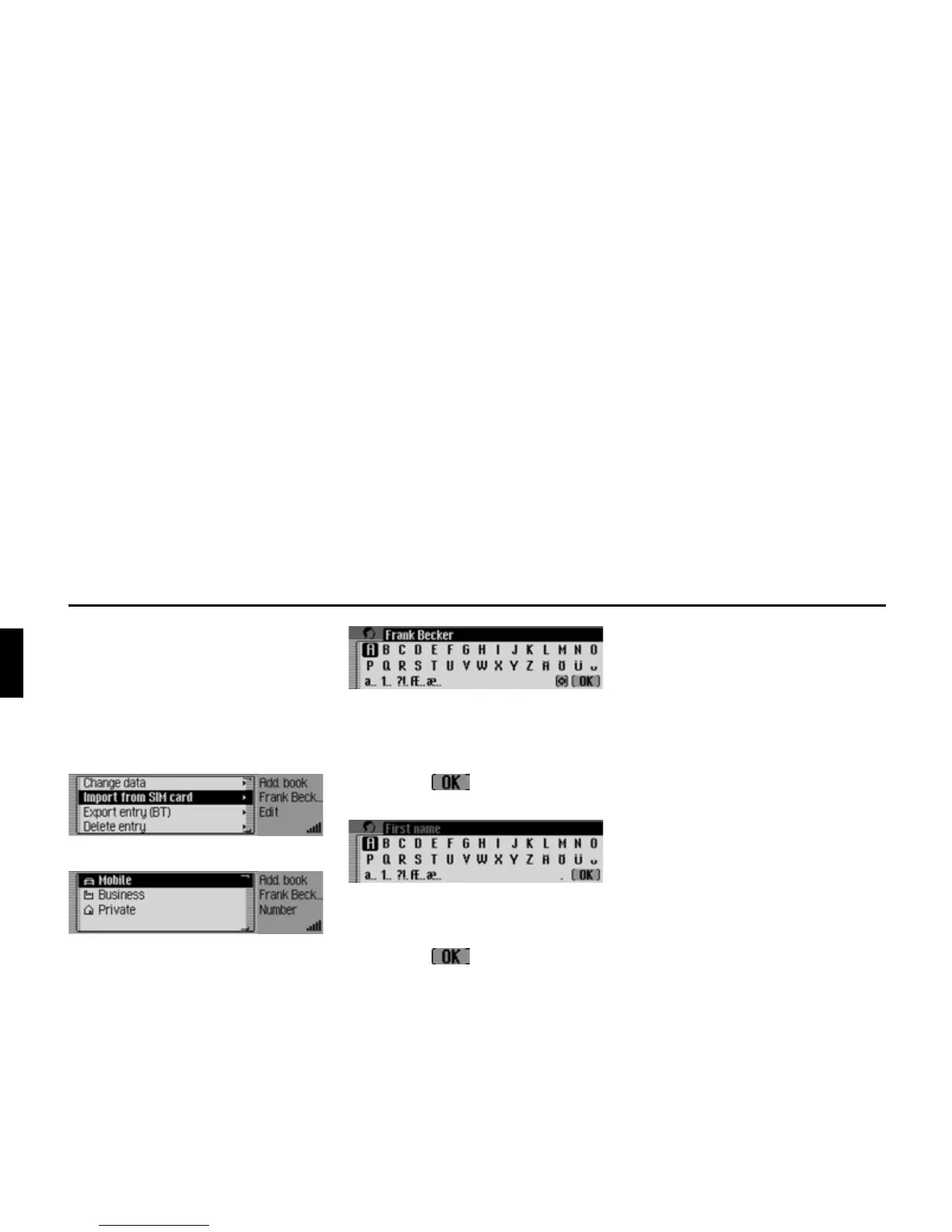
X Find the SIM card entry that you wish
to save as an address book entry.
X Select the (GLW entry.
X Select the ,PSRUWIURP6,0FDUG entry.
X Choose whether the number is to be
stored under the mobile number, the
business number or the private
number.
X The input menu for the surname ap-
pears. The name of the SIM card entry
has already been entered.
X Change the name if you wish.
X Select the symbol from the in-
put menu.
The input menu for the first name ap-
pears.
X Enter the desired first name.
X Select the symbol from the in-
put menu.
The new address book entry has now
been created.
Deleting address book/data en-
tirely
You can delete the entire data in the ad-
dress book or on the SIM card.
X In the Address Book main menu, se-
lect the
'HOHWHDGGUHVVERRN entry.
or if there is an internal phone or a con-
nection via the SIM Access profile.
X In the Address Book main menu, se-
lect the
'HOHWHGDWD entry.
X Then choose from 'HOHWHDGGUHVVERRN
or 'HOHWH6,0FDUGHQWULHV, as desired.
When the prompt appears, choose
whether you want to delete the address
book or the SIM card entries.
The
<HV option deletes the address book
or the SIM card entries.














 To Next Page