2-251
CHAPTER 2 NEW FUNCTIONS
COPYRIGHT
©
2001 CANON INC. 2000 2000 2000 2000 CANON CLC5000 REV.0 JAN. 2001
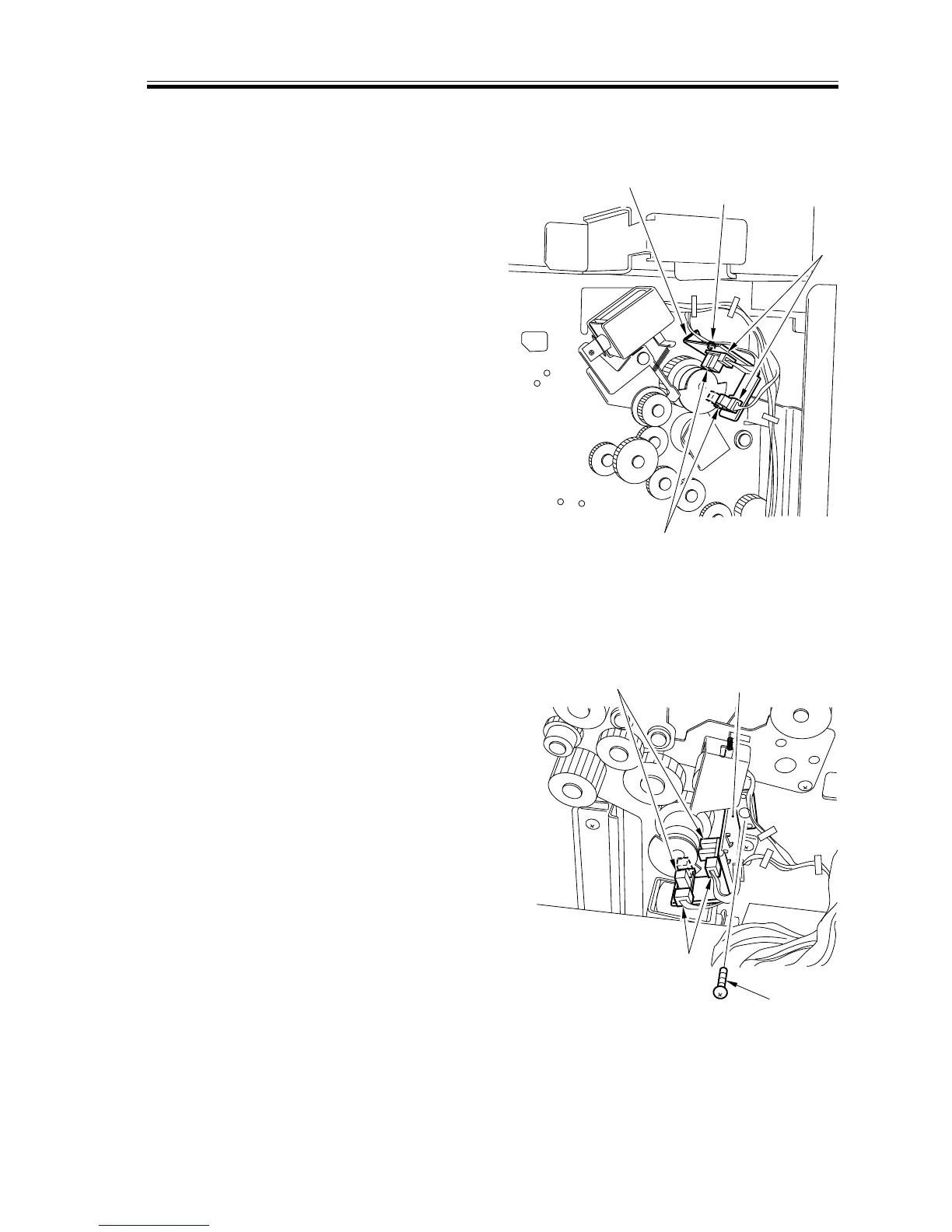
d.Removing the Upper Phase Sensor 1/2 (PS4/5)
1) Remove the rear cover.
2) Disconnect the two connectors [1], and
remove the screw [2]; then, detach the
sensor mounting base [3], and detach
the upper phase sensor [4].
F02-907-43
e.Removing the Lower Phase Sensor 1/2 (PS6/7)
1) Remove the rear cover.
2) Disconnect the two connectors [1], and
remove the screw [2]; then, detach the
sensor mounting base [3], and detach
the lower phase sensor [4].
F02-907-44
[1]
[4]
[2]
[3]
[2]
[4]
[3]
[1]




 To Next Page