COPYRIGHT
©
2001 CANON INC. 2000 2000 2000 2000 CANON CLC5000 REV.0 JAN. 2001
CHAPTER 5 TROUBLESHOOTING IMAGE FAULTS/MALFUNCTIONS
5-18
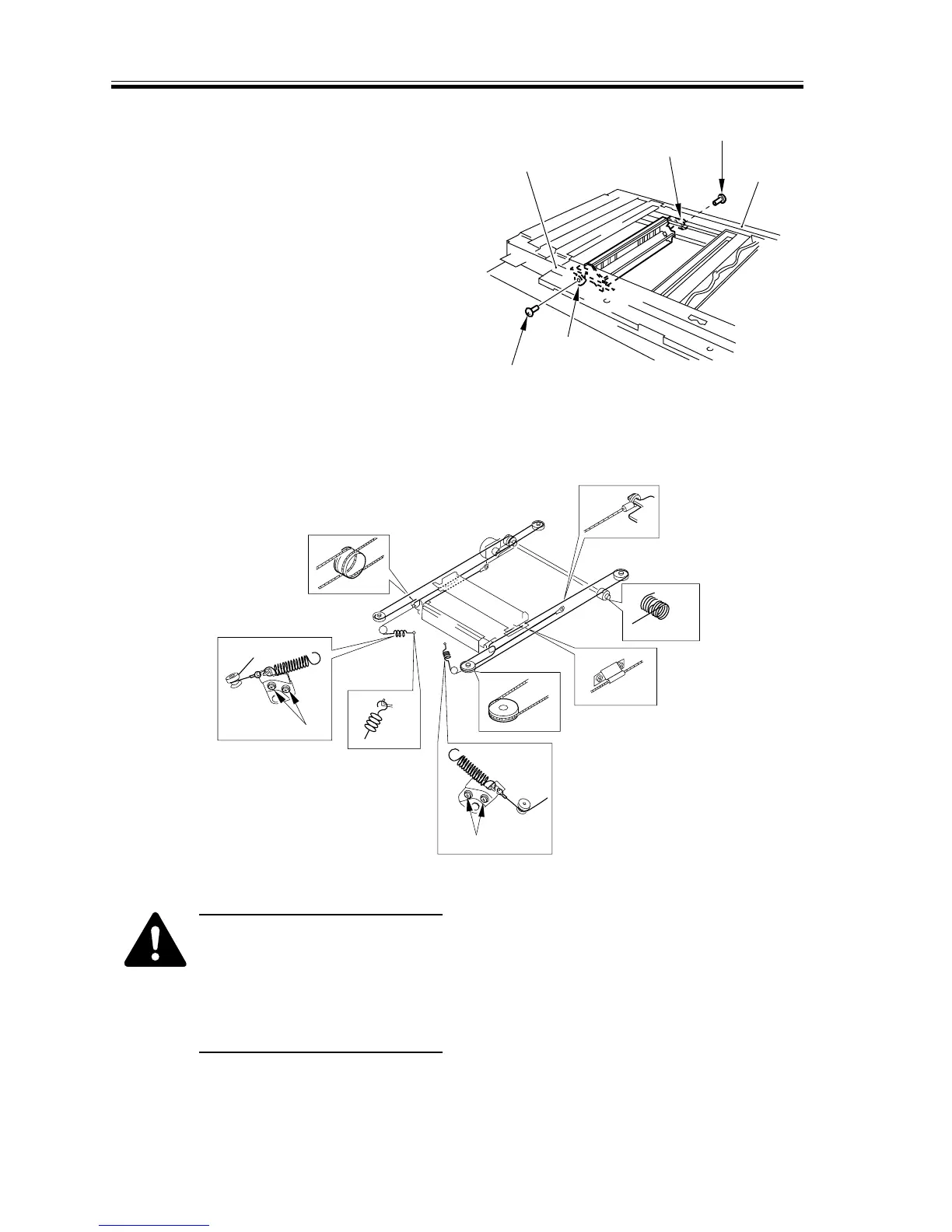
5) Fit a binding screw (M4 × 8mm) [3] to
the pulley shaft [4] to fix the front and
rear of the pulley temporarily to the side
plate [5], thereby temporarily fixing the
No. 2 mirror mount in place.
F05-202-03
6) Fit the scanner cable on the pulley and
the hook as indicated in F05-202-04.
F05-202-04
•Take care not to damage the
wire by the edge of the metal
plate.
•Be sure to keep the four
screws [6] loose during the
work.
[5]
[4]
[3]
[5]
[3]
[4]
1
2
3
4
6
[6]
5,7
[6]


 To Next Page
 Loading...









