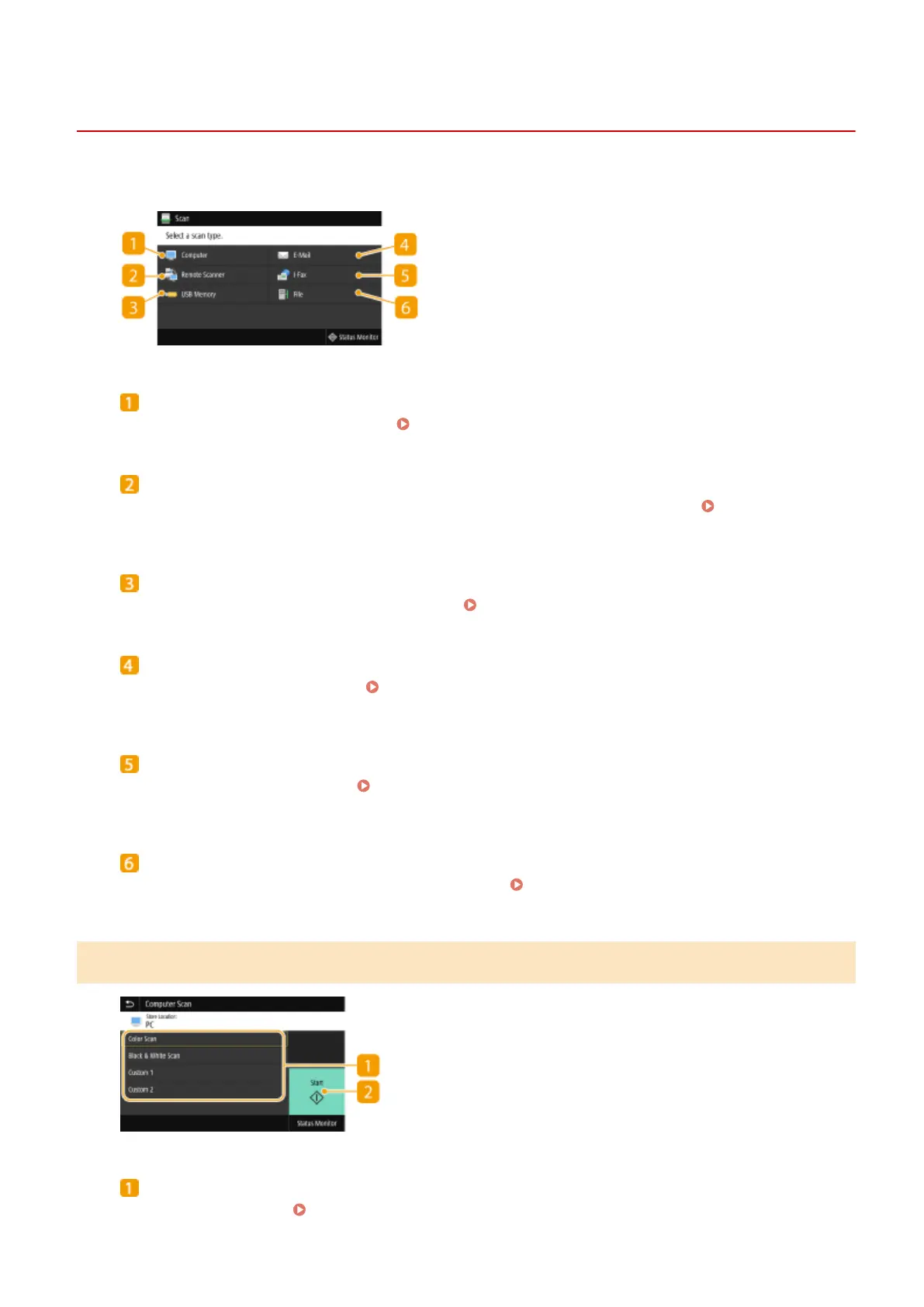
Scan Basic Features Screen
1647-064
When you select <Scan> in the Home screen, the Scan Basic Features screen appears.
<Computer>
Saves the scanned data to a computer. Basic Features Screen for Computer Scanning(P. 281)
<Remote Scanner>
Puts the machine into the online status when originals are scanned from a computer.
Using Your
Computer to Scan (Remote Scan)(P. 319)
<USB Memory>
Saves the scanned data to a USB memory device.
Basic Features Screen for USB Scanning(P. 282)
<E-Mail>
Sends the scanned data by e-mail.
Basic Features Screen for E-Mail Sending/I-Fax Sending/File
Saving(P. 282)
<I-Fax>
Sends the scanned data by I-Fax.
Basic Features Screen for E-Mail Sending/I-Fax Sending/File
Saving(P. 282)
<File>
Saves the scanned data to a shared folder or FTP server.
Basic Features Screen for E-Mail Sending/I-Fax
Sending/File Saving(P. 282)
Basic Features Screen for Computer Scanning
Scan type
Select the scan setting. Scanning and Saving to a Computer(P. 285)
Scanning
281









 To Next Page