Connecting the Telephone Line
1647-01W
Connect the telephone line to the machine.
1
Connect the telephone line to the machine.
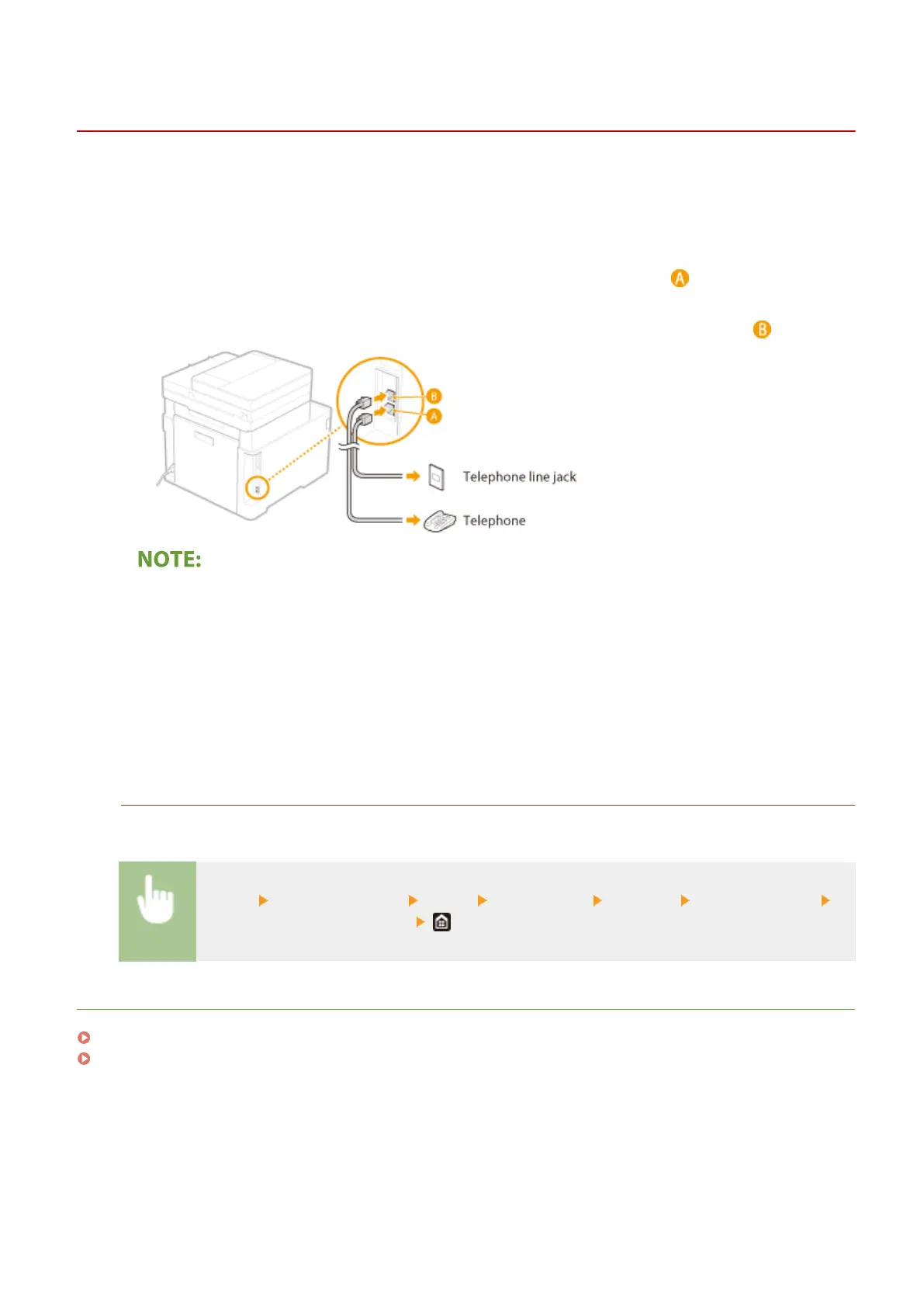
● Connect the included telephone cable to the telephone line jack on the machine ( ) and the telephone line
jack on the wall.
● If you are using a telephone or answering machine, connect it to the external telephone jack ( ).
● If you are connecting an external telephone with fax functions, set up the telephone to receive faxes
manually.
2
Select <End> after the telephone line has been connected.
3
Select <Yes>.
If the machine does not automatically set the type of telephone line
Follow the procedure below to set the type of telephone line. If you are not sure of the type of phone line you
are using, contact your local telephone company.
<Menu> <Function Settings> <Send> <Fax Settings> <Set Line> <Select Line Type>
Select the type of telephone line
LINKS
Basic Operations for Sending Faxes(P. 217)
Receiving Faxes(P. 226)
Setting Up
82









 To Next Page