7
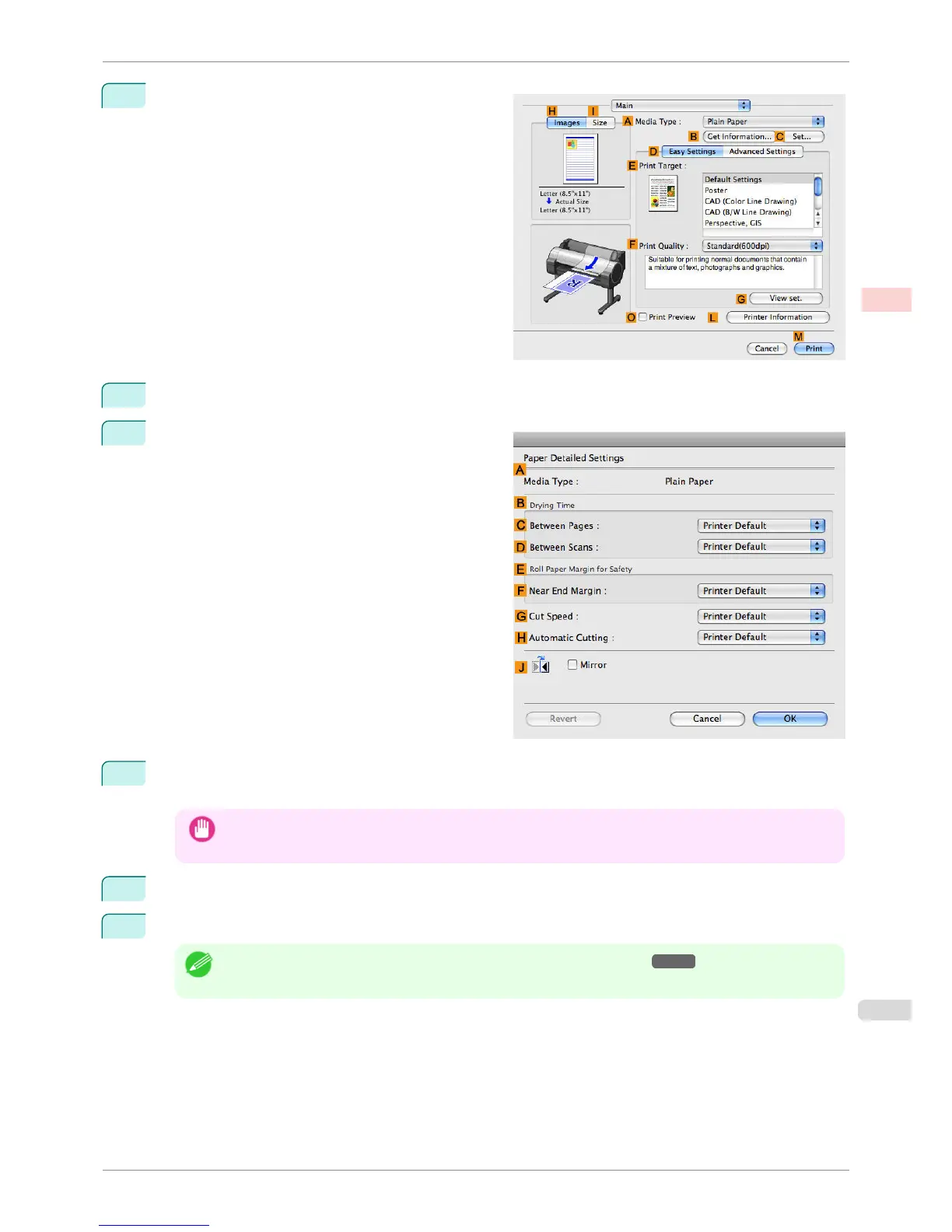
Access the Main pane.
8
In the A Media Type list, select the type of paper that is loaded.
9
Click
C Set to display the Paper Detailed Settings
dialog box.
10
To enable automatic cutting, click Printer Default in the H Automatic Cutting list. If you prefer to cut the
paper later yourself, click Print Cut Guideline.
Important
• If the automatic cut function has been deactivated on the printer, change the auto cut setting on the printer
Control Panel.
11
Click OK to close the Paper Detailed Settings dialog box.
12
Confirm the print settings, and then click M Print to start printing.
Note
• For tips on confirming print settings, see "Confirming Print Settings(Mac OS X) →P.294 "
iPF760
Cutting Roll Paper After Printing (Mac OS X)
User's Guide
Enhanced Printing Options Other useful settings
155















 To Next Page