Install the ink tanks
1
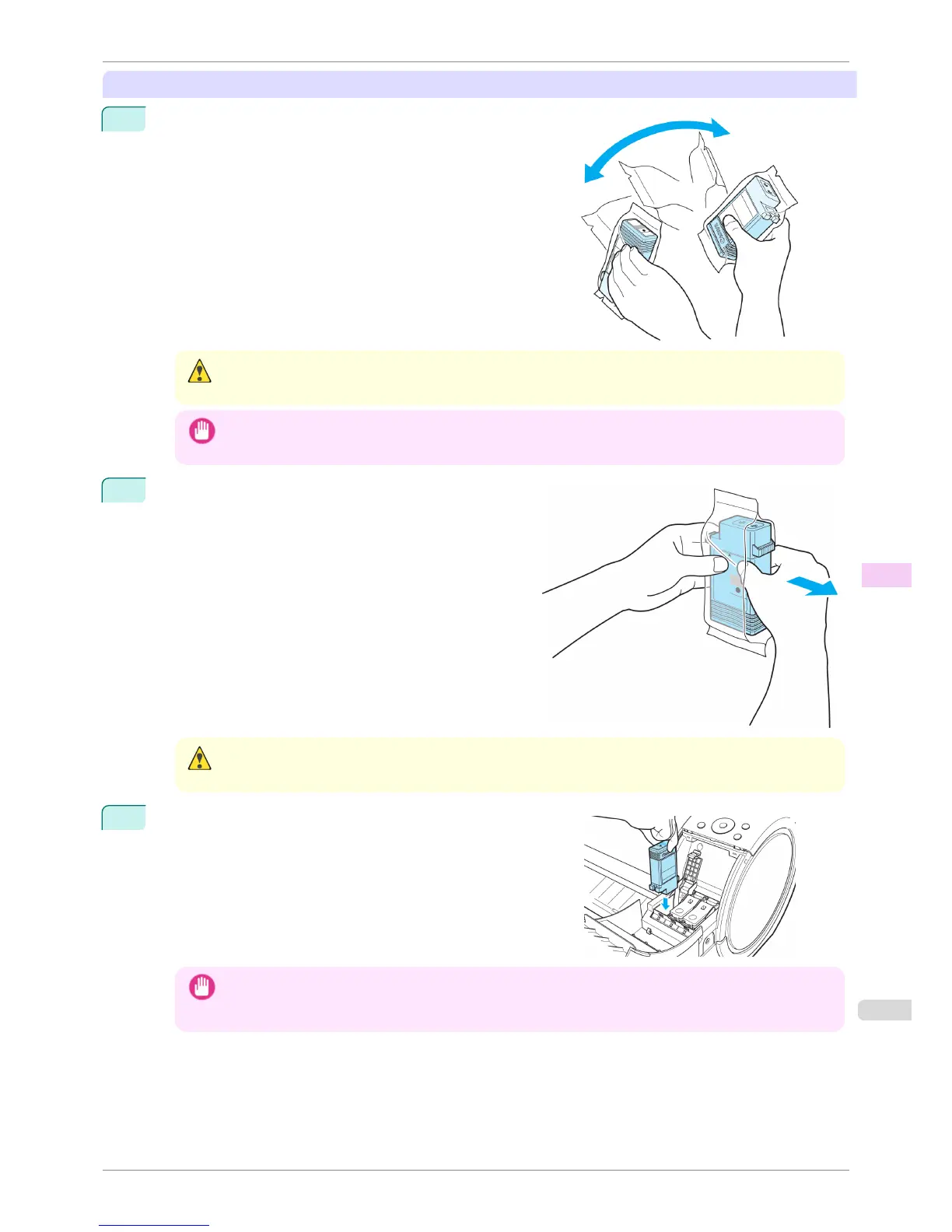
Before opening the pouch, gently agitate the Ink Tank once or
twice. Agitate the ink in the Ink Tank by slowly rotating the Ink
Tank upside-down and right side up repeatedly.
Caution
• Do not remove and agitate ink tanks that have already been installed in the printer. Ink may leak out.
Important
• If you do not agitate the Ink Tank, the ink may settle, which may affect printing quality.
2
Open the pouch and remove the Ink Tank.
Caution
• Never touch the ink holes or electrical contacts. This may cause stains, damage the Ink Tank, and affect print-
ing quality.
3
Press the OK button and insert the Ink Tank into the holder fac-
ing as shown, with the ink holes down.
Important
• Ink tanks cannot be loaded in the holder if the color or orientation is incorrect.
If the Ink Tank does not fit in the holder, do not force it into the holder. Make sure the color of the Ink Tank Lock
Lever matches the color of the Ink Tank and check the orientation of the Ink Tank before reloading it.
iPF760
Replacing Ink Tanks
User's Guide
Maintenance and Consumables Ink Tanks
521















 To Next Page