Cleverscope CS300 Reference Manual v2.11
Page 166 www.cleverscope.com ©Cleverscope 2004-2015
Installation to download the full installer.
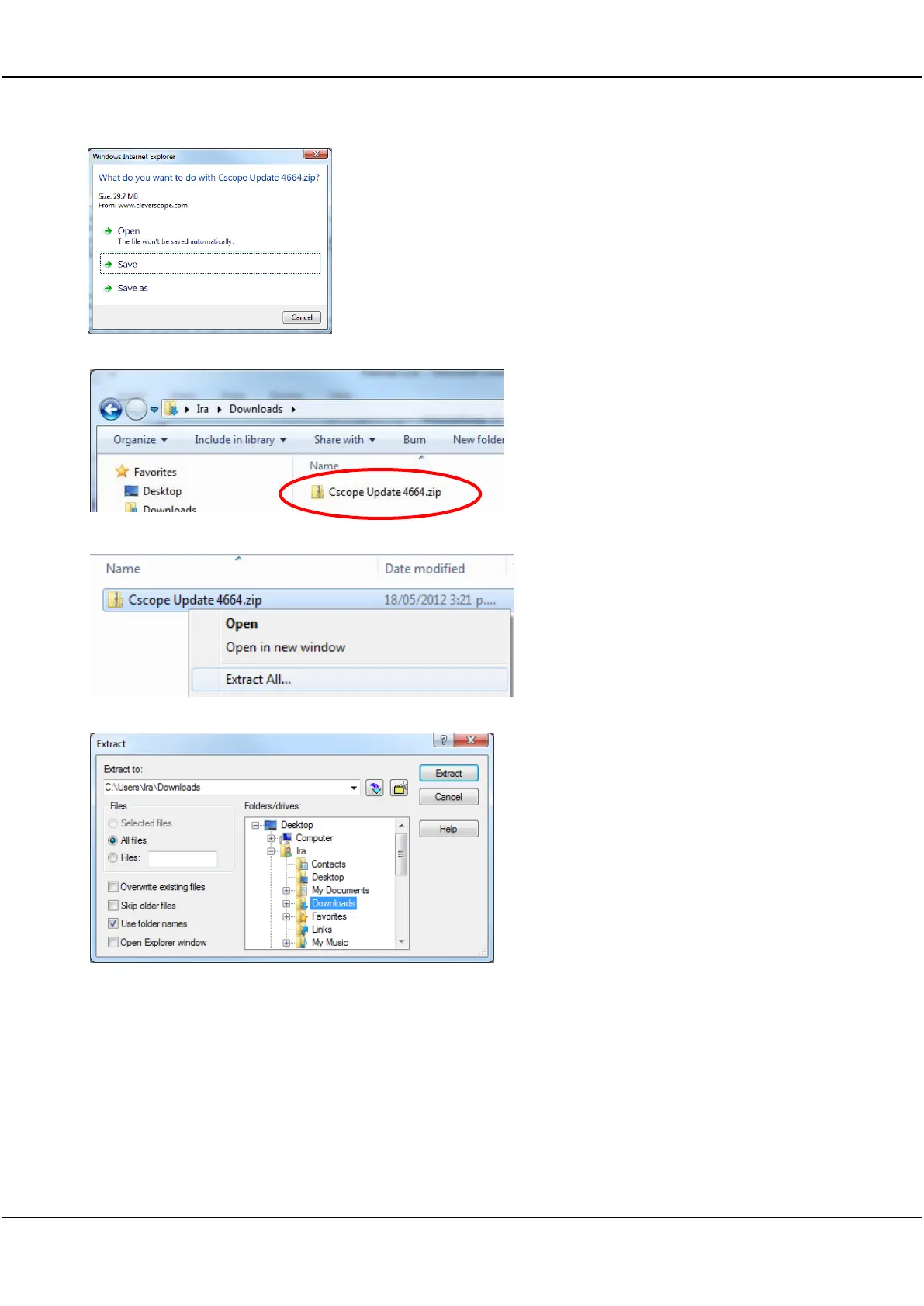
Choose the option of saving the zip file
rather than opening it.
A zipped file will then be downloaded which
must be saved.
The filename will have the form
Cscope
Update 46xx.zip
where
46xx
is the version
number.
In this example the zip file has been saved in
the users Downloads folder.
Right-click on the zip file and choose Extract
All.
Choose a suitable location to extract to and
click Extract.
Note The zip file must be extracted because
the installer (
Setup.exe
) will not run from
inside the zip.
Alternatively, but not recommended, you can
also use WinZip if you have it installed.
Open the
Cscope Update 46xx.zip
file, and
then click Extract.
Make sure you check the Use folder names
option, choose the folder to Extract to and
click Extract:
Open the
Cscope Update 46xx
folder then
open Setup.exe. The Cleverscope Installer
window will open, and four or five choices
are presented. Those choices that are already
up-to-date will not be checked. However,
you can still force an update if required by
checking the option. If you are updating
drivers, ensure the
Cleverscope Acquisition
Unit
is turned off.



 To Next Page