ComNav Commander P2 & P2VS Installation & Operation Basic Operations
Document PN 29010074 V4.1 - 133 -
CTS – Steering a Direct Bearing
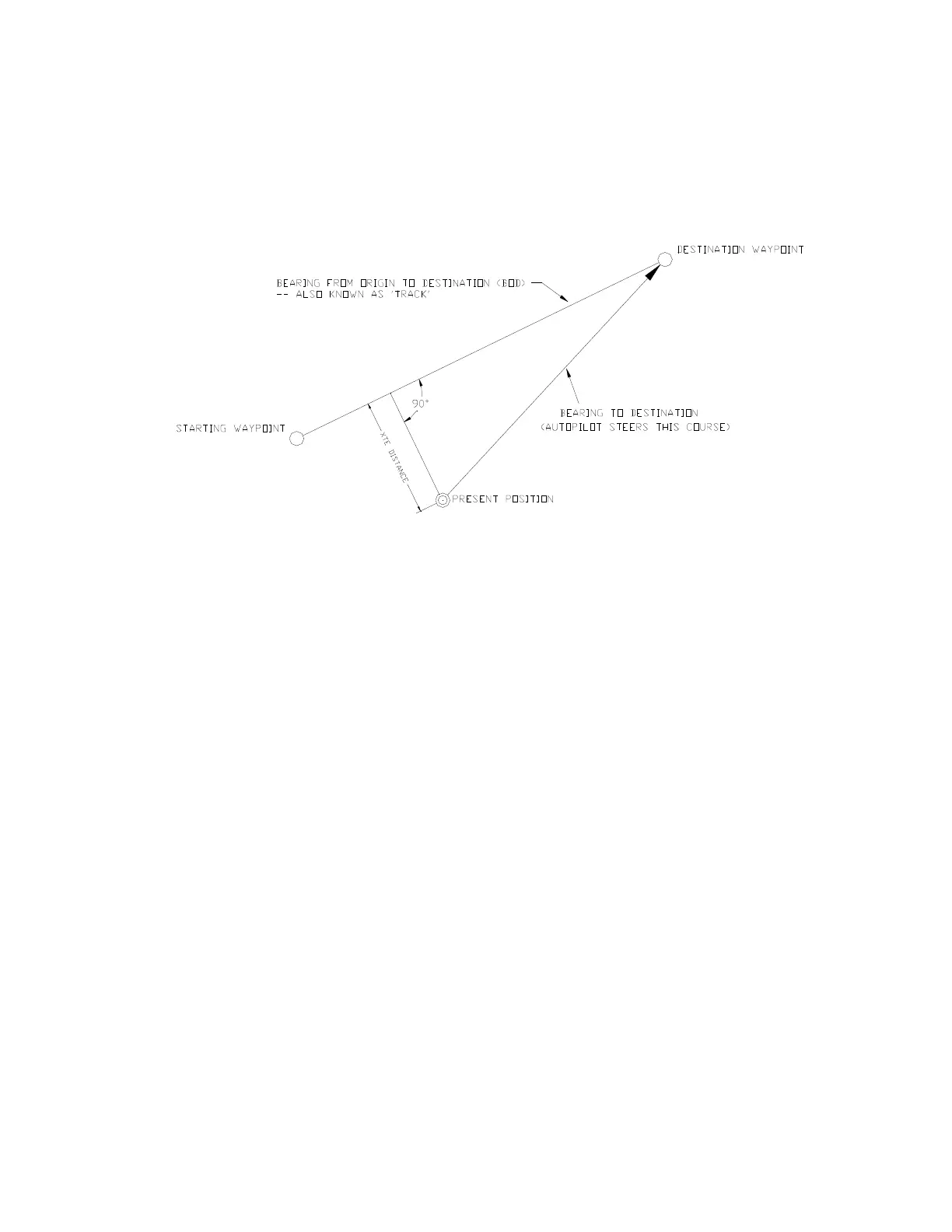
When Correction is set to “CTS”, the autopilot uses only the “steering” data (CTS or BPD)
from the Navigation System – and therefore is always steering directly to the destination, or
next waypoint, from the present position, as depicted in the following diagram.
Cross-Track Error is not used in the calculation.
Figure 86 – Steering with Correction set to CTS
To see how this method works, try it out by performing the following steps:
1) Change Correction in the Nav menu to “CTS”.
2) Make sure the Navigation System is turned on, that a route consisting of at least a
starting position (origin) and a destination point is entered, and that the Navigation
System is set to output sentences which contain either CTS or BPD data.
3) Activate the route.
4) Switch the autopilot into
STANDBY
mode and manually steer the boat away from the
Track between the starting position & destination, by at least a few hundred metres.
5) Place the autopilot into
NAV
mode.
6) Observe the Commanded Heading on the Control Head’s display. It should match the
Bearing Present to Destination value displayed on the Navigation System – rather than
the bearing of the desired Track.
Caution!
Be sure to maintain a sharp lookout to ensure that there are no obstacles
between the boat and the destination, when Correction is set to “CTS”.



 To Next Page