ComNav Commander P2 & P2VS Installation & Operation Installation
Document PN 29010074 V4.1 - 66 -
Compasses
All the types of compasses, excepting NMEA 0183 compasses, are connected to the SPU
receptacle labelled
J8 – COMPASS
Note: see page 79 for how to connect NMEA compasses.
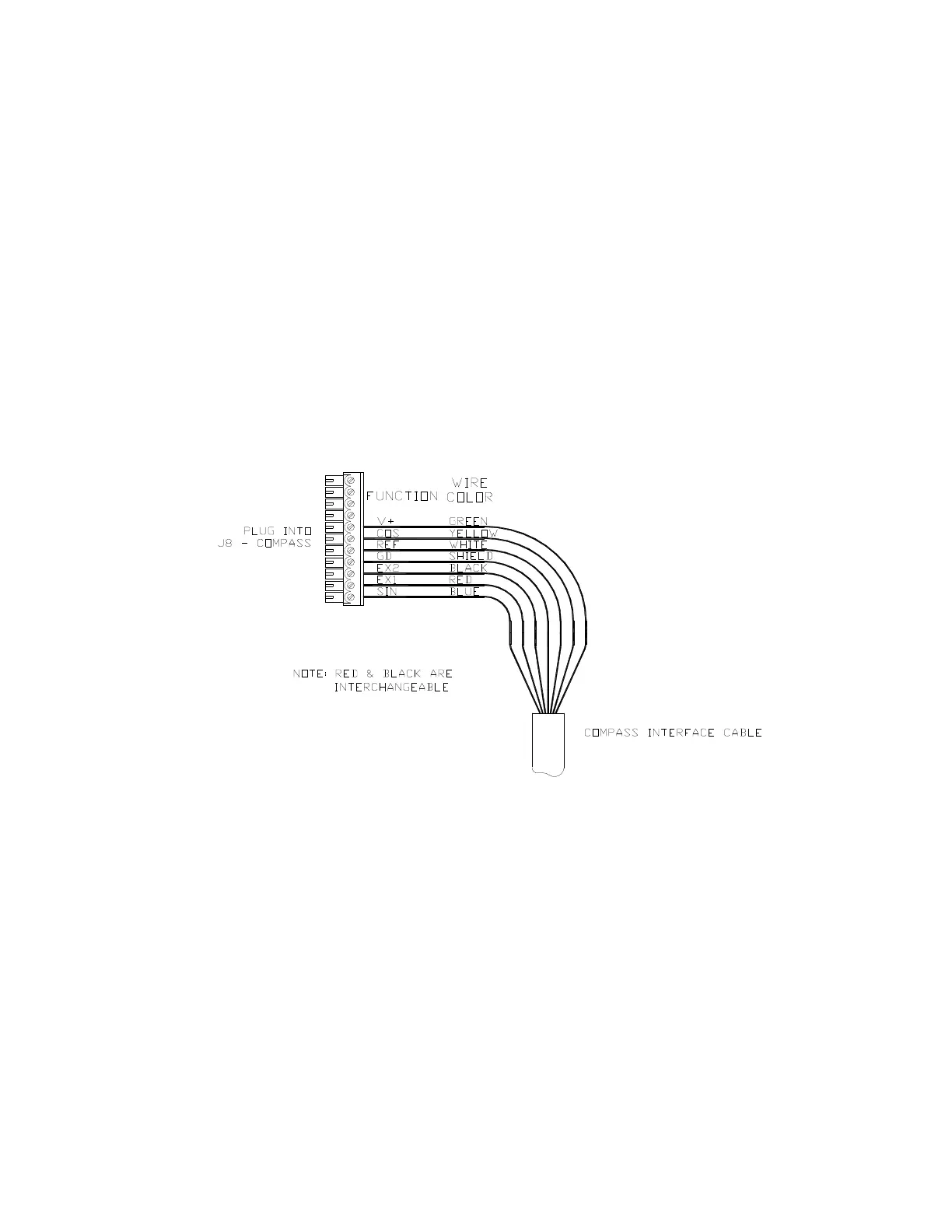
If you ordered your system with the Magnetic Sensor, and mounted it on the bottom of your
magnetic compass, wire the flying-lead end of the sensor cable as per the following diagram.
If you mounted the sensor of top of the compass, exchange the blue & yellow wires.
If you have a Standard or Heeling-coil ComNav Fluxgate Compass (PN 20320003 or
20320008), wire the flying-lead end of the compass’s cable into the eleven-position plug
which mates with the
J8
receptacle, as per the following diagram.
If you ordered your Commander P2 system with the optional Heading Rate Stabilizer
(PN 20320009), the compass will be one with a plug-end cable: either PN 20320007
(Standard), or 20320004 (Heeling coil). Connect the compass cable’s plug into the “To
Compass” receptacle on the HRS.
Then wire the flying leads of the cable from the HRS as per the following diagram.
Figure 41 – Wiring Connections for Magnetic Sensor, Fluxgate Compass or HRS



 To Next Page