ComNav Commander P2 & P2VS Installation & Operation Basic Operations
Document PN 29010074 V4.1 - 110 -
Basic Operations
This chapter describes the basic modes of operation & features of a P Series system, and
shows you how to use them.
The Control Head’s LCD Screen & Buttons
All of your interaction with your autopilot system will be done using the Control Head:
•
selecting an operating mode
•
setting up the parameters you wish to use in each mode
•
monitoring your boat’s Heading
•
setting a desired Heading to be followed
•
… etcetera …
1
2
3 4 5 6
7
8
9
10
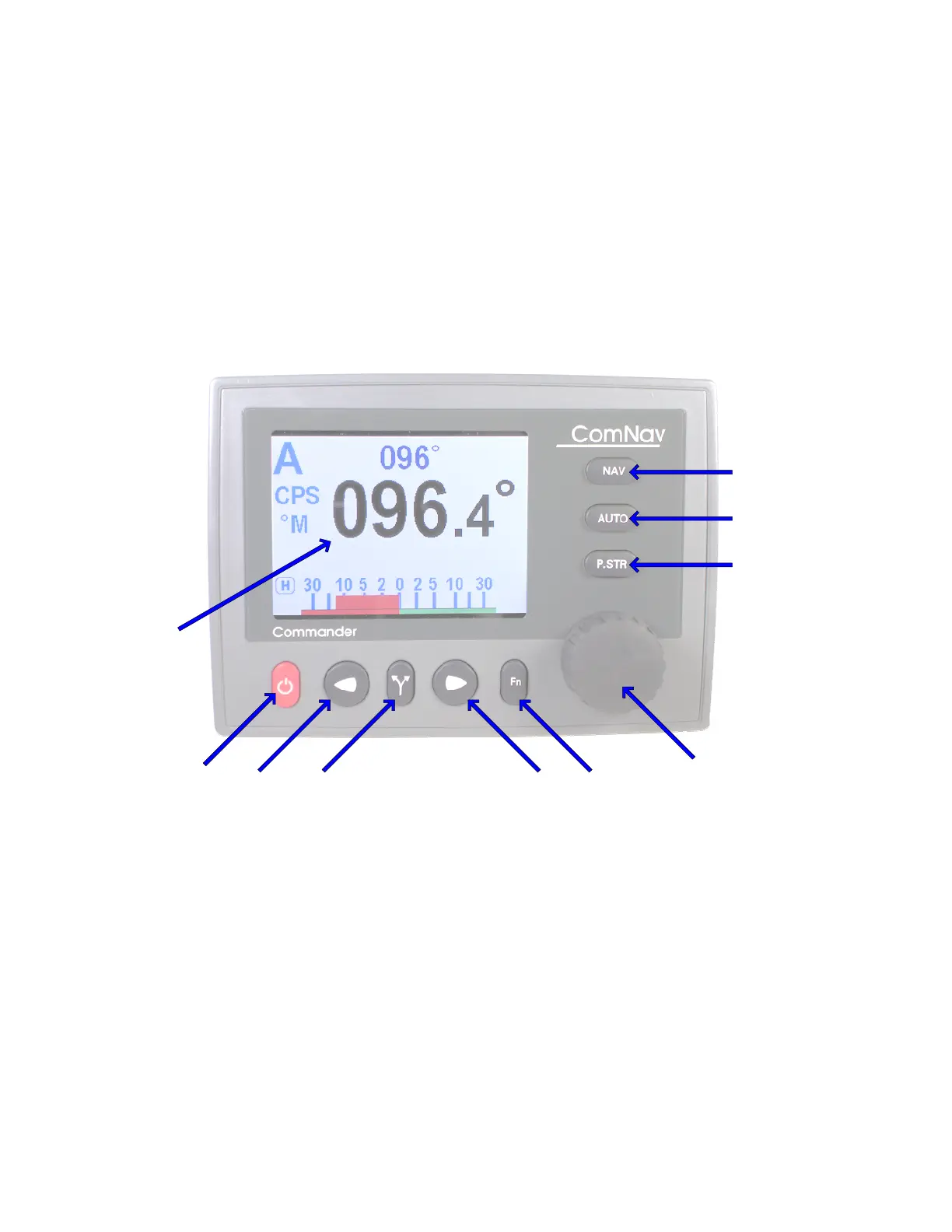
Figure 68 – Using the Control Head
The elements of the Control Head (with reference to the identifiers above) are:
1) LCD Screen.
While the system is powered, the LCD screen is normally displaying the compass
Heading, rudder angle, and mode of operation; it can also be displaying desired Heading,
system status, other information, or various menus.
2)
S
S
T
T
A
A
N
N
D
D
B
B
Y
Y
(and
On/Off) button.
To power on the system, press and hold this button until the LCD screen lights up, and
then release it.
To power off, press & hold this button approximately 3 seconds.
The autopilot always powers up in
STANDBY
mode, and it can always be put into
STANDBY
mode, by pressing and holding this button for approximately 1 second.
Double-pressing this button brings up (or exits) the Standby menu.



 To Next Page