ComNav Commander P2 & P2VS Installation & Operation Appendices
Document PN 29010074 V4.1 - 182 -
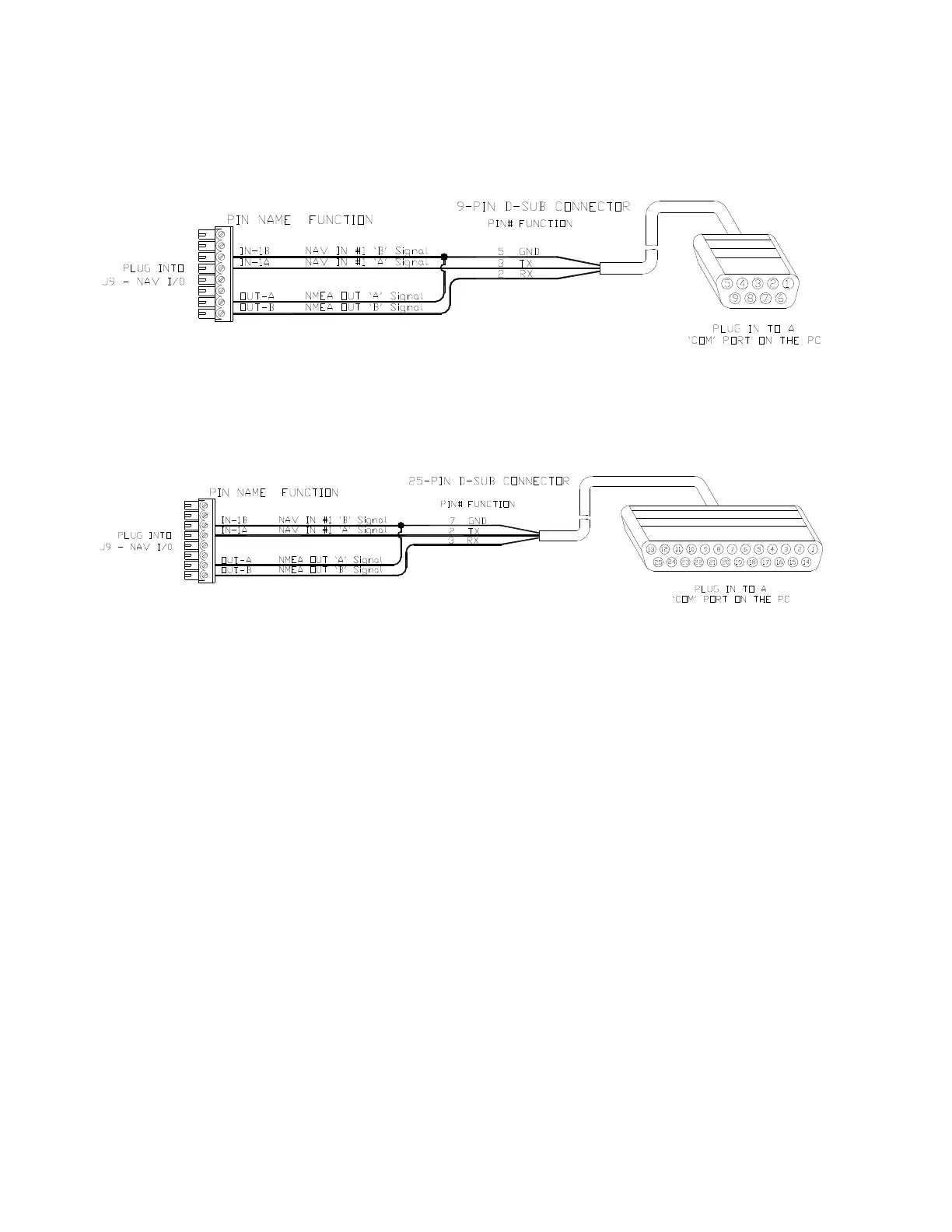
DE9 Connection
To connect to a PC serial port (or to the DE9-P end of a USB-to-Serial adapter), connect the
wires from
J9
to a DE9 female connector (a “socket type”, aka DE9-S) as follows:
Figure 124 – Connection to a PC with a DE9-S Connector
DB25 Connection
If the PC has a DB25 COM port connector, connect the wires from
J9
to a DB25 female
connector (aka DB25-S) as follows:
Figure 125 – Connection to a PC with a DB25-S Connector
Note: none of the other RS-232 signals that are normally available on PC COM ports
(& sometimes used by the ports &/or equipment connected to them), such as the
“status” & “flow control” signals (RTS, CTS, DSR, DCD, etc.), can be connected
to the SPU.
You must also set the COM port’s Baud Rate to 4800, and the serial format to 8
data bits, no parity, one Stop bit.
Please also keep in mind the data bandwidth considerations discussed in
Bandwidth of an NMEA Compass Connection on page 95.



 To Next Page