ComNav Commander P2 & P2VS Installation & Operation Installation
Document PN 29010074 V4.1 - 76 -
External Alarm Output
An external alarm can be connected to the P Series SPU.
The autopilot can be configured to activate the external alarm whenever any alarm or error
message appears on the Control Head, or to activate the external alarm only if the Watch
Alarm is not answered. See the description of the
Watch Alarm
& External Alarm on page
170 on how to choose those options.
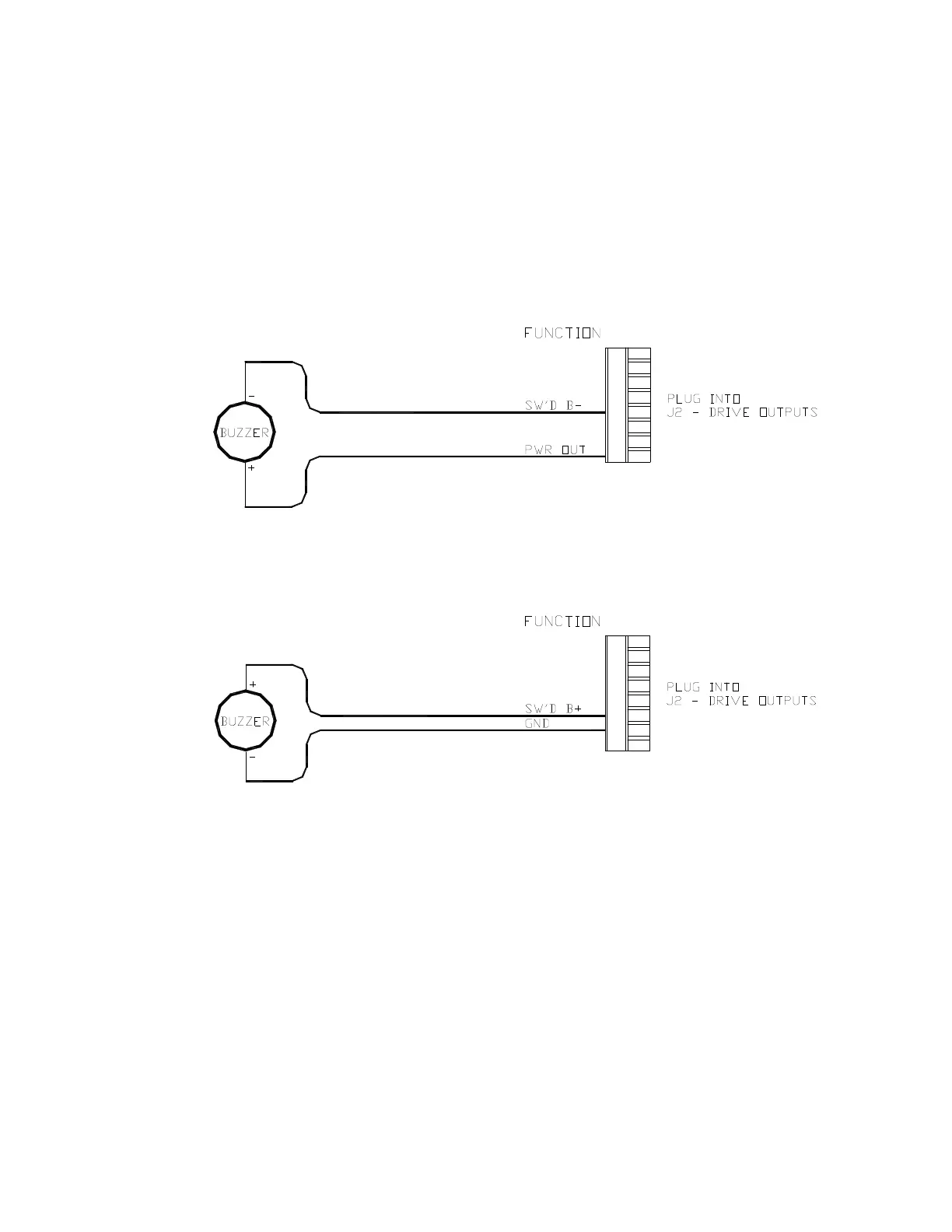
One of two outputs can be used for the external alarm. Typically, you would choose to
connect the external alarm between Battery Positive (
PWR OUT
) and the Switched B-
(
SW’D B-
) outputs on
J2
, as in the following diagram:
Figure 58 – External Alarm, using SW'D B- Output
Alternatively, you may choose to use the
SW’D B+
and
GND
outputs as shown here:
Figure 59 – External Alarm, using SW'D B+ Output
Note: when using the External Alarm configuration shown in Figure 58, there is a
small current which will be flowing constantly between the pins, even when the
alarm is OFF. This will not be a problem with many types of alarms; however,
with certain types of sensitive Piezo-electric audible alarms, the leak current can
cause a constant low-level tone from the Piezo device.
An Application Note is available which describes this potential problem in detail,
with suggested remedies.
If you are experiencing this problem, please ask your ComNav Dealer (or go to
ComNav’s web site) for Application Note 2007-01.



 To Next Page