ComNav Commander P2 & P2VS Installation & Operation Installation
Document PN 29010074 V4.1 - 74 -
A.C. Solenoids
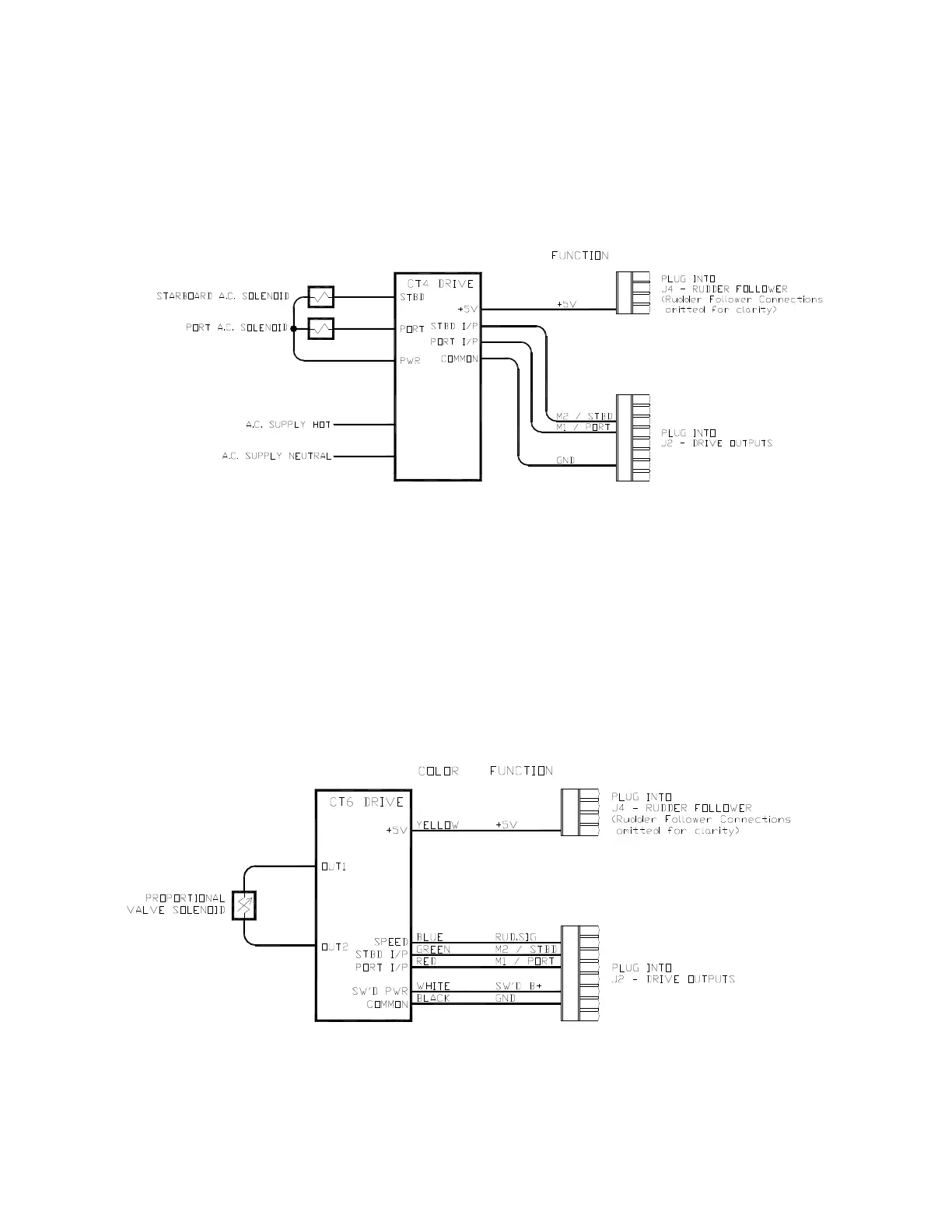
ComNav’s CT4 Drive Box (PN 20350003) should be used to interface between the
Commander P2 SPU and A.C. solenoid systems. Connect the CT4 to the SPU as per the
instructions shipped with the CT4, and the following diagram:
Figure 55 – Wiring Connections for A.C. Solenoids
Proportional Solenoid Valves
ComNav’s CT6 Drive Box (PN 20350005) should be used to interface between the
Commander P2 SPU and proportional valves. The CT6 is custom configured to match the
requirements of the particular valve it is to be fitted to.
Note: ComNav’s Production Department requires information about the make and
model of the proportional valves, in order to configure the drive box correctly.
Instructions for connecting the CT6 to proportional valves are shipped with the CT6 unit.
Connect the CT6 and the SPU as per the following diagram:
Figure 56 – Wiring Connections for Proportional Solenoid Valves



 To Next Page