ComNav Commander P2 & P2VS Installation & Operation Advanced Operations
Document PN 29010074 V4.1 - 154 -
WIND-Points Mode
There is a variation of
WIND
mode, called
WIND-Points
mode.
In this mode, the
C
C
O
O
U
U
R
R
S
S
E
E
C
C
H
H
A
A
N
N
G
G
E
E
knob is used to command the autopilot to steer to specific
predefined Points of Sail: Close Haul, Close Reach, Beam Reach, Broad Reach, or Gybe
Hold . You can define the exact wind angle for any of these in the Wind menu.
To enter the
WIND-Points
mode, press the
A
A
U
U
T
T
O
O
button when in
WIND
mode until the
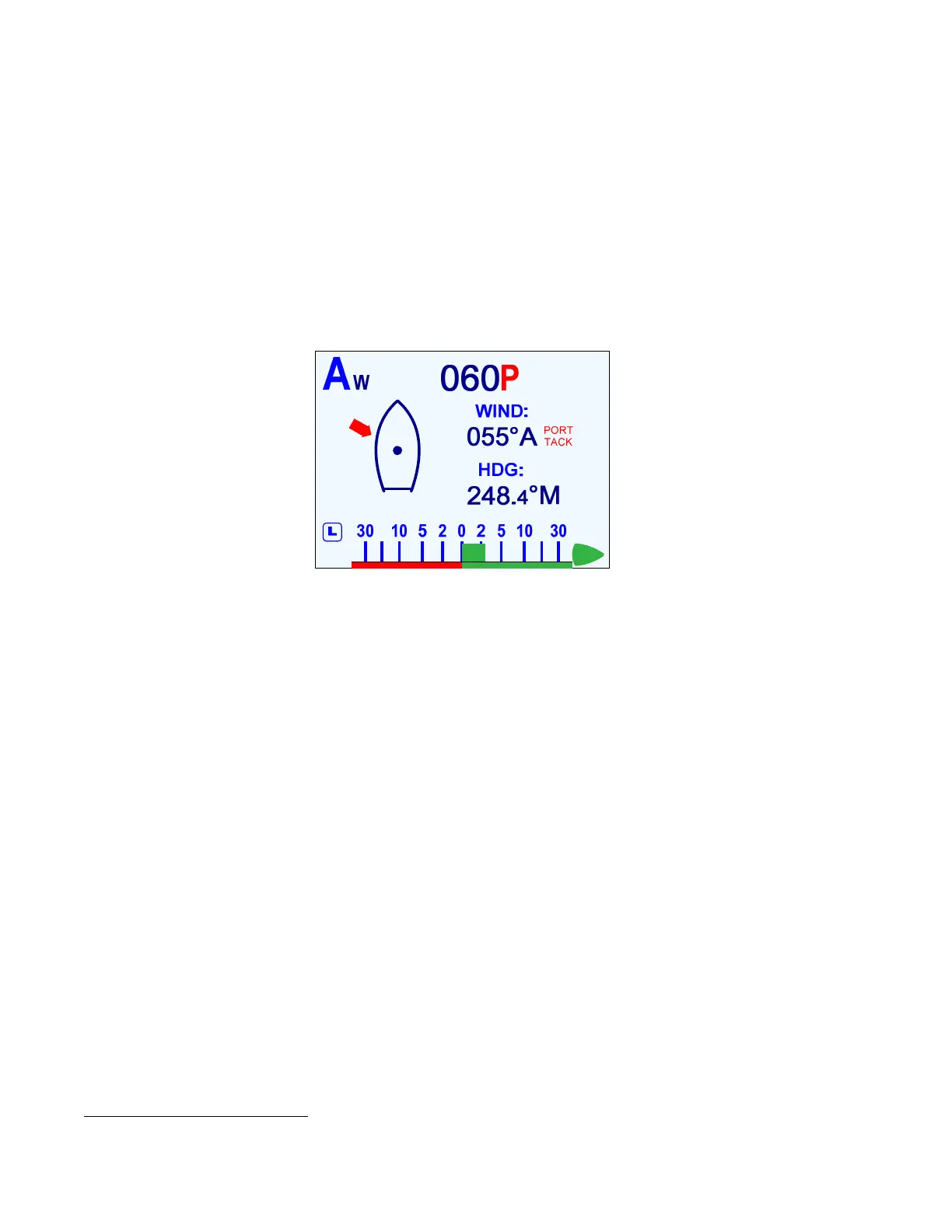
screen changes to the display shown below.
To go back to the
WIND
mode & display, press
AUTO
again.
Note: if you change to a non-wind mode from the WIND-Points mode, then when
you re-enter WIND mode, you will go right back into WIND-Points mode.
Figure 98 – Typical WIND-Points Mode Screen
Changing Point of Sail
In the example above, the solid arrow shows the
approximate
direction which the wind is
coming from. The actual wind angle (055°) is shown in the centre, and whether it is True (T)
or Apparent (A); the boat’s current Heading, 248.4° Magnetic, is also shown
40
.
The Commanded Wind Angle, to which the autopilot will try to steer to & maintain, is located
in the upper middle of the display (060P, in the figure above).
To change the Commanded Wind Angle, rotate the
C
C
O
O
U
U
R
R
S
S
E
E
C
C
H
H
A
A
N
N
G
G
E
E
knob. Note that the
Commanded Wind Angle does not change by 1° as would happen in the regular
WIND
mode;
instead, it changes all the way to the closest (to the current actual wind angle) Point of Sail, in
the direction the boat will turn.
A new arrow is then shown on the display – but this one is an outline only, showing what the
wind direction will be, once the autopilot brings the boat onto the new Commanded Angle.
Important!
Just as in WIND mode, turning the
C
C
O
O
U
U
R
R
S
S
E
E
C
C
H
H
A
A
N
N
G
G
E
E knob, tells
the autopilot to turn the boat in the direction you turn the knob. But keep in
mind that the change in the Commanded Wind Angle depends on the
Tack you are on (see Changing Wind Angle on the previous page).
Tack & Gybe Inhibit
Similar to operation in
WIND
mode, the autopilot does not allow you to Tack or Gybe using
the
C
C
O
O
U
U
R
R
S
S
E
E
C
C
H
H
A
A
N
N
G
G
E
E
knob, in the
WIND-Points
mode. But there
is
a way to do Tacks &
Gybes – see pages 156 & 159.
40
A Low Wind condition – see page 147 – is indicated on this screen as “WIND-LOW”, above the actual wind angle.



 To Next Page