ComNav Commander P2 & P2VS Installation & Operation Installation
Document PN 29010074 V4.1 - 71 -
Drive Outputs
The Commander P2’s SPU is capable of directly driving a variety of steering systems.
Optional Drive Boxes are available for those systems not handled directly by the SPU.
Contact your ComNav Dealer for more information.
Almost all connections to the steering system are done at the
J2 – DRIVE OUTPUTS
connector.
Reversing DC Motor Hydraulic Systems
The Commander P2 SPU can directly handle reversing DC motor hydraulic
14
pumps drawing
up to approximately 20 amps. For larger current requirements, the ComNav CT2 Drive Box
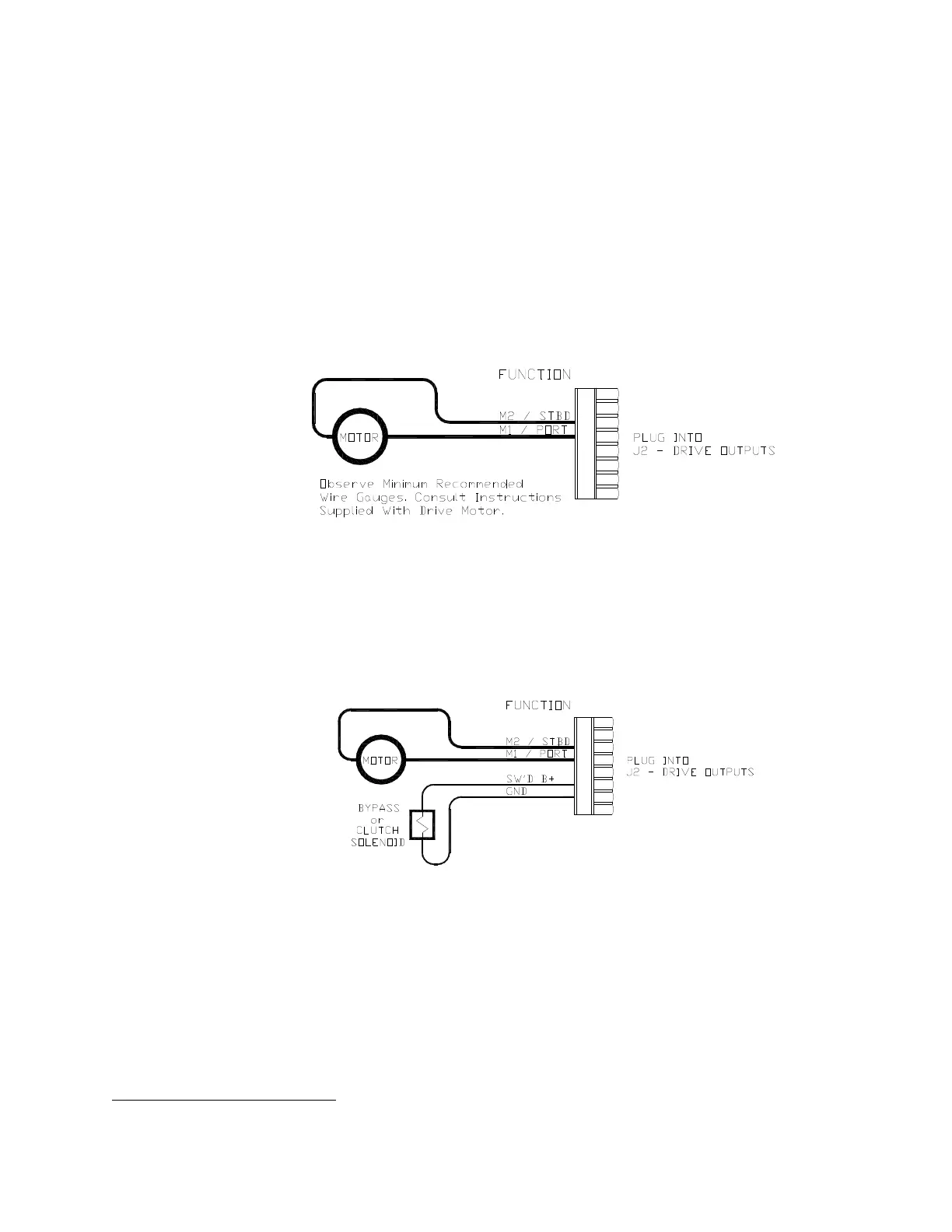
should be used. To connect the pump motor directly to the SPU, use the following diagram.
Note that wire polarity is not important, since the SPU will automatically make the necessary
adjustments internally when the system is set up.
Figure 49 – Wiring Connections for Reversing DC Motors
Linear Actuators or Mechanical Rotary Drives
Some Linear Actuators incorporate a Bypass Valve. To operate properly, the Bypass Valve
should be activated by the SPU’s
SW’D B+
output. Similarly, most mechanical drives
incorporate a solenoid-activated clutch. The clutch solenoid should also be activated by the
SW’D B+
output. Refer to the following diagram:
Figure 50 – Wiring Connections for Linear Actuators or Mechanical Rotary Drives
Shunt-Field Reversing Motors
For shunt-field reversing motors, connect the shunt field coil positive terminal to
SW’D B+
and the coil negative terminal to
SW’D GND
as per the following diagram:
14
Two very important steps when installing any hydraulic system are to bleed it of any air trapped in the fluid, and to
check for fluid leaks. This will be done later, during the Drive Setup procedure.



 To Next Page